- Post History
- Subscribe to RSS Feed
- Mark as New
- Mark as Read
- Bookmark
- Subscribe
- Printer Friendly Page
- Report Inappropriate Content
on 03-10-2022 07:00 AM
The world is big and weird requirements can be found quite often. Recently I got such. Basically, we needed to export data from tables, but with strictly predefined column labels.
By default, exporting to .xlsx file will put the ServiceNow column labels as column names of the exported excel file. When it comes to totally different custom column names, things become trickier.
One possible solution that I found is through database views.
For this example, I will use the ‘core_company’ table and will change the ‘street’ column to ‘STREET1’.
First step is to create Database view and add the ‘core_company’ table. It is important to remember the value that you put in the ‘prefix’ field, as you are going to need it later:

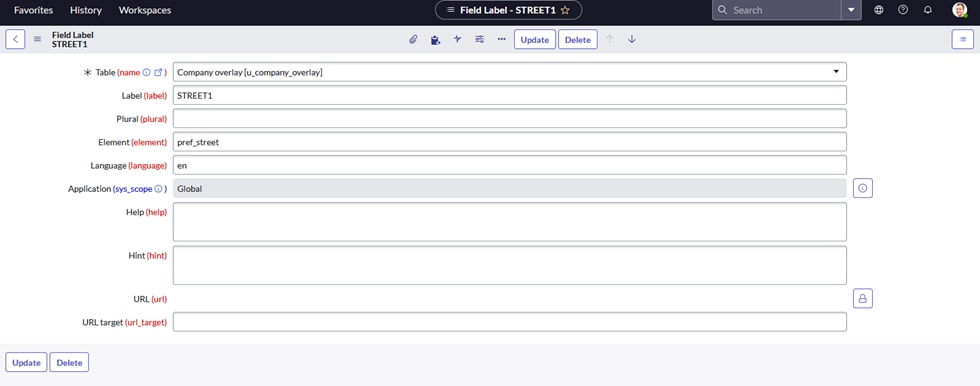
Second step is to navigate to System Definition -> Language File -> New
- In Table put the database view you created
- For Label put the desired name that will be set as a column header for the export
- In the Element field put <your-prefix_column-name>. Here in the example my prefix is ‘pref’, and the column from the ‘core_company’ table that I want to relabel is ‘street’, so I put ‘pref_street’
- Save the record

Time to check if this works
Back to the database view – click ‘Try It’ related link.

We can see the street column labeled as we want: STREET1.
From now on, follow the standard way to export the data: right click on any column name, export, Excel.

Here is how the export looks like:

Please Mark Helpful if you find my content useful. Subscribe for more of my content. Thanks!
Martin Ivanov
2022 Community Rising Star 🌟
- 7,848 Views

- Mark as Read
- Mark as New
- Bookmark
- Permalink
- Report Inappropriate Content
Really glad to see someone come up with a solution. Too bad ServiceNow doesn't provide something to do this OOTB.
- Mark as Read
- Mark as New
- Bookmark
- Permalink
- Report Inappropriate Content
Hi Ryan, please mark helpful if you find it such. thanks!
- Mark as Read
- Mark as New
- Bookmark
- Permalink
- Report Inappropriate Content
Hi Martin, useful resource, thanks!
What if we wanted to change instead how the variables connected to a Requested Item (sc_req_item table) are exported? Something like having "var_name_of_variable" exporting as "Variable New Label" or something different.
I was trying to create a widget for Service Portal to download fields and variables for some RITMs and then export data using labels and not technical names (as it is now, for the variables connected to the RITM).
- Mark as Read
- Mark as New
- Bookmark
- Permalink
- Report Inappropriate Content
- Mark as Read
- Mark as New
- Bookmark
- Permalink
- Report Inappropriate Content
How should I reference the database view if I'm exporting using a URL inside a widget? My current URL goes like this:
var cURL = "/" + c.data.table + "_list.do?"+ type +"&sysparm_query=" + c.data.exportQueryEncoded + "&sysparm_fields=" + c.data.fields_array;but the excel has two Name columns coming from two different tables, and other labels i'd like to change...