- Post History
- Subscribe to RSS Feed
- Mark as New
- Mark as Read
- Bookmark
- Subscribe
- Printer Friendly Page
- Report Inappropriate Content
on 06-24-2019 02:53 AM
Create a telegram bot which would take an Incident number as input and using ServiceNow REST Service it will output the details of the incident back to Telegram Chat Bot
1. Create a Telegram Bot -
To create a telegram bot follow the steps mentioned here
An access token would be generated once we create a telegram bot. This access token is used while making API calls to telegram from ServiceNow
2. Once u have the bot setup, we will create a webhook for this bot on ServiceNow.
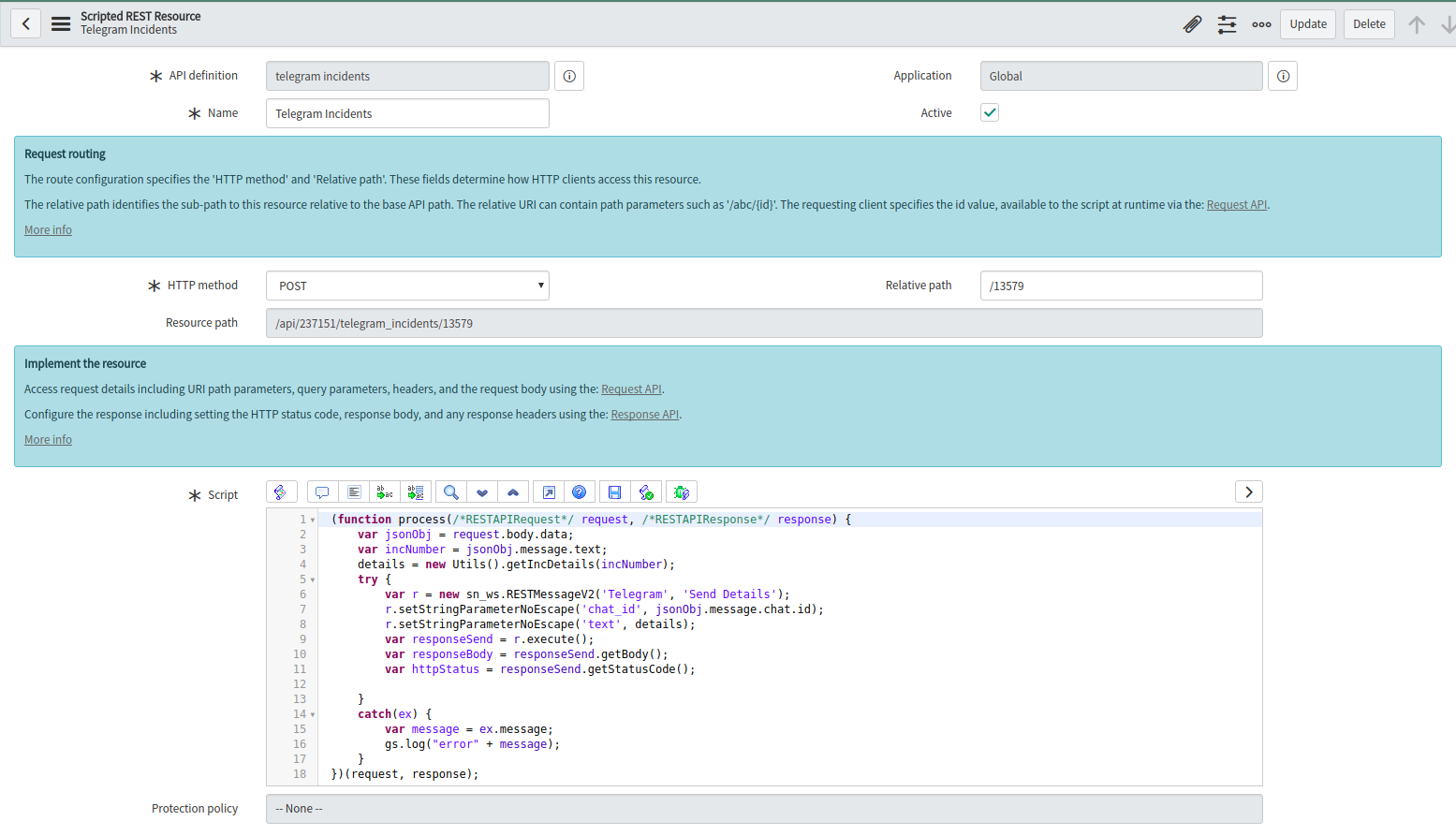
- We created a scripted REST service.

- add a new resource with POST method and define a URL for the same

- take a note of the URL of the resource. This URL we will use in the next step.
- we have used a RestMessage - Send Details. This is an outbound REST message, details are available in the next step
- getIncDetails functions in script include - Utils, will get the incident details in the required format. The script is as follows
getIncDetails: function(number){
  var inc = "";
  var gr = new GlideRecord("incident");
  gr.addQuery("number", number);
  gr.query();
  if (gr.next()) {
    inc = "Number:" + number + "\n" + "Short Description:" + gr.short_description;
  }
  return inc;
},
3. Set the URL in Telegram WebHook Setup.
Send a GET request with the url that is created in the above step. For ex
https://api.telegram.org/bot<bot_token>/setWebhook?url=<instance>/api/237151/telegram_incidents/13579This would set the webhook url on telegram.
4. Create an outbound message to send the details back to the requester
We will create a REST Message.

Send Details - we have used this in step 2 script section.

- You can get the Script by clicking on ‘Preview Script Usage’ found below the Related Links
Once, this is done, the telegram chatbot would look like the following

Resources
- https://core.telegram.org/api
- https://community.servicenow.com/community?id=community_blog&sys_id=886d2a29dbd0dbc01dcaf3231f9619b0
Hope this helps!!
- 11,595 Views

- Mark as Read
- Mark as New
- Bookmark
- Permalink
- Report Inappropriate Content
Dear rad & other experts 😄
very inspiring article, for the beginning I just want to get a telegram notification if there is a new incident, how could I accomplish this?
Any help is highly appreciated
- Mark as Read
- Mark as New
- Bookmark
- Permalink
- Report Inappropriate Content
Hello Simon,
Glad you found the article useful.
You can use a business rule after record insert to send messages to a Telegram channel.
Since we already have an outbound message defined in the article, we can use that in the Business Rule like the following -
(function executeRule(current, previous /*null when async*/) {
	details = new Utils().getIncDetails(current.number);
	try {
		var r = new sn_ws.RESTMessageV2('Telegram', 'Send Details');
		r.setStringParameterNoEscape('chat_id', '@yourchannelusername');
		r.setStringParameterNoEscape('text', details);
		var responseSend = r.execute();
		var responseBody = responseSend.getBody();
		var httpStatus = responseSend.getStatusCode();

	}
	catch(ex) {
		var message = ex.message;
		gs.log("error" + message);
	}
	// Add your code here

})(current, previous);
p.s to send message to a telegram, we will need a chat_id of the user or a channel username.
- Mark as Read
- Mark as New
- Bookmark
- Permalink
- Report Inappropriate Content
thank you very much 😄

- Mark as Read
- Mark as New
- Bookmark
- Permalink
- Report Inappropriate Content
Dear Rad,
How can I make the bot reply to a message?
I tried adding in the script:
"r.setStringParameterNoEscape ('reply_to_msg_id', jsonObj.message.chat.id);"
But it doesn't work.
Can you help me?
Thanks a lot,
Giacomo
- Mark as Read
- Mark as New
- Bookmark
- Permalink
- Report Inappropriate Content
Hello Rad,
I would like to make my BOT reply to a specific message like this:

I am using the "reply_to_msg_id" with the ID of the message to replies to, but it doesn't work.
Anyone can help me?
Thanks in advance,
Giacomo
- Mark as Read
- Mark as New
- Bookmark
- Permalink
- Report Inappropriate Content
What is the relative path we need to mention?

- Mark as Read
- Mark as New
- Bookmark
- Permalink
- Report Inappropriate Content
Guys, I'm quite confused on step 2, any guidance, I have successfully created Telegram Bot, the Webhook, messages are going through correctly to the Bot, however there is no interaction working between Telegram Bot and SN
- Mark as Read
- Mark as New
- Bookmark
- Permalink
- Report Inappropriate Content
can anyone please help with step 3

- Mark as Read
- Mark as New
- Bookmark
- Permalink
- Report Inappropriate Content
Works perfectly... thanks for sharing!!!

- Mark as Read
- Mark as New
- Bookmark
- Permalink
- Report Inappropriate Content
Hello there,
I am stuck here:
- getIncDetails functions in script include - Utils, will get the incident details in the required format. The script is as follows
Where do I have to insert the script?
Thank you,
Andrea Lorenzo Gambadoro