- Post History
- Subscribe to RSS Feed
- Mark as New
- Mark as Read
- Bookmark
- Subscribe
- Printer Friendly Page
- Report Inappropriate Content
07-08-2019 12:41 AM - edited 09-23-2023 03:24 AM
Installation procedure.
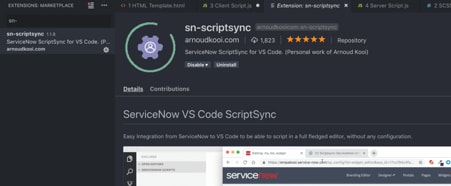
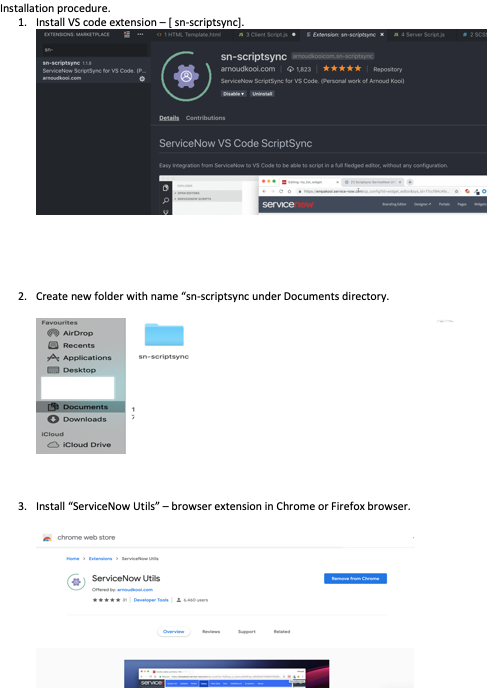
1. Install VS code extension – [ sn-scriptsync].

2. Create a new folder with the name “sn-scriptsync" under Documents directory.

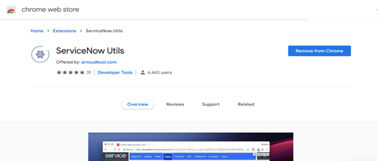
3. Install “ServiceNow Utils” – browser extension in Chrome or Firefox browser.

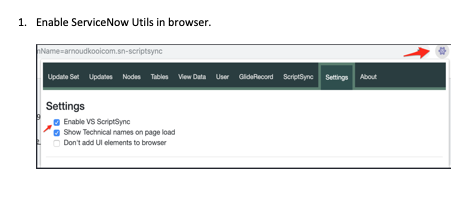
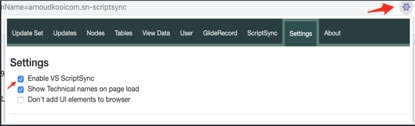
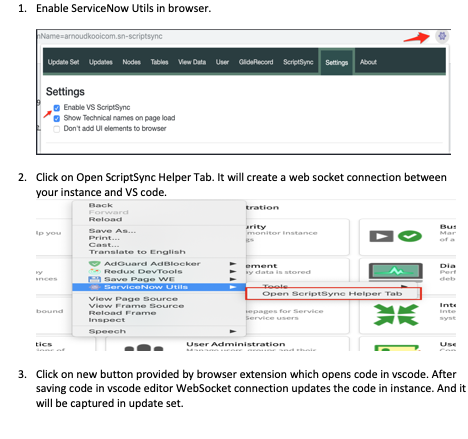
4. Enable ServiceNow Utils in the browser.

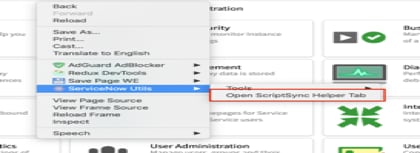
5. Click on Open ScriptSync Helper Tab. It will create a web socket connection between your instance and the VS code.

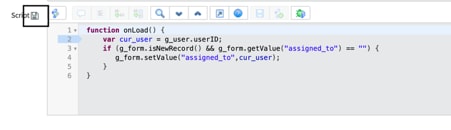
6. Click on the new button provided by browser extension which opens code in vscode. After saving code in VS code editor, WebSocket connection updates the code in an instance. And it will be captured in the update set.

My Articles:
1. Useful Number methods in JavaScript
2. Service-Now Client Script APIs
- 27,740 Views

- Mark as Read
- Mark as New
- Bookmark
- Permalink
- Report Inappropriate Content
how to install in Google Chrome or Firefox browser
- Mark as Read
- Mark as New
- Bookmark
- Permalink
- Report Inappropriate Content
Install SN Utils browser extension i the chrome and Firefox browsers

- Mark as Read
- Mark as New
- Bookmark
- Permalink
- Report Inappropriate Content
Hi All,
Can you try the official ServiceNow Vs Code Extension.
https://marketplace.visualstudio.com/items?itemName=ServiceNow.now-vscode
- Mark as Read
- Mark as New
- Bookmark
- Permalink
- Report Inappropriate Content
This video helped me to set up and use that extension: https://www.youtube.com/watch?v=vCQ-PtQYnGU
- Mark as Read
- Mark as New
- Bookmark
- Permalink
- Report Inappropriate Content
@kundanthaku, when trying the official one, I had trouble to set it up. I didn't know where to find the client ID and client secret for our OIDC authentication. This one is pretty simple to use, doesn't require you to set up credentials at all.

- Mark as Read
- Mark as New
- Bookmark
- Permalink
- Report Inappropriate Content
@kundanthaku You can go with basic auth with user name (email id) and the password for your profile
- Mark as Read
- Mark as New
- Bookmark
- Permalink
- Report Inappropriate Content
Hi @MichelSamia and @Community Alums ,
Please check this article and ServiceNow Documentation for Oauth:
- https://www.servicenow.com/community/itsm-forum/how-to-know-my-instance-client-secret-and-client-id/...
- https://www.servicenow.com/docs/bundle/washingtondc-platform-administration/page/administer/notifica...
- Mark as Read
- Mark as New
- Bookmark
- Permalink
- Report Inappropriate Content
I am using 1.7.0 version with OAUTH+MFA and it works fine for all but Script Includes.
I have scoped app and use ESLINT on VSCODE but it is annoying that file sync fails calling SN for script includes.
Does anyone know how to trace extension; to figure out why just for script include it is not calling metadata update, even if diff works perfectly fine?

this is not really verbose...
Should I ask Support or it is rather Community business?
- Mark as Read
- Mark as New
- Bookmark
- Permalink
- Report Inappropriate Content
Hi @pawel_st -then-
Can you please explain the issue to me in detail? Are you getting any errors?
- Mark as Read
- Mark as New
- Bookmark
- Permalink
- Report Inappropriate Content
This is a solid setup! Curious—once the code syncs to the instance via WebSocket, does it automatically get captured in whichever update set is currently active? Or do we need to manually select the update set before opening the script in VS Code? I would appreciate knowing the precise sequence to prevent inadvertently pushing to the incorrect update set.
- Mark as Read
- Mark as New
- Bookmark
- Permalink
- Report Inappropriate Content

Hi @Sandhya_pandey ,
Please refer to the screenshot above. I have highlighted the section that shows the active Update Set, which tracks all your updates from Extension.
You can change it by clicking on the Update Set name.
- Mark as Read
- Mark as New
- Bookmark
- Permalink
- Report Inappropriate Content
ty ! very useful 😄