Ankur Bawiskar
Tera Patron

Many a times there is a need to use list collector variable in the Flow Designer for multiple purposes such as creating 'n' number of catalog tasks or approval records based on list collector variable value count.

So we will have to use 'For Each' Action in Flow designer.

I have seen numerous questions around this so thought of creating a blog with the steps so that it helps community members.

Limitations: There is a known issue that it cannot be done directly KB0793340

Reason -> The Get Catalog Variables action returns a list collector as a comma separated string rather than an array. So we cannot use the 'For Each' action directly in your flow.

Resolution: So here is a workaround

  1. Create a custom flow action that takes list collector value string as the input
  2. Parse the string into an array
  3. Then output the array to be used in the For Each Loop.
  4. Then call this custom action in your flow and then use the output as per your needs

Steps:

1) Create custom flow action

a) Name - List Collector Convert to Array

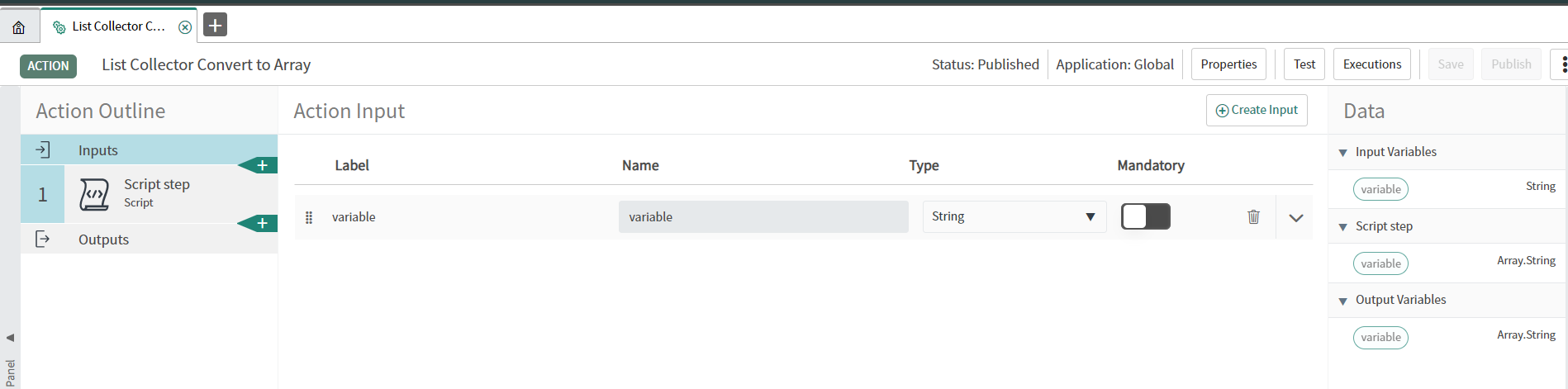
2) Define the input variable as String

find_real_file.png

3) Create Script step

a) Map the input variable to the variable being used in script step -> by selecting the data pills -> inputs variable

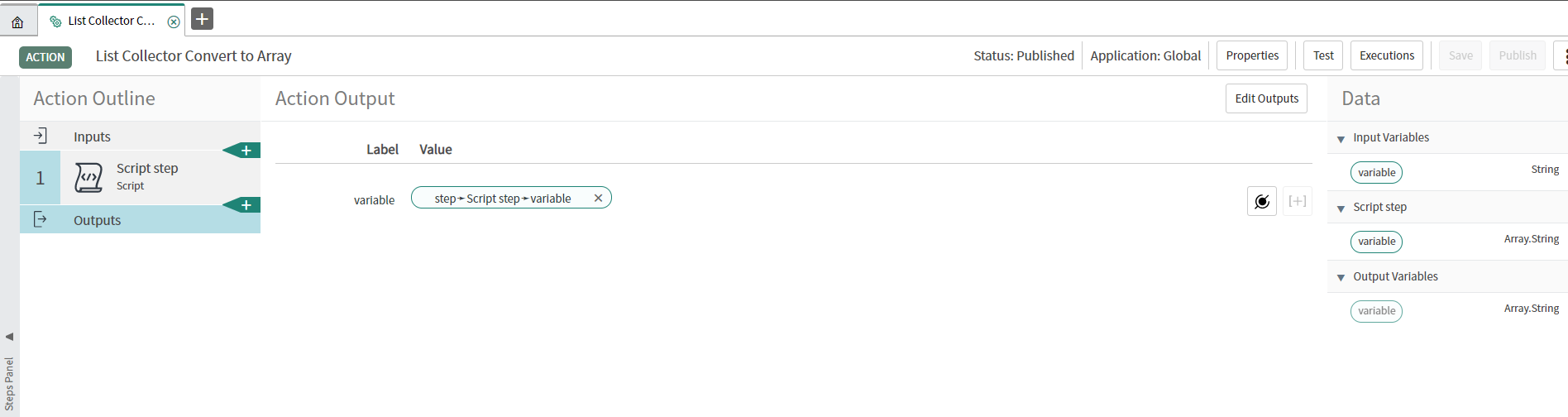
b) Create output variable of type -> Array.String

Edit: As per few members update this is not working post upgrade from Orlando to new instance

So please change the Output type as Array.Object instead of Array.String

c) Use this script: To convert String to Array of Object (Edited)

(function execute(inputs, outputs) {
// ... code ...
  
  outputs.variable = inputs.variable.toString().split(',');
  
})(inputs, outputs);

find_real_file.png

find_real_file.png

4) Define the Output

find_real_file.png

5) Publish the Action

find_real_file.png

Usecase:

  1. Consider you have 1 list collector variable on your catalog item referring to Users table (sys_user)
  2. You want to set approvers based on how many users are present in list collector. If 3 users are selected then 3 approvers or 3 catalog tasks are to be created

Steps to implement with example: Trigger - Service Catalog

I assume you must have attached the flow to your catalog item.

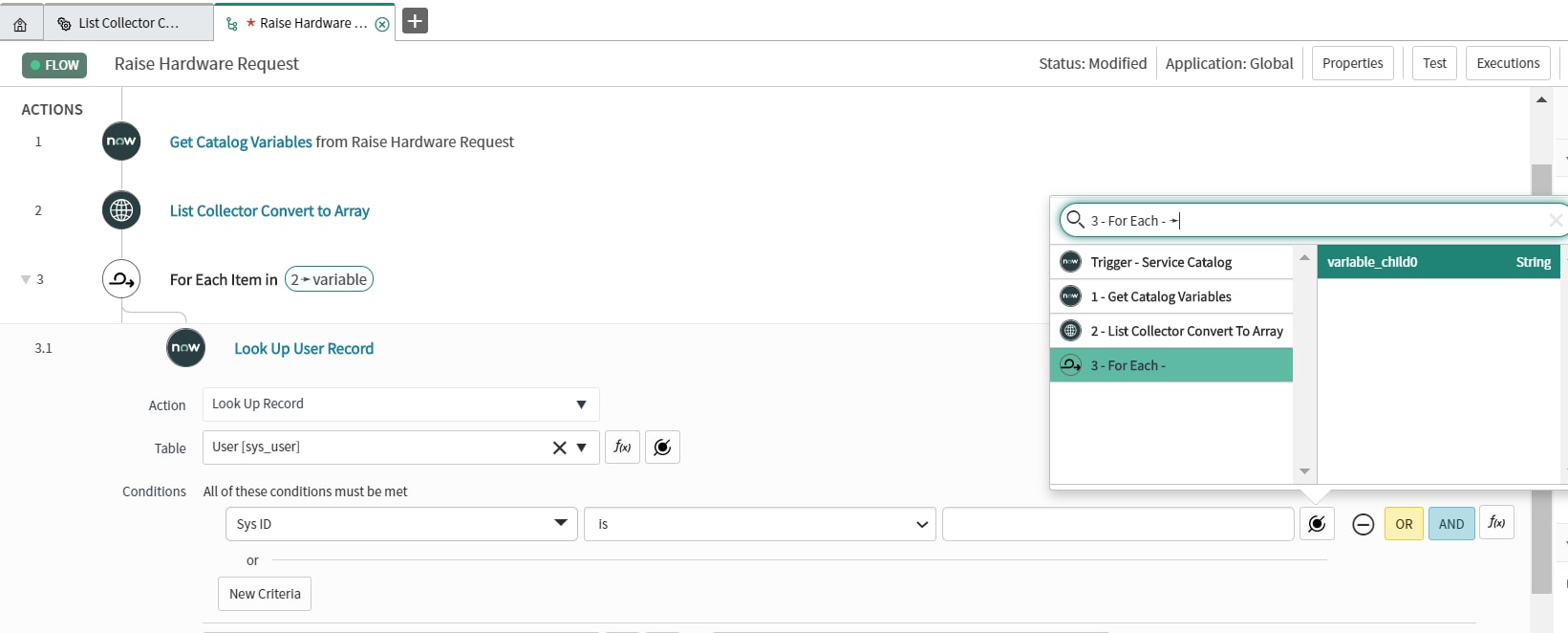
  1. Use the "Get Catalog Variables" Action
  2. Call the custom Action "List Collector Convert to Array" and pass the list collector values as input
  3. Do a For-Each on the result from the custom action (array of sys_ids)
    3.1 Do a GlideRecord Lookup for the User based on the for-each value (sys_id)
    3.2 Use the "Ask For Approval" Action as you want and set the User as Output from 3.1 step

Screenshots:

find_real_file.png

find_real_file.png

find_real_file.png


find_real_file.png

find_real_file.png


Thanks for reading the blog and do provide your inputs/suggestions if any.

Hope you find this article helpful. Don’t forget to Mark it Helpful & also Bookmark.
Thanks,
Ankur Bawiskar

ServiceNow MVP 2020,2019,2018

My Articles & Blogs

102 Comments
williepalmer
Tera Expert

I have been trying to get this to work in my personal instance but the array is not being created from the list collector.


When I run a test on the custom action and manually enter in data it creates the array

find_real_file.png

However when I use the custom action in a flow and pass a list collector variable to the custom action it does not create the output as a comma separated array but gives the output runtime value as {"variable":{"variable_child0":["[object GlideRecord]"]}}

find_real_file.png


The other variables are for counting the number of elements in the array and as you can see in the manual test it gives the count of 4, in the test using a list variable it shows three entries in the input but only one count in the output.


The variable_child0 string is also greyed out when trying to select it in the For Each Item section.

Has anyone else come across this problem? 


A_Nelson
Kilo Expert

Yes! I came across this and the solution was to make the output as Array.Object instead of Array.String and I was able to use it in the For Each.


https://community.servicenow.com/community?id=community_question&sys_id=8a590752db122450a08a1ea668961983&anchor=answer_e5a2939edb922450a08a1ea668961960&feedbacktype=answerEditor0

A_Nelson
Kilo Expert

@Ankur Bawiskar 


If I use multiple pills, it will combine some of the sys_ids into a single string.

In the request, The below returned two comma separated values rather than four. 1 and 2 were combined into a single string and then3 and 4 were also combined. Any ideas how to combat this other than having to use the activity multiple times?

find_real_file.png

----------------------------------------------------------------------------------------------------------------------

find_real_file.png

----------------------------------------------------------------------------------------------------------------------

find_real_file.png

Thanks!

Monse Rj
Tera Contributor

When I tried testing the action am not getting the proper output.Can some one help?

find_real_file.png

A_Nelson
Kilo Expert

It ended up being way more simple than I thought. Just needed to add a comma in between each of the data pills

find_real_file.png

A_Nelson
Kilo Expert

Hey! I didn't have the exact same issue, but I ended up needing to change the output to Array.Object instead of Array.String.


See if that helps?

Spence90
Tera Contributor

So, I'm having an issue using this action in the "For Each" loop - I changed the output type to "Array.Object", but it's still trying to push it as a string and won't let me add it to the "For Each" loop.

A_Nelson
Kilo Expert

That was the same problem I was having. I ended up deleting the action and completely recreating it with the Array.Object output instead of just switching it and then I was able to use it.


https://community.servicenow.com/community?id=community_question&sys_id=8a590752db122450a08a1ea668961983

mejasonroar
Tera Contributor

I am having the same problem. No matter what input type I choose, it always comes in as an actual string of [object GlideRecord]. I saw the posts about output type, but I can't even get the input to come in correctly.

My input type is String, which is mapped to the List Collector.

If I then try and access it in code..

var sysids = inputs.groupmembers.toString().split(",");

I did a .length on the split input and it just mocked me by telling me the length of [object GlideRecord].

All it ever returns is [object GlideRecord]. I have tried String, Array.String, List.Users, none of them work. I am doing this on a Quebec EA instance. Did something change?

phil-m
Tera Contributor

Thank you most sincerely, sir!

Because of your excellent work and clear communication, our customer got their solution in minutes instead of days!

--Phil