- Mark as New
- Bookmark
- Subscribe
- Mute
- Subscribe to RSS Feed
- Permalink
- Report Inappropriate Content
09-18-2018 12:22 PM
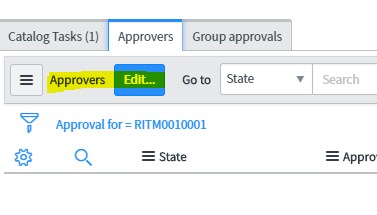
How do I add approver to change request if I am not using Assignment group? I want to add something like this :
Which is from Requested Item related list.
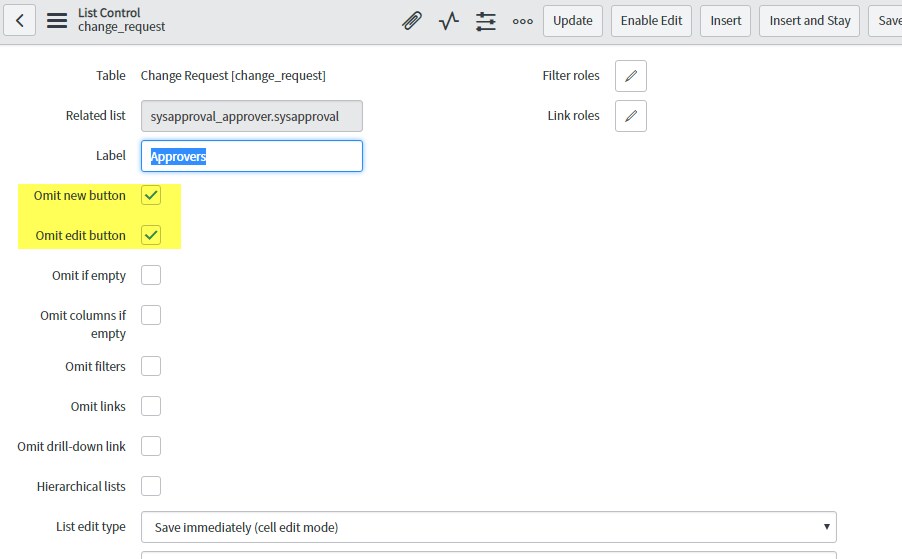
For CHANGE, I have this option :

It doesn't allow me to EDIT as per OOB functionalities.
My requirement is to -
1) Be able to select multiple approver for the change
2) Remove the dependency on the Assignment Group which is available OOB
Any help to achieve the above will be highly appreciated!
Solved! Go to Solution.
- Labels:
-
Scripting and Coding
- Mark as New
- Bookmark
- Subscribe
- Mute
- Subscribe to RSS Feed
- Permalink
- Report Inappropriate Content
09-18-2018 12:32 PM
1. Right click on Approvers and select List Control and add the edit button in the Approvers.

2. To remove dependency, go to configure dictionary on assigned_to field, and remove dependency.

- Mark as New
- Bookmark
- Subscribe
- Mute
- Subscribe to RSS Feed
- Permalink
- Report Inappropriate Content
09-18-2018 01:26 PM
Go to System Definition -> Relationships -> New
Below article may be helpful.
https://www.servicenowguru.com/system-definition/relationships/defined-related-lists/