Add Style to variable on report

- Mark as New
- Bookmark
- Subscribe
- Mute
- Subscribe to RSS Feed
- Permalink
- Report Inappropriate Content
01-02-2024 08:07 AM
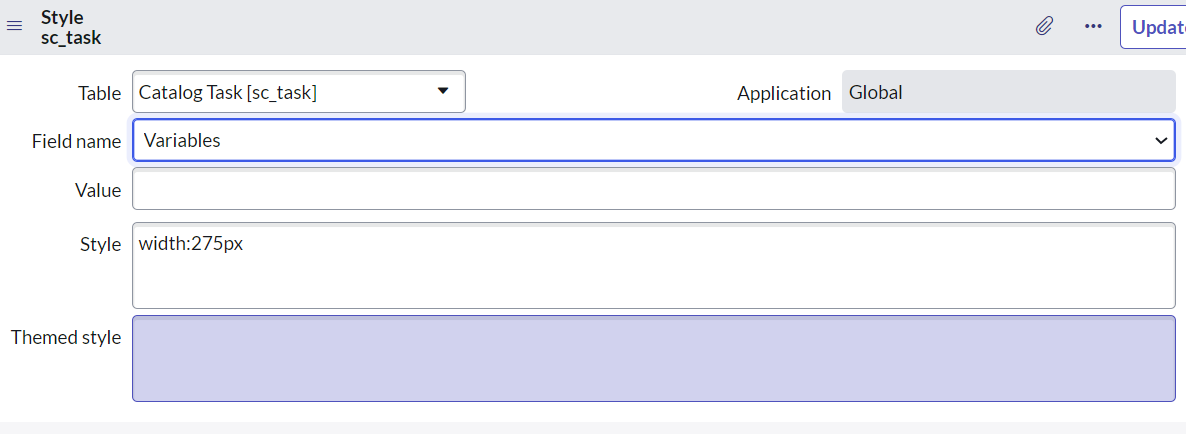
How do I add Style to a catalog item variable so that when the variable is in a column on a report used in a dashboard, it is shown with a yellow background color if the variable "E Date" is the current date? If selecting SCTASK as the table, there is a choice of field that is 'Variables', but I cannot see how to select the specific variable I would like the Style to effect. See screenshot "Screenshot 2024-01-02 110011".
Similarly, in the attached screenshot from my personal instance, the given catalog item "Register a Business Application" is a record producer. On setting up a Style, there is a field choice "Questions". How would you add a Style to the "Type of Application" variable when the Value is "Homegrown"? See screenshot "Screenshot 2024-01-02 085932".
Any help much appreciated!


- Mark as New
- Bookmark
- Subscribe
- Mute
- Subscribe to RSS Feed
- Permalink
- Report Inappropriate Content
01-02-2024 08:12 AM
Hi @RR16
Have a look here
https://servicenowguru.com/system-ui/field-styles-service-catalog-variables/
Regards
Dr. Atul G. - Learn N Grow Together
ServiceNow Techno - Functional Trainer
LinkedIn: https://www.linkedin.com/in/dratulgrover
YouTube: https://www.youtube.com/@LearnNGrowTogetherwithAtulG
Topmate: https://topmate.io/dratulgrover [ Connect for 1-1 Session]
****************************************************************************************************************