- Mark as New
- Bookmark
- Subscribe
- Mute
- Subscribe to RSS Feed
- Permalink
- Report Inappropriate Content
04-27-2022 02:13 PM
Hello, I am working on an ATF to add an existing user to a current group. First, I used the “Navigate to Module” to make it to the “Groups” module in the “System Security” application. Second, I applied “Open an Existing Record” to open an existing group. Third, in the Group Members related list, I tried to click on the “Edit” button via “Click a UI Action,” but there is no Edit UI Action. Does anyone know how to accomplish this? I would greatly appreciate any help.
Solved! Go to Solution.
- Labels:
-
Automated Test Framework

- Mark as New
- Bookmark
- Subscribe
- Mute
- Subscribe to RSS Feed
- Permalink
- Report Inappropriate Content
04-28-2022 12:27 PM
I change it a little as it is always best not to use an existing user. So step 1 is create user.
1. Note that I have uncheck Impersonate user since the user would not have access to add someone to a group.

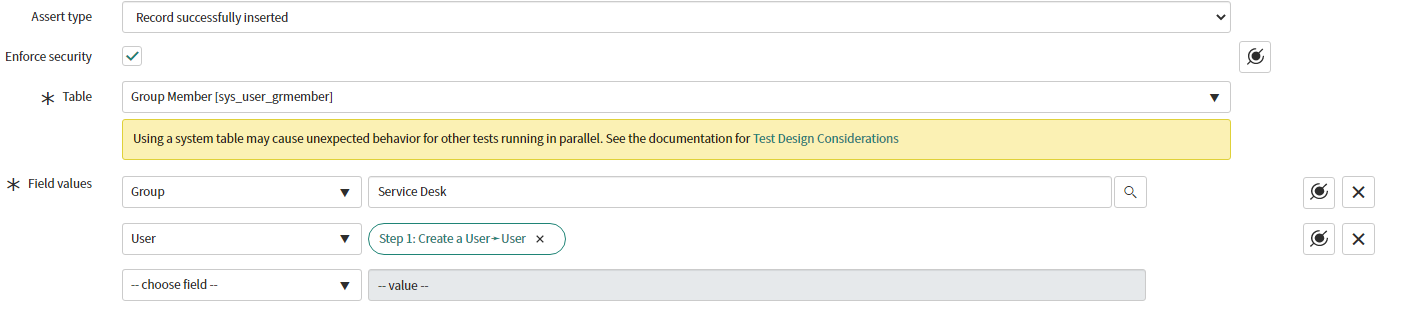
2. Setup 2 is a record insert into the sys_user_grmember table. I choose to insert the user into one of the out of the box groups and set the user to step 1.

3. Next is to open an existing record using the record id from step 2.

4. Final step is field value validation to verify the groups and user are what was expected.

- Mark as New
- Bookmark
- Subscribe
- Mute
- Subscribe to RSS Feed
- Permalink
- Report Inappropriate Content
04-27-2022 02:26 PM
I think the best way to simulate adding a user to a group would be to do the follwing.
1. Record lookup to get the sys_id of the group.
2. Record lookup to get the sys_id of the user.
3. Record insert to insert a record in the sys_user_grmember table passing group as the record_id from step 1 and user passing the record_id from step 2.
When adding a user to a group from the edit button in the user related list on a group the system is just adding a record into the sys_user_grmember table.
- Mark as New
- Bookmark
- Subscribe
- Mute
- Subscribe to RSS Feed
- Permalink
- Report Inappropriate Content
04-28-2022 08:55 AM
Brian, thank you for the recommendation. Would it be possible for you to share some visuals of the steps?
- Mark as New
- Bookmark
- Subscribe
- Mute
- Subscribe to RSS Feed
- Permalink
- Report Inappropriate Content
04-28-2022 12:27 PM
I change it a little as it is always best not to use an existing user. So step 1 is create user.
1. Note that I have uncheck Impersonate user since the user would not have access to add someone to a group.
2. Setup 2 is a record insert into the sys_user_grmember table. I choose to insert the user into one of the out of the box groups and set the user to step 1.
3. Next is to open an existing record using the record id from step 2.
4. Final step is field value validation to verify the groups and user are what was expected.
- Mark as New
- Bookmark
- Subscribe
- Mute
- Subscribe to RSS Feed
- Permalink
- Report Inappropriate Content
04-29-2022 09:01 AM
Brian, you are awesome. This is really helpful; thank you so much!