- Mark as New
- Bookmark
- Subscribe
- Mute
- Subscribe to RSS Feed
- Permalink
- Report Inappropriate Content
06-08-2018 07:45 AM
Hi to everyone,
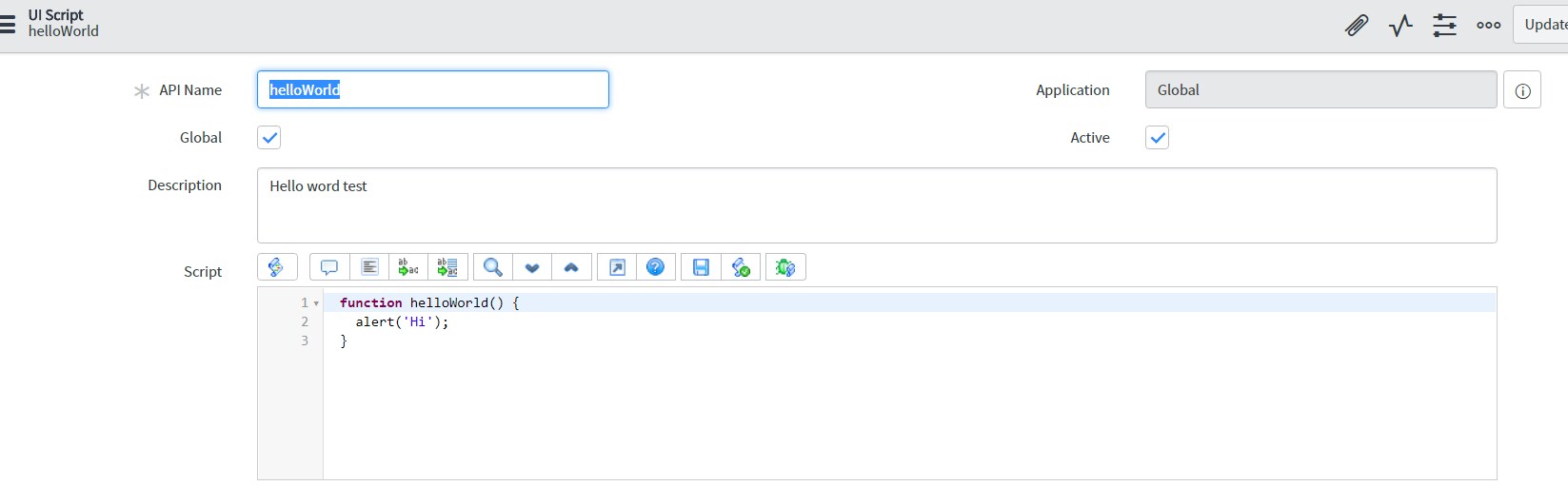
By using the documentation i've tried to call the helloword script example in a Onload Client Script but it's retrun an error :

Any Idea ?


Thank you in advance,
Solved! Go to Solution.


- Mark as New
- Bookmark
- Subscribe
- Mute
- Subscribe to RSS Feed
- Permalink
- Report Inappropriate Content
06-11-2018 12:55 AM
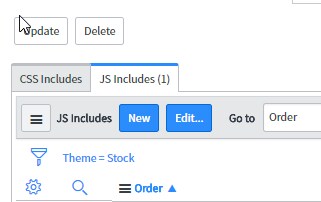
If you are testing in Service Portal, you need to add the UI Script to your Service Portals Theme.
Navigate to Service Portal > Themes and select the theme being used (Stock is the default).
Then, add the UI Script via the related list JS Includes at the bottom of the form (New)

Please note that UI Scripts ran from Service Portal have no access to g_form.
ServiceNow Nerd
ServiceNow Developer MVP 2020-2022
ServiceNow Community MVP 2019-2022

- Mark as New
- Bookmark
- Subscribe
- Mute
- Subscribe to RSS Feed
- Permalink
- Report Inappropriate Content
06-08-2018 07:51 AM
There us typo on your OnChange script. it should be helloWorld();
- Mark as New
- Bookmark
- Subscribe
- Mute
- Subscribe to RSS Feed
- Permalink
- Report Inappropriate Content
06-11-2018 12:55 AM
If you are testing in Service Portal, you need to add the UI Script to your Service Portals Theme.
Navigate to Service Portal > Themes and select the theme being used (Stock is the default).
Then, add the UI Script via the related list JS Includes at the bottom of the form (New)
Please note that UI Scripts ran from Service Portal have no access to g_form.
ServiceNow Nerd
ServiceNow Developer MVP 2020-2022
ServiceNow Community MVP 2019-2022
- Mark as New
- Bookmark
- Subscribe
- Mute
- Subscribe to RSS Feed
- Permalink
- Report Inappropriate Content
06-11-2018 01:12 AM
It's working !
Thank you very much !