Can not get the sent Options of the embedded widget

- Mark as New
- Bookmark
- Subscribe
- Mute
- Subscribe to RSS Feed
- Permalink
- Report Inappropriate Content
12-23-2016 04:17 AM
Hi,
I created a new widget with an embedded widget. I'm trying to sent params from the new widget to the embedded widget.
1) Parent widget:
HTML:
<div class="embedded-widget">
<sp-widget widget="c.processflow"></sp-widget>
</div>
Client controller:
spUtil.get("process-flow", {table:"change_request"}).then(function(response) {
c.processflow= response;
});
2) Embedded widget:
Client controller:
console.log("Table: "+c.options.table);
Server script:
console.log("table: "+input.options.table +" - "+options.table);
All of these results for "console.log" are undefined.
Cheers,
Serkan
- 6,096 Views

- Mark as New
- Bookmark
- Subscribe
- Mute
- Subscribe to RSS Feed
- Permalink
- Report Inappropriate Content
12-23-2016 06:35 AM
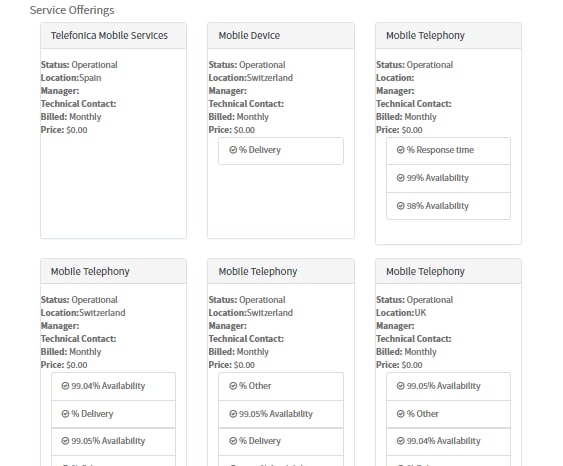
Yes, I can give some examples. In the screenshot below, you see that there are several "cards" that are repeated at the bottom of the page:

The HTML for these is just one line:

I had an array, and i wanted to create a card for each item in the array. The array was an array of objects.
I use ng-include to create a template for each item in the array


As you can see, the object (offering, in this case) contains any unique information necessary to each card. You can see in the second line where I access the widget options.

- Mark as New
- Bookmark
- Subscribe
- Mute
- Subscribe to RSS Feed
- Permalink
- Report Inappropriate Content
12-23-2016 05:33 AM
If using spUtil to embed a widget, you would pass options like the following using your example:
spUtil.get("process-flow", {table:"change_request"}).then(function(response) {
c.processflow= response;
c.processflow.options = {"table": "change_request"}
});
- Mark as New
- Bookmark
- Subscribe
- Mute
- Subscribe to RSS Feed
- Permalink
- Report Inappropriate Content
12-23-2016 05:58 AM
You are correct Chris, but I need to send options multiple time, because a have a ng-repeat in the HTML part and I'm embedding the widget in the ng-repeat.
- Mark as New
- Bookmark
- Subscribe
- Mute
- Subscribe to RSS Feed
- Permalink
- Report Inappropriate Content
12-23-2016 07:16 AM
Is there a way to use server side to embed your widget? If so this will work:
var opts = [
{"table": 'table info 1'},
{"table": 'table info 2'}
];
data.embedWid = [];
for(i in opts){
data.embedWid.push($sp.getWidget('process-flow', opts[i]));
}
<div ng-repeat="widg in data.embedWid">
<sp-widget widget="widg"></sp-widget>
</div>
- Mark as New
- Bookmark
- Subscribe
- Mute
- Subscribe to RSS Feed
- Permalink
- Report Inappropriate Content
12-23-2016 11:30 AM
How about this:
HTML Template:
<div ng-repeat="process in process_widgets">
<sp-widget widget="process"></sp-widget>
</div>
Client Controller:
var opts = [
{"table": 'table info1'},
{"table": 'table info2'}
];
$scope.process_widgets = [];
for( i in opts ){
getProcessWidget(opts[i]);
}
function getProcessWidget(opt){
spUtil.get('process-flow').then(function(response){
var process = response;
process.options = opt;
$scope.process_widgets.push(process);
})
}
Of course you'll more than likely need to create your options array in a different manner.
Hope this helps