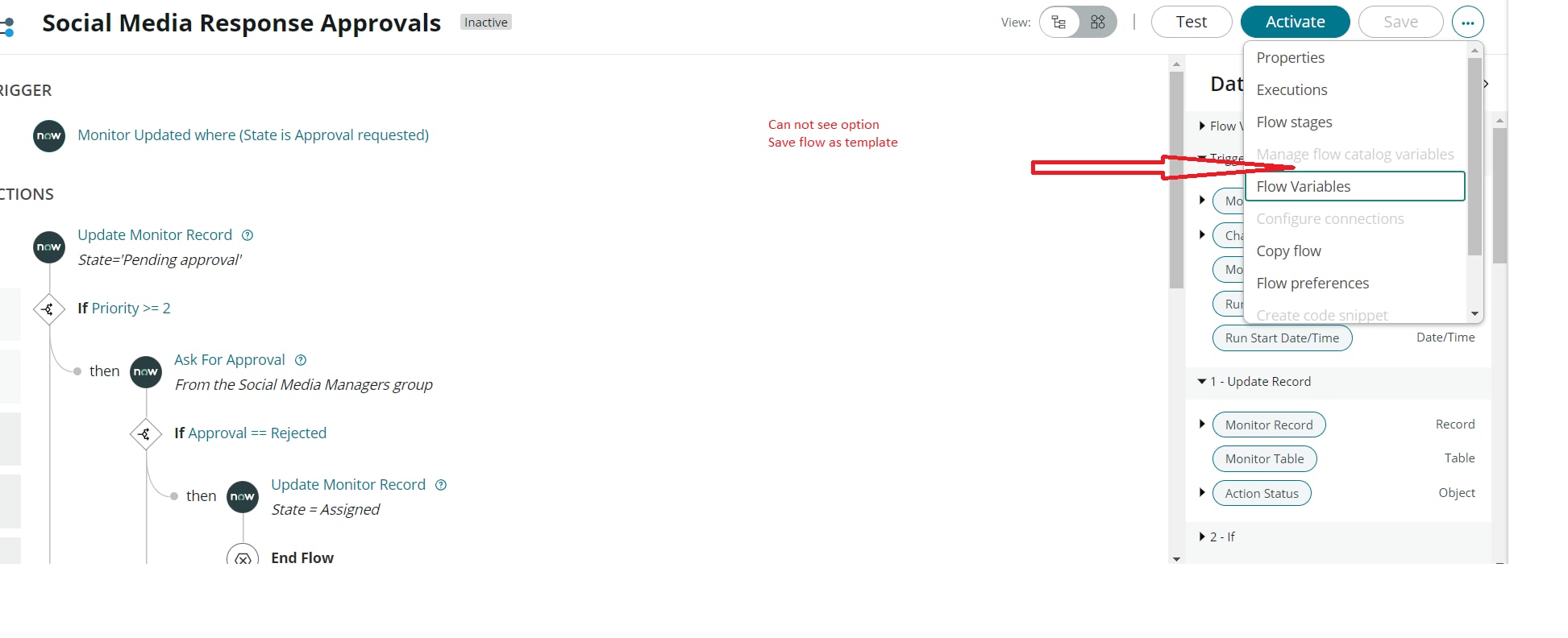
Can not see "Save flow as template" in flow designer

- Mark as New
- Bookmark
- Subscribe
- Mute
- Subscribe to RSS Feed
- Permalink
- Report Inappropriate Content
06-01-2022 05:23 PM

- 8,321 Views


- Mark as New
- Bookmark
- Subscribe
- Mute
- Subscribe to RSS Feed
- Permalink
- Report Inappropriate Content
06-01-2022 05:32 PM
Hi Muhammad,
To save a flow as a template, "Flow Template Builder" plugin is required.
Also, there's a following note:
Note: Users with the App Template Author cannot create flow templates in the Global scope. They can create flow template in only those scopes to which they have access.
- Mark as New
- Bookmark
- Subscribe
- Mute
- Subscribe to RSS Feed
- Permalink
- Report Inappropriate Content
11-29-2022 03:28 PM
This is not mentioned in the Flow Designer Essentials training course that a plugin "Flow Template Builder" is required to proceed with the step in the training. Even after installing this to my personal instance and ensuring I am in the same scope as where I created the flow initially, the option to save flow as template is not there.
- Mark as New
- Bookmark
- Subscribe
- Mute
- Subscribe to RSS Feed
- Permalink
- Report Inappropriate Content
03-05-2024 01:09 PM
This still hasn't been fixed. "The Flow Designer: Create a Flow" course is looking for the "Flow Template Builder" and it's not available; also no mention of that requirement.
- Mark as New
- Bookmark
- Subscribe
- Mute
- Subscribe to RSS Feed
- Permalink
- Report Inappropriate Content
03-20-2024 09:20 AM
Did anyone figure this out? I'm going through the Flow Designer Fundamentals On Demand course - the lab instance shows that the plugin is installed and I've tried using both global and scoped and still can not see the option to save the flow as a template.