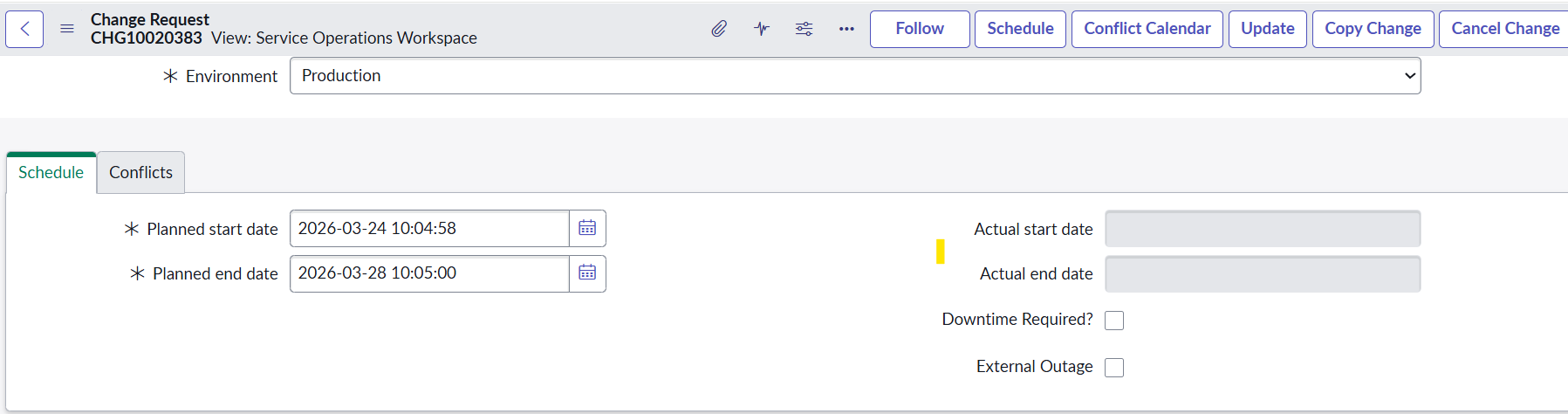
Change Request "Scheduled UI Action" need to visible in SOW View

- Mark as New
- Bookmark
- Subscribe
- Mute
- Subscribe to RSS Feed
- Permalink
- Report Inappropriate Content
03-24-2026 10:21 AM


- Mark as New
- Bookmark
- Subscribe
- Mute
- Subscribe to RSS Feed
- Permalink
- Report Inappropriate Content
03-25-2026 05:42 AM
It wil not be there, you can use the formatter
Regards
Dr Atul G. - Learn N Grow Together ServiceNow Techno - Functional Trainer
LinkedIn: https://www.linkedin.com/in/dratulgrover
YouTube: https://www.youtube.com/@LearnNGrowTogetherwithAtulG
******************************************************************************************
- Mark as New
- Bookmark
- Subscribe
- Mute
- Subscribe to RSS Feed
- Permalink
- Report Inappropriate Content
03-25-2026 05:48 AM
Hello Atul,
Thanks for your Reply, I tried to click the Formatter but it is not clickable.

- Mark as New
- Bookmark
- Subscribe
- Mute
- Subscribe to RSS Feed
- Permalink
- Report Inappropriate Content
03-25-2026 05:47 AM
Hi @SayanG838505890 ,
You have checked the "workspace form menu". as true so the ui action will visible under 3 dots symbol.
click on 3 dots symbol and verify .
if you want to visible on form check "workspace form button" as true.
- Mark as New
- Bookmark
- Subscribe
- Mute
- Subscribe to RSS Feed
- Permalink
- Report Inappropriate Content
03-25-2026 05:51 AM
Hello Naga,
Thanks for your response,
I have checked the UI action by clicking on the 3dots, Scheduled Ui action is not Visible in the 3 dots
Thanks