client script

- Mark as New
- Bookmark
- Subscribe
- Mute
- Subscribe to RSS Feed
- Permalink
- Report Inappropriate Content
11-11-2025 10:12 PM

- Mark as New
- Bookmark
- Subscribe
- Mute
- Subscribe to RSS Feed
- Permalink
- Report Inappropriate Content
11-20-2025 11:50 AM
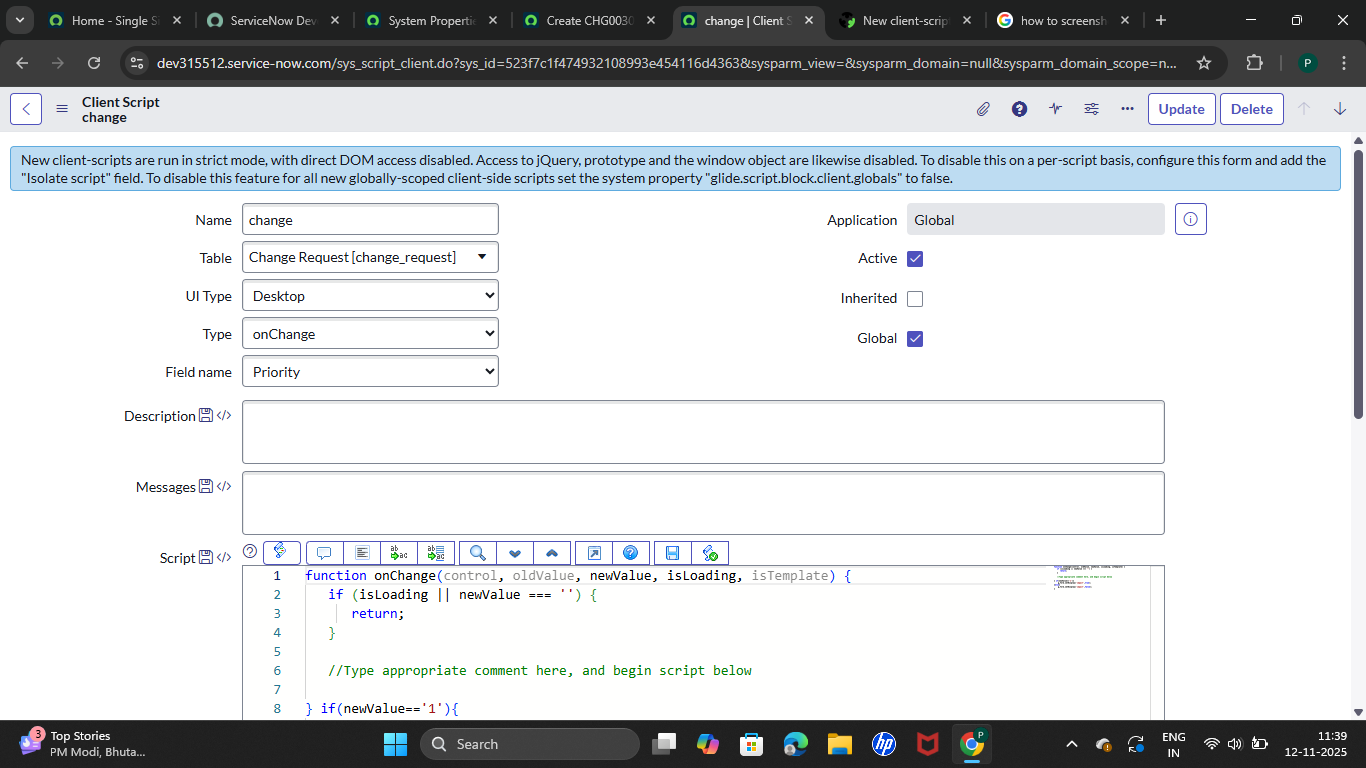
Based on your screenshot it look like you are trying to add the code after the closing back on the on change script.

- Mark as New
- Bookmark
- Subscribe
- Mute
- Subscribe to RSS Feed
- Permalink
- Report Inappropriate Content
11-20-2025 12:27 PM
Hi !
The code if(newValue === '1') is outside the onChange function, so it will not be interpreted.
If you want to write code outside the onChange function, you need another function and call it.

- Mark as New
- Bookmark
- Subscribe
- Mute
- Subscribe to RSS Feed
- Permalink
- Report Inappropriate Content
11-21-2025 01:13 AM
Hii @Palmarp
The issue is not with the “Isolate Script” option.
Your script is failing because the function is closed before the if condition, which means the if block is never executed.
Corrected Script
function onChange(control, oldValue, newValue, isLoading) {  <--opening
    if (isLoading || newValue === '') {
        return;
    }

    // your logic must be INSIDE the function
    if (newValue === '1') {
        g_form.setValue('short_description', 'Test'); //E.g Setting Short description some Test Valur
    }
} <--   closing
Glad the issue is resolved.
If the answer helped you, kindly mark the response as Helpful / Correct so the thread can be closed.
Thank you!
Technical Consultant
Sumit Y
- Mark as New
- Bookmark
- Subscribe
- Mute
- Subscribe to RSS Feed
- Permalink
- Report Inappropriate Content
11-21-2025 01:14 AM
Hi @Palmarp
The issue is not with the “Isolate Script” option.
Your script is failing because the function is closed before the if condition, which means the if block is never executed.
Corrected Script
function onChange(control, oldValue, newValue, isLoading) {  <--opening
    if (isLoading || newValue === '') {
        return;
    }

    // your logic must be INSIDE the function
    if (newValue === '1') {
        g_form.setValue('short_description', 'Test'); //E.g Setting Short description some Test Valur
    }
} <--   closing
Glad the issue is resolved.
If the answer helped you, kindly mark the response as Helpful / Correct so the thread can be closed.
Thank you!
Technical Consultant
Sumit Y