- Mark as New
- Bookmark
- Subscribe
- Mute
- Subscribe to RSS Feed
- Permalink
- Report Inappropriate Content
02-22-2021 12:58 AM
Hi Guys,
I have a client script for UI16 which displays a popup box to confirm an action.
I am using Glidemodal for this and this works fine.
However, this doesnt work in Agent Workspace, so how can I create a custom modal popup in Agent Workspace that allows me to display a message with a a yes and no, and if yes trigger the rest of the script.
Thanks.
Solved! Go to Solution.
- Mark as New
- Bookmark
- Subscribe
- Mute
- Subscribe to RSS Feed
- Permalink
- Report Inappropriate Content
02-22-2021 02:35 AM
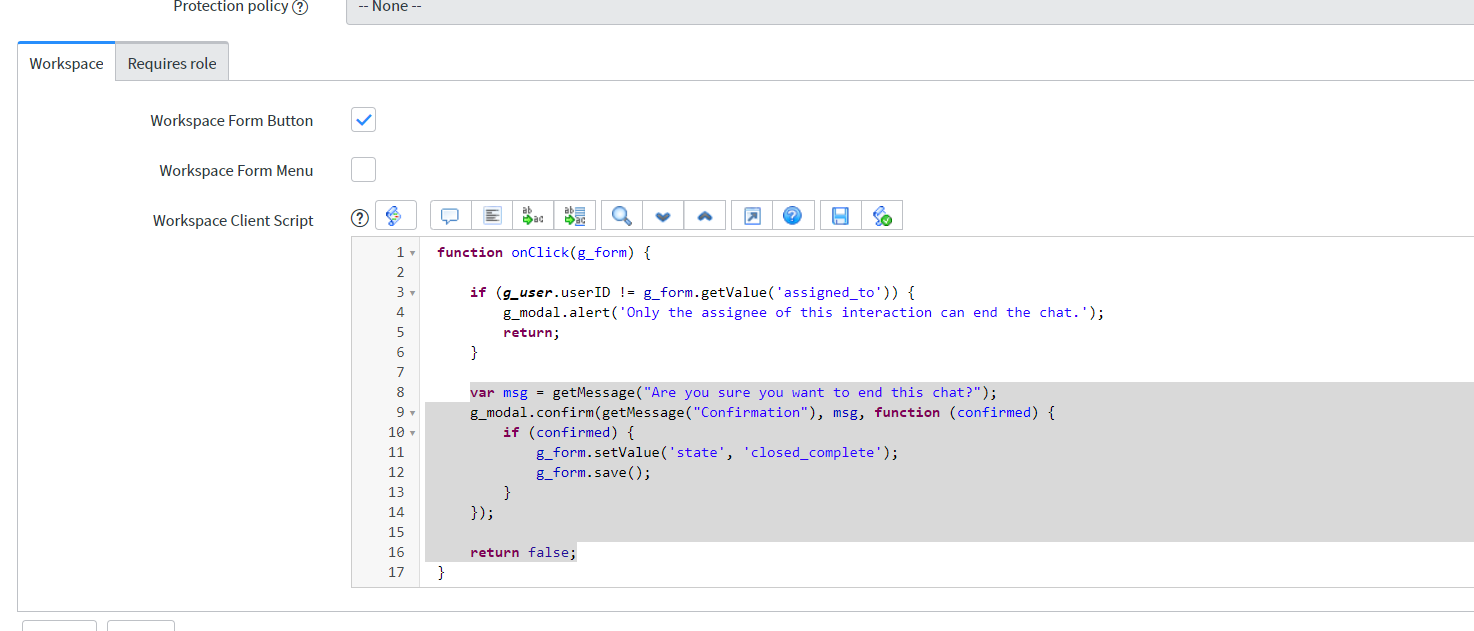
try g_modal.confirm in workspace client script
var msg = getMessage("Are you sure you want to end this chat?");
	g_modal.confirm(getMessage("Confirmation"), msg, function (confirmed) {
		if (confirmed) {
			g_form.setValue('state', 'closed_complete');
			g_form.save();
		}
	});

	return false;

- Mark as New
- Bookmark
- Subscribe
- Mute
- Subscribe to RSS Feed
- Permalink
- Report Inappropriate Content
04-05-2022 08:56 PM
function onClick() {
//Set the 'Incident state' and 'State' values to 'Resolved', and display mandatory fields
g_form.setValue('incident_state', 6);
g_form.setValue('state', 6);
g_form.setValue('resolved_by', g_user.userID, g_user.getFullName());
var close_code = g_form.getValue("close_code");
var close_notes = g_form.getValue("close_notes");
var opentasks = '';
var ga_1 = new GlideAjax('IncidentTaskUtilsAjax');
ga_1.addParam('sysparm_name', 'openTasksAvailable');
ga_1.addParam('sysparm_incident', g_form.getUniqueValue());
ga_1.getXML(function(response) {
var answer = response.responseXML.documentElement.getAttribute("answer");
opentasks = answer;
if ((opentasks == "Yes") && (close_code != '') && (close_notes != '')) {
g_modal.confirm("Warning", "You are about to resolve an Incident with open incident tasks",function(ret) {
if(ret)
{
g_form.submit('resolve_incident');
}
});
}
});
}
- Mark as New
- Bookmark
- Subscribe
- Mute
- Subscribe to RSS Feed
- Permalink
- Report Inappropriate Content
04-05-2022 09:06 PM
make sure you are writing it in workspace client script.
try following code
function onClick(g_form) {

	//Set the 'Incident state' and 'State' values to 'Resolved', and display mandatory fields
	g_form.setValue('incident_state', 6);
	g_form.setValue('state', 6);
	g_form.setValue('resolved_by', g_user.userID, g_user.getFullName());

	var close_code = g_form.getValue("close_code");
	var close_notes = g_form.getValue("close_notes");

	var opentasks = '';
	var ga_1 = new GlideAjax('IncidentTaskUtilsAjax');
	ga_1.addParam('sysparm_name', 'openTasksAvailable');
	ga_1.addParam('sysparm_incident', g_form.getUniqueValue());
	ga_1.getXML(function(response) {
		var answer = response.responseXML.documentElement.getAttribute("answer");
		opentasks = answer;
		if ((opentasks == "Yes") && (close_code != '') && (close_notes != '')) {
			g_modal.confirm("Warning", "You are about to resolve an Incident with open incident tasks",function(ret) {
				if(ret)
				{
					g_form.submit('resolve_incident');
				}
			});

		}
	});
	return false;
}- Mark as New
- Bookmark
- Subscribe
- Mute
- Subscribe to RSS Feed
- Permalink
- Report Inappropriate Content
09-01-2022 05:44 AM
Hi Pranesh
What is the reason for 'return false' at the end of the code in work space client script.

- Mark as New
- Bookmark
- Subscribe
- Mute
- Subscribe to RSS Feed
- Permalink
- Report Inappropriate Content
05-18-2023 10:21 PM
But how to get a same kind popup in workspace with our own options instead ok and cancel.
Again if I have written any function on click of cancel that also works when i close popup using cross mark.? how to avoid it?
my requirement is I need to show popup with my own options and options have individual functionality and if i want to close window i can use cross so that nothing will happen we be remains where we are page.