- Mark as New
- Bookmark
- Subscribe
- Mute
- Subscribe to RSS Feed
- Permalink
- Report Inappropriate Content
05-30-2022 05:29 AM
Hi Priyanka,
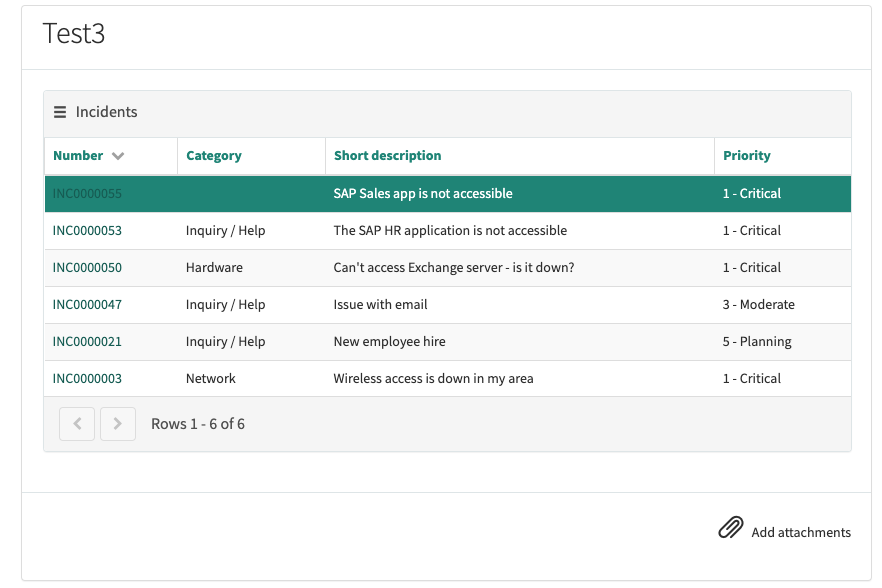
i have used the Data table widget using macro variable. i am seeing result like below.
i am getting any table view, Please let me know if missed anything.
Or can you help me to create some custom widget to display table records and use it in catalog variable

Solved! Go to Solution.
- Mark as New
- Bookmark
- Subscribe
- Mute
- Subscribe to RSS Feed
- Permalink
- Report Inappropriate Content
05-30-2022 10:52 AM
I think this is related to your "hide submit" button post (please close the thread if you have found a solution)?
https://community.servicenow.com/community?id=community_question&sys_id=aeaf6d5d1b374990c17111751a4bcbc3
I guess in this case you want to go with the custom widget solution. The Widget is down below, here is an example of how this will look like:

Name: My Incidents
Body HTML Template:
<div>
<sp-widget widget="data.widget" />
</div>Server script:
(function() {
data.widget = $sp.getWidget('widget-data-table', {
table: 'incident',
filter: 'assigned_toDYNAMIC90d1921e5f510100a9ad2572f2b477fe' // <Assigned to> <is dynamic> <Me>
});
})();If you want a different filter, simply go to incident.list use the filter and then right click on the breadcrumbs: "Copy query" and paste this query in the server script.
Please let us know if this solved your problem 🙂
- Mark as New
- Bookmark
- Subscribe
- Mute
- Subscribe to RSS Feed
- Permalink
- Report Inappropriate Content
06-18-2022 05:59 AM
Hm strange, can you show a screenshot of this? Cannot reproduce this instantly. Maybe you also wanna create a new thread for this (in this case please mark most helpful answer of this thread as the solution so that people with the same problem know what to do).
- Mark as New
- Bookmark
- Subscribe
- Mute
- Subscribe to RSS Feed
- Permalink
- Report Inappropriate Content
06-01-2022 12:54 AM
Here you go:
HTML remains unchanged
Server script:
(function() {
data.widget = $sp.getWidget('widget-data-table', {
table: 'incident',
filter: 'assigned_toDYNAMIC90d1921e5f510100a9ad2572f2b477fe',
fields: 'number,short_description,description'
});
})();Client ctonroller:
api.controller=function($scope) {
var c = this;
var baseFilter = 'assigned_toDYNAMIC90d1921e5f510100a9ad2572f2b477fe';
var g_form = $scope.page.g_form;
$scope.$watch(function () {
return g_form.getValue('short_description');
}, function (newValue) {
setFilter(newValue, g_form.getValue('description'));
});
$scope.$watch(function () {
return g_form.getValue('description');
}, function (newValue) {
setFilter(g_form.getValue('short_description'), newValue);
});
function setFilter(shortDescription, description) {
var filter = baseFilter;
if (shortDescription) {
filter += '^short_descriptionLIKE' + shortDescription;
}
if (description) {
filter += '^descriptionLIKE' + description;
}
$scope.$broadcast('data_table.setFilter', filter);
}
};Result:
- Mark as New
- Bookmark
- Subscribe
- Mute
- Subscribe to RSS Feed
- Permalink
- Report Inappropriate Content
06-19-2022 11:52 PM
Hi
The desired fields are being shown but when I click on export then in the exported file still the old data is shown.How to modify fields here as well
- Mark as New
- Bookmark
- Subscribe
- Mute
- Subscribe to RSS Feed
- Permalink
- Report Inappropriate Content
06-20-2022 01:24 AM
Just checked that, it seems to be only a problem with the PDF export.
To get PDF export working, you actually need to either change the 'mobile' list view of incident. PDF export ignores the field list in general so you have to either change the mobile list view, or create a new list view of the incident table and let this view load by setting the view in the server controller:
data.widget = $sp.getWidget('widget-data-table', {
table: 'incident',
filter: 'assigned_toDYNAMIC90d1921e5f510100a9ad2572f2b477fe', // <Assigned to> <is dynamic> <Me>
fields: 'number,short_description,description',
view: 'my_view_name'
});
One more thing: Please create a new threads for things like this. Currently if someone is having the same problem, and he/she checks this thread, he will not see the solving answer to your initial problem. So please mark the the answer that answered your initial question as the "solution" (i think the solution was one of my very first answers in this thread) and create a new thread things like "Data Table Export not exporting the shown fields".