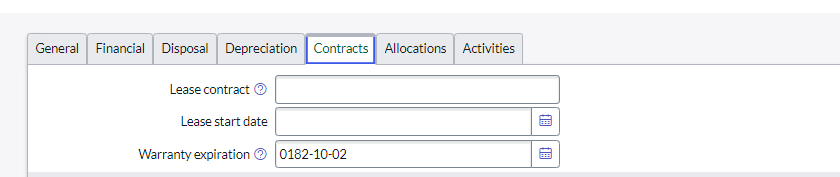
Date fields are not populating the dates correctly on the hardware table

- Mark as New
- Bookmark
- Subscribe
- Mute
- Subscribe to RSS Feed
- Permalink
- Report Inappropriate Content
02-14-2024 04:33 PM
Hi,
When I import assets to servicenow, the warranty date and scheduled retirement fields do not show the dates correctly. No matter what format we set the date to.
Date entered as 02/14/2026 on the import spreadsheet but shows up in the warranty expiration field on the hardware form 0182/10/2

- Mark as New
- Bookmark
- Subscribe
- Mute
- Subscribe to RSS Feed
- Permalink
- Report Inappropriate Content
02-14-2024 05:36 PM

- Mark as New
- Bookmark
- Subscribe
- Mute
- Subscribe to RSS Feed
- Permalink
- Report Inappropriate Content
02-14-2024 05:45 PM
Hi @msmo ,
Please refer to below thread:
https://support.servicenow.com/kb?id=kb_article_view&sysparm_article=KB0955636
If I could help you with your Query then, please hit the Thumb Icon and mark it as Correct !!
Thanks & Regards,
Sumanth Meda


- Mark as New
- Bookmark
- Subscribe
- Mute
- Subscribe to RSS Feed
- Permalink
- Report Inappropriate Content
02-14-2024 07:23 PM
HI @msmo ,
I trust you are doing great.
Here's an example of how you can transform a date field in a transform map script:
(function runTransformScript(source, target, map, log, isUpdate) {
// Example: Transforming a date from "MM/dd/yyyy" to "yyyy-MM-dd"
var dateString = source.u_warranty_date; // Assuming 'u_warranty_date' is the field in your import set
if (dateString) {
var date = new GlideDate();
date.setValue(dateString, "MM/dd/yyyy"); // Parse date from source format
target.warranty_expiration = date.getByFormat("yyyy-MM-dd"); // Set target field in ServiceNow's expected format
}
})()
Was this answer helpful?
Please consider marking it correct or helpful.
Your feedback helps us improve!
Thank you!
Regards,
Amit Gujrathi