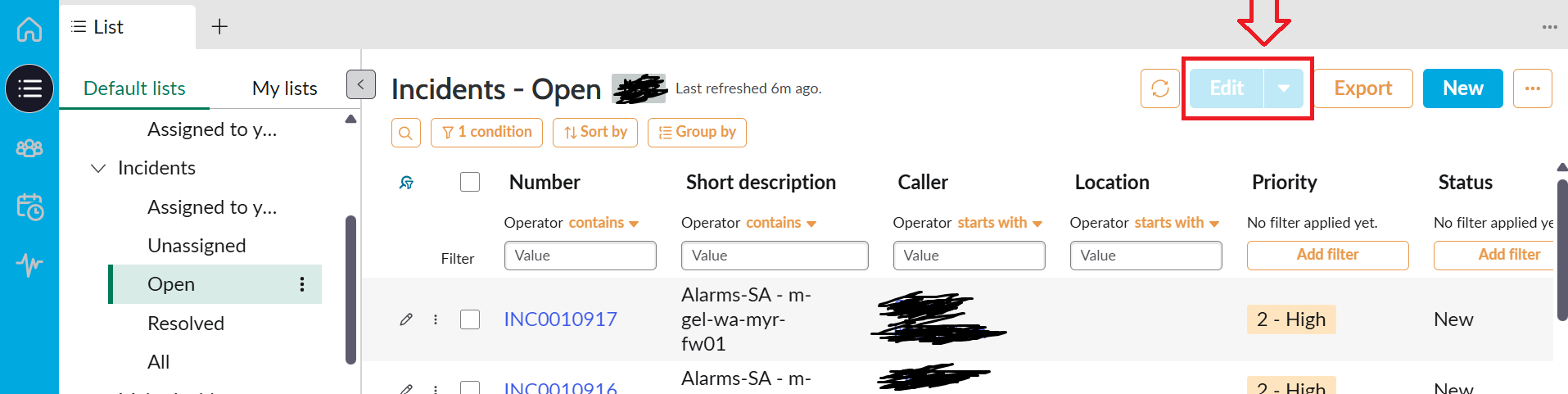
Edit UI action visible but greyed out for all users (workspace view)

- Mark as New
- Bookmark
- Subscribe
- Mute
- Subscribe to RSS Feed
- Permalink
- Report Inappropriate Content
04-15-2026 07:41 PM
- Mark as New
- Bookmark
- Subscribe
- Mute
- Subscribe to RSS Feed
- Permalink
- Report Inappropriate Content
04-15-2026 08:15 PM
Hi @amita2 ,
That Edit action will be enabled only after if we select any record by using checkbox.
Still if you want to make that action will be visible before any record selection, 4a9232b273131010a0a79329faf6a732 this is the sysId of that record ,open the record and there is a field called Record Selection Required make it false and observe.
But it is not a best practice to do, because this declarative will be appear almost all the table list views and one more thing it is designed in a way atleast we need to select one record if we change functionality will be different if someone clicked the button without selecting the record nothing will be appear on the right side.

If my response helped, mark it as helpful and accept the solution.


- Mark as New
- Bookmark
- Subscribe
- Mute
- Subscribe to RSS Feed
- Permalink
- Report Inappropriate Content
04-15-2026 08:34 PM
it must be coming from one of these, check which one and then add Action Exclusion for your custom table
https://instanceName.service-now.com/sys_declarative_action_assignment_list.do?sysparm_query=labelLIKEEdit%5Etable%3Dglobal%5Emodel%3Dc3547169534723003eddddeeff7b126c&sysparm_view=


💡 If my response helped, please mark it as correct ✅ and close the thread 🔒— this helps future readers find the solution faster! 🙏
Ankur
✨ Certified Technical Architect || ✨ 10x ServiceNow MVP || ✨ ServiceNow Community Leader
- Mark as New
- Bookmark
- Subscribe
- Mute
- Subscribe to RSS Feed
- Permalink
- Report Inappropriate Content
05-18-2026 05:13 AM
If no further help required, please close the thread by marking appropriate response as correct so that it benefits future readers.
Ankur
✨ Certified Technical Architect || ✨ 10x ServiceNow MVP || ✨ ServiceNow Community Leader

- Mark as New
- Bookmark
- Subscribe
- Mute
- Subscribe to RSS Feed
- Permalink
- Report Inappropriate Content
05-18-2026 07:13 AM
Hi @amita2
Refer this article: SOLVED: Workaround for "Edit ..." buttons on Related Lists of Workspaces
Regards
Tanushree Maiti
ServiceNow Technical Architect
LinkedIn: https://www.linkedin.com/in/tanushreemaiti