- Mark as New
- Bookmark
- Subscribe
- Mute
- Subscribe to RSS Feed
- Permalink
- Report Inappropriate Content
02-17-2021 11:50 AM
I am stuck in a flow designer Flow on how to only get the first element from an array of objects.
I am using a REST action I built to pull back all the shipping tracking history based on a tracking number. One of the fields is 'actions' and the first action listed is the most recent action which is all I want.
So now that I have an output from my flow action step that set a variable as an array of objects for 'actions' I just want to get the first element.
I see the logic tool ForEach but I just want the first one and then end.
I'm not sure how to indicate the element I am looking for from the array.
Solved! Go to Solution.
- Labels:
-
Studio
- Mark as New
- Bookmark
- Subscribe
- Mute
- Subscribe to RSS Feed
- Permalink
- Report Inappropriate Content
02-17-2021 01:06 PM
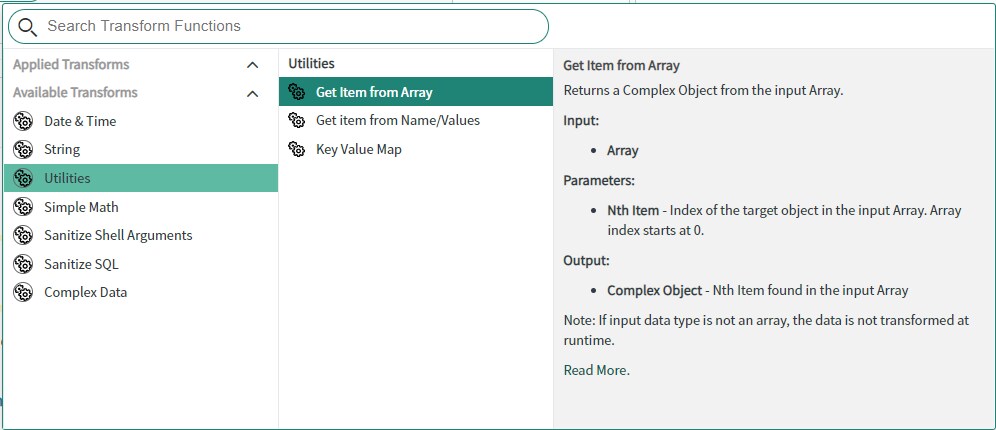
Have you looked into Utilities. There's an option for getting item from the array. index starts at 0 so in your case you are looking for 0th item from the array
https://docs.servicenow.com/bundle/paris-servicenow-platform/page/administer/flow-designer/reference/utilities-transform-functions.html
- Mark as New
- Bookmark
- Subscribe
- Mute
- Subscribe to RSS Feed
- Permalink
- Report Inappropriate Content
02-17-2021 01:06 PM
Have you looked into Utilities. There's an option for getting item from the array. index starts at 0 so in your case you are looking for 0th item from the array
https://docs.servicenow.com/bundle/paris-servicenow-platform/page/administer/flow-designer/reference/utilities-transform-functions.html
- Mark as New
- Bookmark
- Subscribe
- Mute
- Subscribe to RSS Feed
- Permalink
- Report Inappropriate Content
02-22-2021 07:37 AM
I tried that utility but am still getting all rows:
output variable name is latestActivity as array.object type
Raw input is array.object
{
    "latestActivity": {
        "Activity": [
            {
                "Activity": {
                    "ActivityLocation": {
                        "Address": {
                            "City": "BEVERLY",
                            "CountryCode": "US",
                            "PostalCode": "01915",
                            "StateProvinceCode": "MA"
                        },
                        "Code": "ML",
                        "Description": "Front Door"
                    },
                    "Date": "20201210",
                    "GMTDate": "2020-12-10",
                    "GMTOffset": "-05:00",
                    "GMTTime": "16:41:51",
                    "Status": {
                        "StatusCode": {
                            "Code": "FS"
                        },
                        "StatusType": {
                            "Code": "D",
                            "Description": "Delivered"
                        }
                    },
                    "Time": "114151"
                }
            },
            {
                "Activity": {
                    "ActivityLocation": {
                        "Address": {
                            "CountryCode": "US"
                        },
                        "Description": "Front Door"
                    },
                    "Date": "20201209",
                    "GMTDate": "2020-12-10",
                    "GMTOffset": "-05:00",
                    "GMTTime": "00:13:55",
                    "Status": {
                        "StatusCode": {
                            "Code": "MP"
                        },
                        "StatusType": {
                            "Code": "M",
                            "Description": "Shipper created a label, UPS has not received the package yet."
                        }
                    },
                    "Time": "191355"
                }
            }
        ]
    }
}
Maybe I have the Output variable setup incorrectly? I am attaching a screenshot of the setup I have that is still outputing all the Activity elements, not just the first one.