- Mark as New
- Bookmark
- Subscribe
- Mute
- Subscribe to RSS Feed
- Permalink
- Report Inappropriate Content
04-28-2016 12:09 PM
I have created a Form Button UI Action called "Place On Hold". Below are the details

Name - Place On Hold
Table - Requested Item [sc_req_item]
Action name - sysverb_hold_and_stay
Active = True
Show insert - False
Show Update - True
Client - False
Form Button - True
Condition - current.canWrite()&¤t.state==11&& gs.hasRole("itil")
Script
action.setRedirectURL(current);
current.state=12;
current.update();
I currently have the Sub State field hidden on the request unless the category STARTS WITH "Security > Hardware" and the State is On Hold. I don't want the field on the form any other time. If I have to change something for the below to work, I would need to know how. I'm not sure if you can hard set a field with code if it's not visible on the form.
When the "Place On Hold" button is clicked, I am wanting to have a dialog box pop up that states, "Is the reason you are placing this request on hold because of Awaiting Customer Approval?". Then there would be Yes / No buttons.
If Yes, then Change state to On Hold, set the Sub State field to Awaiting Customer Approval, update the request and then stay on the current page.
current.state=12;
current.u_sub_state=2;
current.update();
action.setRedirectURL(current);
If No, Change state to On Hold, set the Sub State field on the Requested Item request to None, update the request and then stay on the current page.
current.state=12;
current.u_sub_state=0;
current.update();
action.setRedirectURL(current);
Can anyone help?
Thanks in Advance!
Charlie Ward
Facilities Security and 1CALLNOW Supervisor
University Hospitals Authority & Trust
Solved! Go to Solution.


- Mark as New
- Bookmark
- Subscribe
- Mute
- Subscribe to RSS Feed
- Permalink
- Report Inappropriate Content
04-29-2016 02:50 PM
Hi Charlie,
I don't have your exact field names and values you want to set, but I hope this would be a good example to how to do it. Let me know if you get stuck.
UI action which calls for the popup window(GlideDialogWindow):

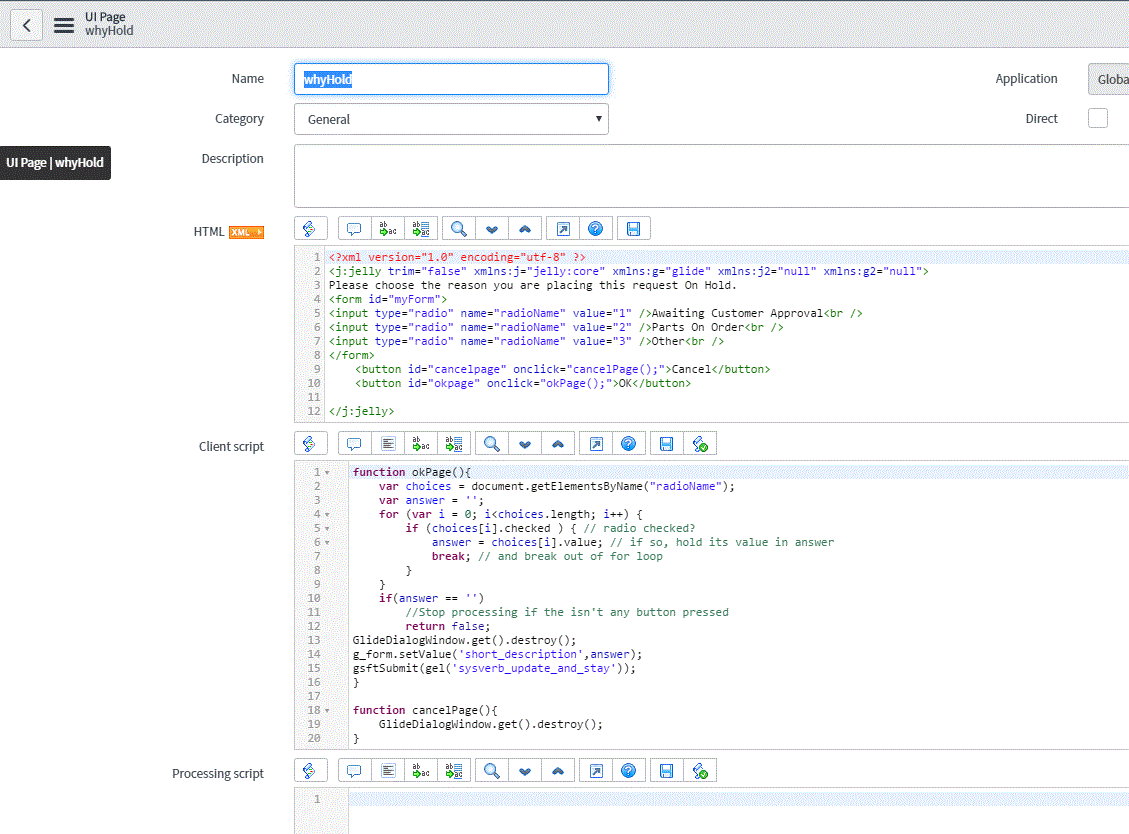
Then I have made a UI Page called "whyHold" which the UI Action calls on:
I put on 3 radio buttons and two normal(Cancel & OK). pressing cancel just destroys the popup,
Having OK checking which radio button is pressed. There is also a check so if the user doesn't choose a option,
they can't press OK.

//Göran
- Mark as New
- Bookmark
- Subscribe
- Mute
- Subscribe to RSS Feed
- Permalink
- Report Inappropriate Content
04-29-2016 02:50 PM
Hi Charlie,
I don't have your exact field names and values you want to set, but I hope this would be a good example to how to do it. Let me know if you get stuck.
UI action which calls for the popup window(GlideDialogWindow):
Then I have made a UI Page called "whyHold" which the UI Action calls on:
I put on 3 radio buttons and two normal(Cancel & OK). pressing cancel just destroys the popup,
Having OK checking which radio button is pressed. There is also a check so if the user doesn't choose a option,
they can't press OK.
//Göran
- Mark as New
- Bookmark
- Subscribe
- Mute
- Subscribe to RSS Feed
- Permalink
- Report Inappropriate Content
05-03-2016 06:28 AM
Thanks Goran, this is exactly what I was needing!!!!!!!!
- Mark as New
- Bookmark
- Subscribe
- Mute
- Subscribe to RSS Feed
- Permalink
- Report Inappropriate Content
05-03-2016 07:48 AM
No problem 😃 Happy to help
//Göran
- Mark as New
- Bookmark
- Subscribe
- Mute
- Subscribe to RSS Feed
- Permalink
- Report Inappropriate Content
12-07-2020 08:55 AM

- Mark as New
- Bookmark
- Subscribe
- Mute
- Subscribe to RSS Feed
- Permalink
- Report Inappropriate Content
03-02-2021 07:11 PM