- Mark as New
- Bookmark
- Subscribe
- Mute
- Subscribe to RSS Feed
- Permalink
- Report Inappropriate Content
10-11-2021 07:30 PM
I want to display a clickable URL (hyperlink) in my work notes. Currently, clickable URLs can be displayed by enclosing them in [code] [/ code], but I would like to know how to display clickable URLs without writing [code] [/ code] directly in the work notes.
Solved! Go to Solution.
- 24,602 Views

- Mark as New
- Bookmark
- Subscribe
- Mute
- Subscribe to RSS Feed
- Permalink
- Report Inappropriate Content
10-11-2021 07:41 PM
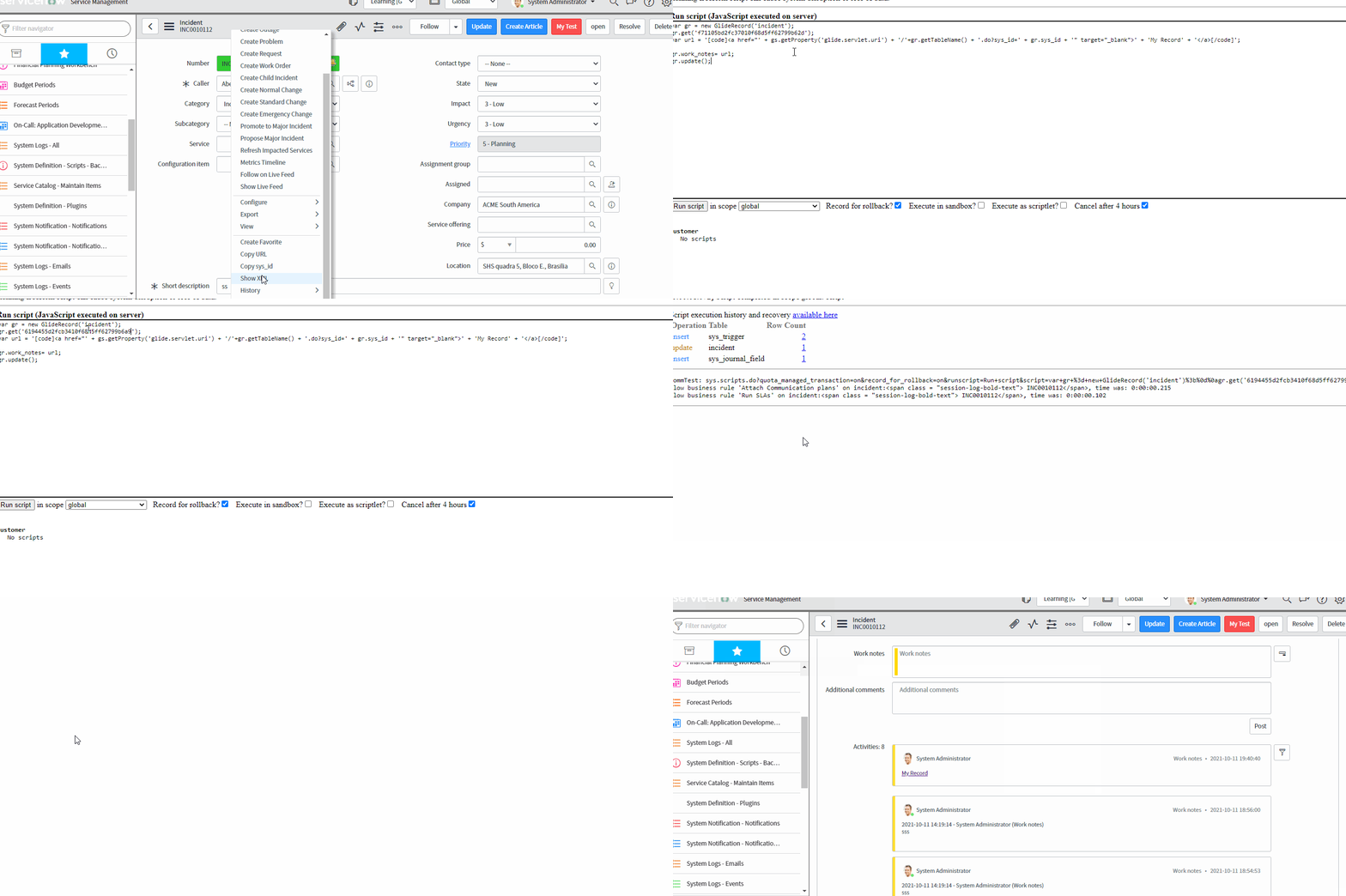
You can build href tag inside code.
Sample eg:
var gr = new GlideRecord('incident');
gr.get('f71105bd2fc37010f68d5ff62799b62d');
var url = '[code]<a href="' + gs.getProperty('glide.servlet.uri') + '/'+gr.getTableName() + '.do?sys_id=' + gr.sys_id + '" target="_blank">' + 'My Record' + '</a>[/code]';

gr.work_notes= url;
gr.update();
Quick Demo

If my answer helped you, kindly mark it as correct and helpful.
- Mark as New
- Bookmark
- Subscribe
- Mute
- Subscribe to RSS Feed
- Permalink
- Report Inappropriate Content
10-08-2024 10:15 AM
I'm also looking for an alternative to the [code][/code] option. It is a bad user experience, after all, isn't this supposed to be a low code no code platform?
- Mark as New
- Bookmark
- Subscribe
- Mute
- Subscribe to RSS Feed
- Permalink
- Report Inappropriate Content
11-11-2024 07:12 AM
As a user why would i ask a user to do all those, ????
as an agent all i want to do is update a link in the work notes, it should show up as a url, this is basic functionality that is supported by JIRA . i am thinking there might be a way we are missing something ?
- Mark as New
- Bookmark
- Subscribe
- Mute
- Subscribe to RSS Feed
- Permalink
- Report Inappropriate Content
03-29-2023 02:05 PM
- Mark as New
- Bookmark
- Subscribe
- Mute
- Subscribe to RSS Feed
- Permalink
- Report Inappropriate Content
11-12-2024 12:08 PM
I created 3 fields that can be used to generate clickable links in the worknotes. I also implemented a checkbox field named "Generate Note Hyperlink" used to show/hide the 3 fields
The user puts the title in one field, link in anohter, and the code for the clickable URL is generated. Below are the fields & code used...
3 string fields
- u_title
- u_link
- u_hyperlink
2 client scripts.
- Note Hyperlink Generator - Link
- Type: onChange
- Field name: Link
- Script:
function onChange(control, oldValue, newValue, isLoading, isTemplate) {
    if (isLoading || newValue === '') {
        return;
    }

    // Get the values of the title and link fields
    var title = g_form.getValue('u_title');
    var link = g_form.getValue('u_link');

    // Ensure both title and link are populated before proceeding
    if (title && link) {
        // Generate the HTML hyperlink format
        var hyperlink = '[code]<a href = "' + link + '" target="_blank">' + title + '</a>[/code]';

        // Set the generated hyperlink into the u_hyperlink field
        g_form.setValue('u_hyperlink', hyperlink);

        // Optionally, you could add a message to notify the user that the hyperlink has been generated
        g_form.showFieldMsg('u_hyperlink', 'Hyperlink generated! Copy and paste it into your work notes.');
    } else {
        // If either title or link is missing, clear the hyperlink field and show an error message
        g_form.setValue('u_hyperlink', '');
    }
}
- Note Hyperlink Generator - Title
- Type: onChange
- Field name: Title
- Script: Exace same as above client script
- Mark as New
- Bookmark
- Subscribe
- Mute
- Subscribe to RSS Feed
- Permalink
- Report Inappropriate Content
05-14-2026 11:35 PM
I'm using same approach for HR task but when I'm opening the HR task on esc portal, it's showing in French language and complete button is missing to complete the HR task.