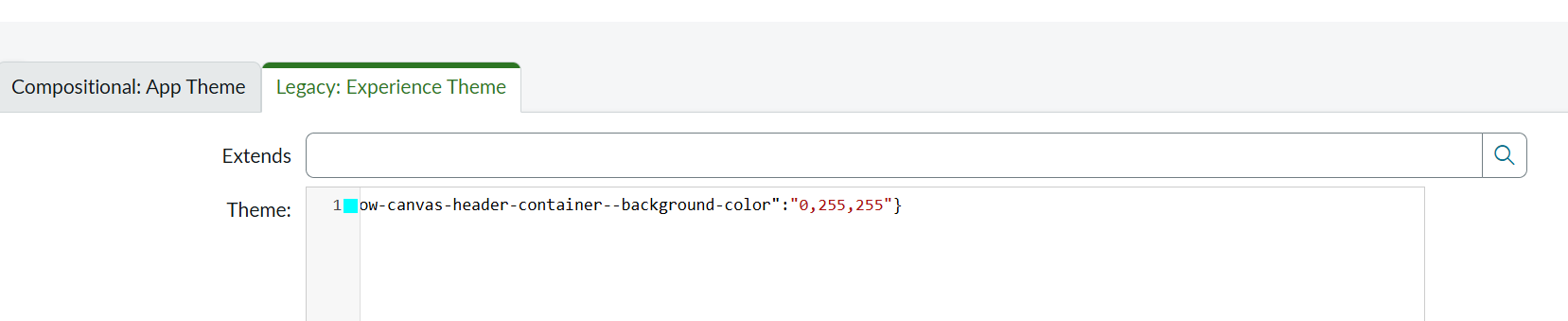
How do I modify the color for the heading in the new UI Builder page when using Portal App Shell

- Mark as New
- Bookmark
- Subscribe
- Mute
- Subscribe to RSS Feed
- Permalink
- Report Inappropriate Content
03-26-2021 07:12 AM
I create a portal using the new UI builder and am trying to figure out how I can modify the color for the heading.
My setup is as below
1. Created a new Experience with Portal App Shell and created a UX App Config for my new experience.
2. Created a theme and linked it to the new experience.
3. Created a page, with a component on it, I used Richtext component for my testing.
in the theme I added below, and was expecting bluish background for the header, but it didn't change color.
theme:
{
"--now-color_brand--primary" : "5,49,77"
}
Any Help is appreciated.


- Mark as New
- Bookmark
- Subscribe
- Mute
- Subscribe to RSS Feed
- Permalink
- Report Inappropriate Content
03-29-2021 06:32 AM

- Mark as New
- Bookmark
- Subscribe
- Mute
- Subscribe to RSS Feed
- Permalink
- Report Inappropriate Content
12-15-2025 04:11 AM - edited 12-15-2025 04:11 AM
Hi ,
i tried this now but it is not working, ui builder is changed since this last tried.
can someone help me with this thing now i have done the theme setup but not working if changing background color it is changing but every background also then change with that.
please let me know how i can set the header color now