How to add a html code into the HTML type Text box?

- Mark as New
- Bookmark
- Subscribe
- Mute
- Subscribe to RSS Feed
- Permalink
- Report Inappropriate Content
04-03-2018 03:57 AM
Hi All,
I am trying to insert a source code into the HTML type field through a business rule and I want the output of the code in that field.
How can we directly add the source code into the field through business rule?

Please suggest on this.
- Labels:
-
Personal Developer Instance
- Mark as New
- Bookmark
- Subscribe
- Mute
- Subscribe to RSS Feed
- Permalink
- Report Inappropriate Content
04-03-2018 05:22 AM
Hi,
you can do it as it was a string, by dividing it into smaller pieces of HTML script.
for example:
var html_header = "<html>";

var body_start = "<body><h2 title='TEST'>The title Attribute</h2>";

var par = "<p>TEST</p>";

var body_end = "</body>";

var html_end = "</html>";


current.description = html_header + body_start + par + body_end + html_end;
Hope it helps!
- Mark as New
- Bookmark
- Subscribe
- Mute
- Subscribe to RSS Feed
- Permalink
- Report Inappropriate Content
04-03-2018 07:14 AM
We have already following the method which you have suggested.
But, while exporting the record in PDF format, it is not in the format which is actually there.
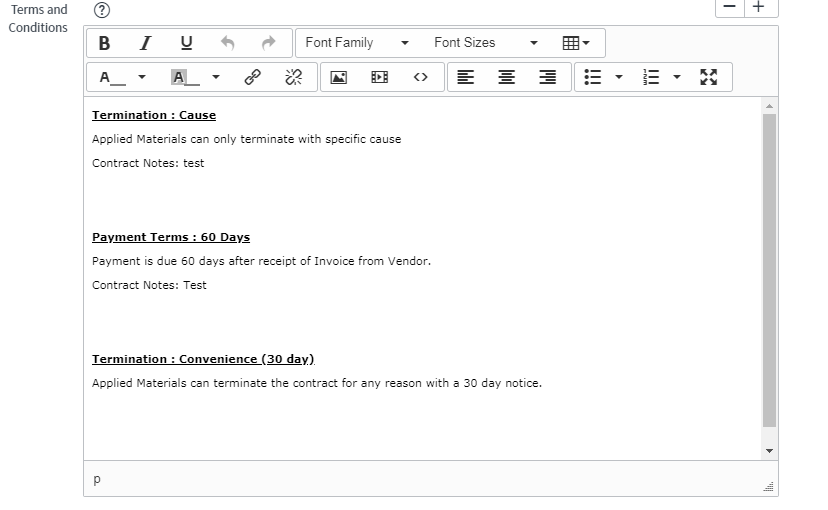
Please refer the Screenshot:
In the form it looks like,

While exporting, it is giving this value.

But, if I saved the form once and exporting, it is giving the exact value,

Kindly suggest, what should be followed to get the result.
- Mark as New
- Bookmark
- Subscribe
- Mute
- Subscribe to RSS Feed
- Permalink
- Report Inappropriate Content
04-03-2018 07:25 AM
I've struggled with that quite a lot, but I've manage to fix it.
You need to add the equivalent of "\n" but in HTML format, meaning, you need to add "<br>" and "</br>" for every paragraph you add.
In your case:
var example = "<br>Termination: Cause</br><br>Applied Materials can only terminate with specific cause</br><br>Contract Notes: test</br>";And so on.
Hope it helps!