- Mark as New
- Bookmark
- Subscribe
- Mute
- Subscribe to RSS Feed
- Permalink
- Report Inappropriate Content
07-23-2020 02:01 PM
Hi,
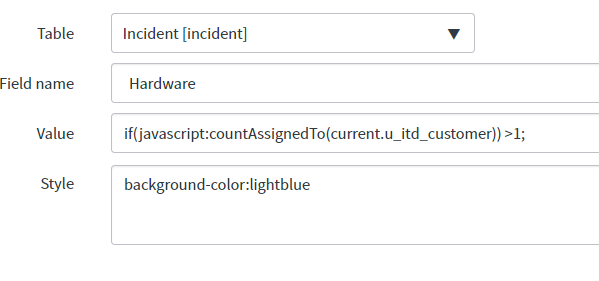
I am trying to set the background of a field to blue if the user has more than 1 PC assigned to them. I believe my script include is setup properly since it worked when running it in Background-Script, I think I just need to adjust "if(javascript:countAssignedTo(current.u_itd_customer))>1;". Anyone know how I need to adjust this?


Solved! Go to Solution.

- Mark as New
- Bookmark
- Subscribe
- Mute
- Subscribe to RSS Feed
- Permalink
- Report Inappropriate Content
07-24-2020 11:43 AM
kindly have a look on below article. it has mentioned the details.
https://www.servicenowelite.com/blog/2013/11/24/custom-field-styles
- Mark as New
- Bookmark
- Subscribe
- Mute
- Subscribe to RSS Feed
- Permalink
- Report Inappropriate Content
07-24-2020 11:40 AM
Ah that was my issue. I was testing this on a form, not in a list view. I want the style to apply specifically on the form. Is there a way to have the style appear on the form without blanking value?
- Mark as New
- Bookmark
- Subscribe
- Mute
- Subscribe to RSS Feed
- Permalink
- Report Inappropriate Content
07-24-2020 11:43 AM
kindly have a look on below article. it has mentioned the details.
https://www.servicenowelite.com/blog/2013/11/24/custom-field-styles
- Mark as New
- Bookmark
- Subscribe
- Mute
- Subscribe to RSS Feed
- Permalink
- Report Inappropriate Content
07-23-2020 04:43 PM
I think you have to initialize the script include first, dont remember how I did it exactly but before you start scripting in that value field you have to do "javascript:"
So maybe try
javascript: new countAssignedTo(current.u_itd_customer)>1- Mark as New
- Bookmark
- Subscribe
- Mute
- Subscribe to RSS Feed
- Permalink
- Report Inappropriate Content
07-23-2020 05:57 PM
Hii
javascript: var answer = new countAssignedTo(current.u_itd_customer) >1; answer;
apply style in the style field.
Thanks
Sudhanshu