- Mark as New
- Bookmark
- Subscribe
- Mute
- Subscribe to RSS Feed
- Permalink
- Report Inappropriate Content
10-19-2023 12:09 PM
- Hi All,
- In one catalog item we have three variables
- Variable name - Type
1)Start Date/Time -Date/Time
2)Access Duration - Drop Down
5 minutes
15 minutes
30 minutes
1 hour
5 hours
12 hours
1 Day
5 Days
10 Days - 3)End Date/Time -Date/Time
- End Date should be auto fill by based start date/ time & access Duration.
- I have written the code but I'm not getting please let us know where I can modify.
- Note :suppose if start date is 10.50:00 19/10/2023
If access Duration selected as 15 min
Then End Date/Time is auto populate by
11:05:00 19/10/2023 - Please let us know how can I achieve this. Please provide source code also
Solved! Go to Solution.


- Mark as New
- Bookmark
- Subscribe
- Mute
- Subscribe to RSS Feed
- Permalink
- Report Inappropriate Content
10-20-2023 05:33 AM
Hello @Sirri ,
Please replace your scripts with the below script and try it.
Client Script:-
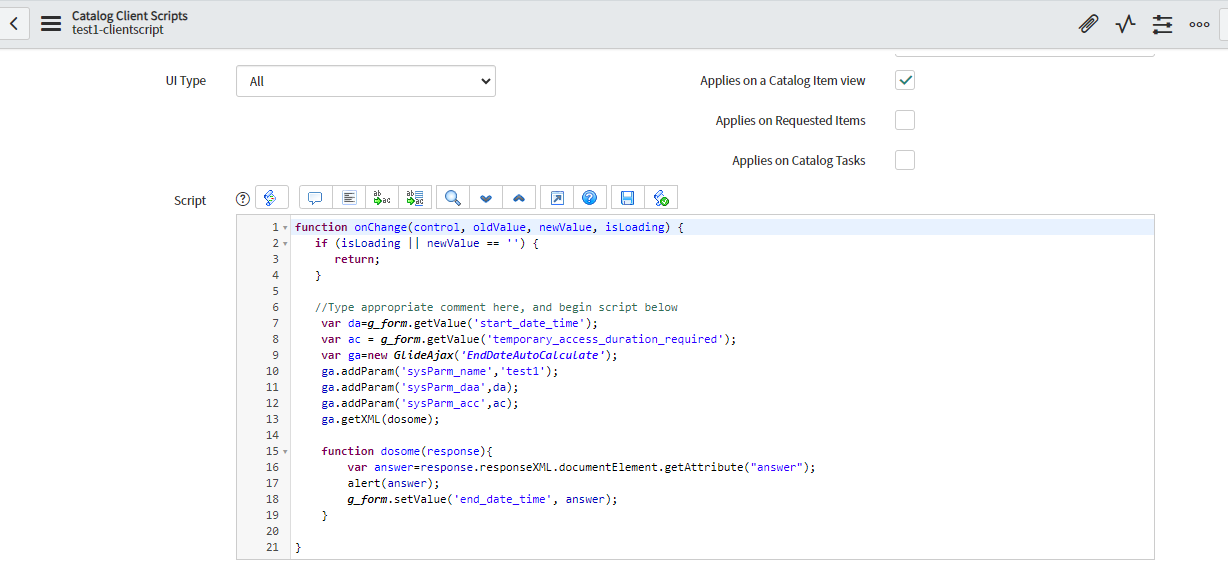
    var da = g_form.getValue('start_date_time');
    var ac = g_form.getValue('temporary_access_duration_required');
    var ga = new GlideAjax('EndDateAutoCalculate');
    ga.addParam('sysparm_name', 'test1');
    ga.addParam('sysparm_daa', da);
    ga.addParam('sysparm_acc', ac);
    ga.getXML(callback);

    function callback(response) {
        var answer = response.responseXML.documentElement.getAttribute("answer");
        alert(answer);

        g_form.setValue('end_date_time', answer);

    }
Script Include:
 test1: function() {
        var ab = this.getParameter('sysparm_daa');
        var ac = this.getParameter('sysparm_acc');
        var gdt = new GlideDateTime(ab);
        if (ac == '5 Minutes') {
            gdt.addSeconds(300);
        } else if (ac == '15 Minutes') {
            gdt.addSeconds(900);
        } else if (ac == '30 Minutes') {
            gdt.addSeconds(1800);
        } else if (ac == '1 Hour') {
            gdt.addSeconds(3600);
        } else if (ac == '5 Hours') {
            gdt.addSeconds(18000);
        } else if (ac == '12 Hours') {
            gdt.addSeconds(43200);
        } else if (ac == '1 Day') {
            gdt.addDays(1);
        } else if (ac == '5 Day') {
            gdt.addDays(5);
        } else if (ac == '10Days') {
            gdt.addDays(10);
        }
        return gdt;
},- Mark as New
- Bookmark
- Subscribe
- Mute
- Subscribe to RSS Feed
- Permalink
- Report Inappropriate Content
10-20-2023 05:56 AM - edited 10-20-2023 05:58 AM
Hello @Sirri ,
I have updated the following things in the script:-
- sysParm to sysparm in both client and script include.
- Added function name test1 in quotation
- Removed quotation of ab, gdt.
- Removed current from if conditions
- Replace addDaysLocalTime with addDays.
Please Mark my answers Helpful & Accepted if I have answered your questions.
Thanks,
Alka
- Mark as New
- Bookmark
- Subscribe
- Mute
- Subscribe to RSS Feed
- Permalink
- Report Inappropriate Content
10-19-2023 01:20 PM - edited 10-19-2023 01:21 PM
@Sirri , Please share the updated scripts screenshot again.
- Mark as New
- Bookmark
- Subscribe
- Mute
- Subscribe to RSS Feed
- Permalink
- Report Inappropriate Content
10-19-2023 01:25 PM - edited 10-19-2023 01:28 PM
- Mark as New
- Bookmark
- Subscribe
- Mute
- Subscribe to RSS Feed
- Permalink
- Report Inappropriate Content
10-19-2023 01:28 PM
@Sirri , Script Include line 37, please replace the current.ac with ac.
- Mark as New
- Bookmark
- Subscribe
- Mute
- Subscribe to RSS Feed
- Permalink
- Report Inappropriate Content
10-19-2023 01:31 PM - edited 10-19-2023 01:33 PM
I have modified but Still showing as null. let me know still any modification is required
- Mark as New
- Bookmark
- Subscribe
- Mute
- Subscribe to RSS Feed
- Permalink
- Report Inappropriate Content
10-19-2023 01:59 PM
@Sirri , what this backend values of drop down variable access duration? Like-> what is the backend value of '5 minutes'?