- Mark as New
- Bookmark
- Subscribe
- Mute
- Subscribe to RSS Feed
- Permalink
- Report Inappropriate Content
08-07-2017 02:23 AM
Hi All,
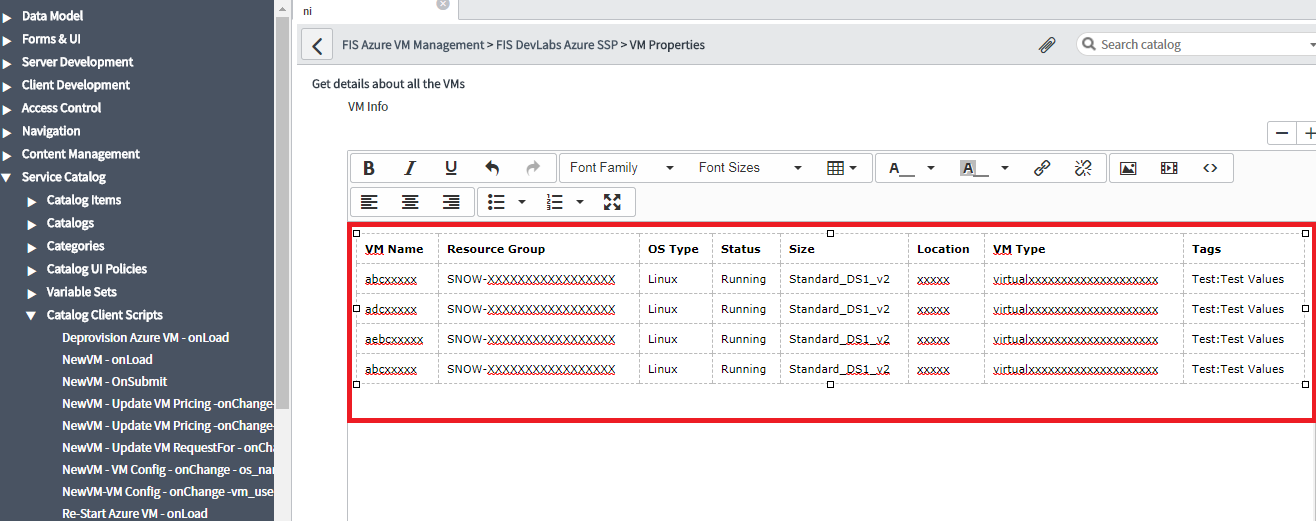
I have catalog item called VM Properties, and on click of that, I want to make Rest Call and get JSON response. Now i want to display this JSON response in a table, where VM_Name, OS_Type, Resource_Groupe etc will by my column names and rows will be added dynamically depending on the number of VMs.

So i have to write a onClick event and make a Rest call and pass data from catalog client script to catalog item form and show it in a table.
Its very easy to show data on a single line text by using g_form.setValue() function.
Any suggestion on how to create a table dynamically and display my JSON data in a table.
Solved! Go to Solution.
- Labels:
-
Scripting and Coding
- Mark as New
- Bookmark
- Subscribe
- Mute
- Subscribe to RSS Feed
- Permalink
- Report Inappropriate Content
08-07-2017 08:55 AM
The way I typically do this is to loop though the JSON response and build the html table in a string variable, then set the g_form field value to the variable that has the html table. Something like below should get you close...
Assuming the JSON response you're getting is something like this:
{
         "results": [{
                   "vmName": "test01",
                   "resourceGroup": "SNOW-0001",
                   "osType": "Linux",
                   "status": "Running",
                   "size": "standard"
         }, {
                   "vmName": "test02",
                   "resourceGroup": "SNOW-0002",
                   "osType": "Windows",
                   "status": "Shutdown",
                   "size": "standard"
         }]
}
...build a string value with html code then set the variable that string
// start by defining the html table with desired style...
var strTable = '<table style="align:center; border-collapse: collapse;">';


// add header rows
strTable += '<tr><th>VM Name</th><th>Resource Group</th><th>OS Type</th><th>Status</th><th>Size</th></tr>';


// parse JSON and put results into table
var parsedResults = JSON.parse(jsonString).results;
for (var i = 0; i < parsedResults.length; i++) {
         strTable += '<tr>';
         strTable += '<td>' + parsedResults[i].vmName + '</td>';
         strTable += '<td>' + parsedResults[i].resourceGroup + '</td>';
         strTable += '<td>' + parsedResults[i].osType + '</td>';
         strTable += '<td>' + parsedResults[i].status + '</td>';
         strTable += '<td>' + parsedResults[i].size + '</td>';
         strTable += '</tr>';
}


strTable += '</table>';


// then set value to the dynamic table string
g_form.setValue('variable', strTable);
- Mark as New
- Bookmark
- Subscribe
- Mute
- Subscribe to RSS Feed
- Permalink
- Report Inappropriate Content
01-13-2022 05:58 AM
Hi, can we write above script to onchange client script where we are receiving JSON response from REST API which is written in script include?
I tried above with onchange CS bt no luck..please advise
- Mark as New
- Bookmark
- Subscribe
- Mute
- Subscribe to RSS Feed
- Permalink
- Report Inappropriate Content
02-19-2024 08:58 PM
Hi @fredflintstone ,
I am facing challenge to make readonly from native and portal.After I applied ACL create and write roles still facing issue it is not even populating data in portal.