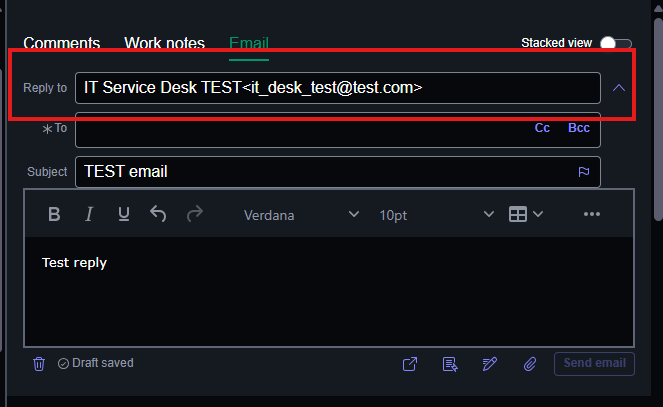
How to make the Reply to field read-only in HR Agent Workspace Compose Email?

- Mark as New
- Bookmark
- Subscribe
- Mute
- Subscribe to RSS Feed
- Permalink
- Report Inappropriate Content
08-12-2026 01:33 AM
Hi! I’m currently investigating whether it is possible to make the “Reply to” field read-only in the Compose Email functionality within HR Agent Workspace.
Has anyone implemented a similar requirement? Any guidance, configuration, or recommended approaches would be greatly appreciated.
Thanks!


- Mark as New
- Bookmark
- Subscribe
- Mute
- Subscribe to RSS Feed
- Permalink
- Report Inappropriate Content
08-12-2026 02:11 AM
hide it if you don't want it to be editable
-> left nav Email client configuration
-> Display Configuration
-> uncheck "Display Reply-To"


💡 If my response helped, please mark it as correct ✅ and close the thread 🔒— this helps future readers find the solution faster! 🙏
Ankur
✨ Certified Technical Architect || ✨ 10x ServiceNow MVP || ✨ ServiceNow Community Leader
- Mark as New
- Bookmark
- Subscribe
- Mute
- Subscribe to RSS Feed
- Permalink
- Report Inappropriate Content
08-12-2026 02:12 AM
But if you want to show but make it readonly then you need to check the Email compose UI builder component and then tweak it
Somewhat complex to handle this
💡 If my response helped, please mark it as correct ✅ and close the thread 🔒— this helps future readers find the solution faster! 🙏
Ankur
✨ Certified Technical Architect || ✨ 10x ServiceNow MVP || ✨ ServiceNow Community Leader
- Mark as New
- Bookmark
- Subscribe
- Mute
- Subscribe to RSS Feed
- Permalink
- Report Inappropriate Content
08-12-2026 02:19 AM
Thank you for your quick reply! Yes, I want it to be visible but non-editable.
- Mark as New
- Bookmark
- Subscribe
- Mute
- Subscribe to RSS Feed
- Permalink
- Report Inappropriate Content
08-12-2026 02:34 AM
Can you please give further explanation? What do you mean by tweaking it? Thank you in advance.