- Mark as New
- Bookmark
- Subscribe
- Mute
- Subscribe to RSS Feed
- Permalink
- Report Inappropriate Content
03-24-2022 01:25 AM
Hi,
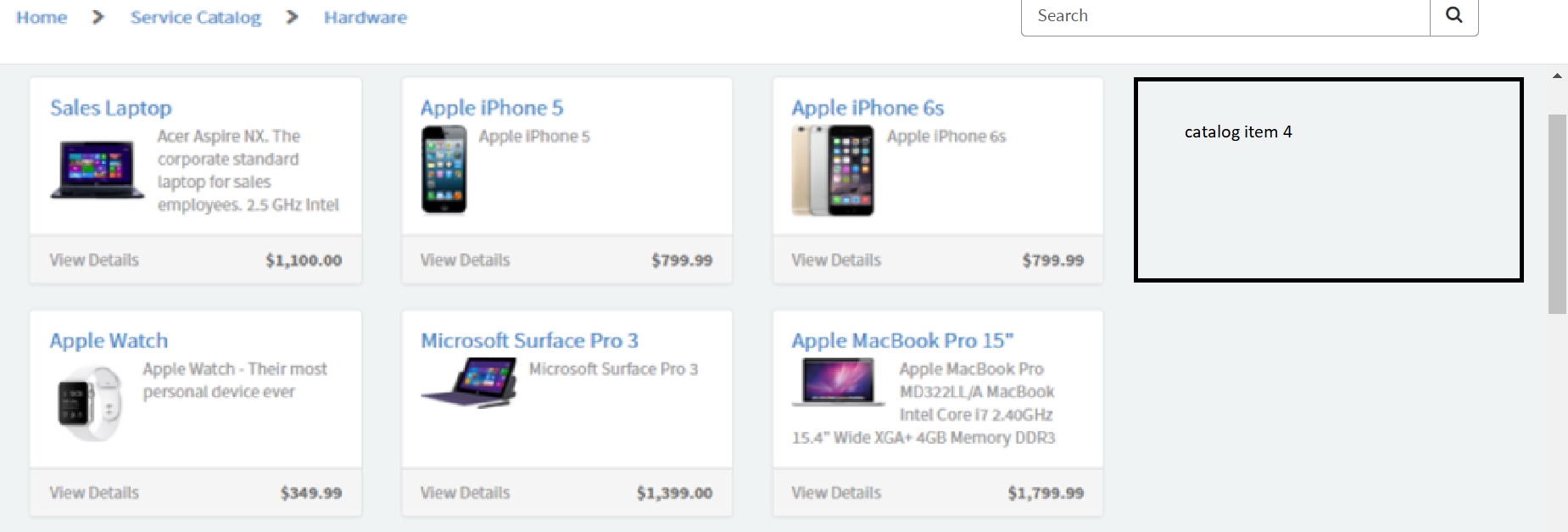
I am new to service portal .I need modify the number of catalog item show in one row, currently 3 catalog item are shown instead of this need to show 4 catalog item. Please advice me to achieve this. Notes: I'm using OOB SC catagory page widget
Best Regards
Akshaya
Solved! Go to Solution.
- Labels:
-
Service Portal Development

- Mark as New
- Bookmark
- Subscribe
- Mute
- Subscribe to RSS Feed
- Permalink
- Report Inappropriate Content
03-24-2022 01:45 AM
Hi,
You can clone OOB SC category widget and paste below code in HTML
<div class="m-t-sm " ng-class="{'hidden-xs' : hideItemWidget, 'm-l-sm': !isMobile}">
<h4 ng-if="data.error">{{data.error}}</h4>
<div ng-init="spSearch.targetCatalog()" role="tabpanel" aria-labelledby="{{::data.category_id && data.category_id != -1 ? 'tab_' + data.category_id : null}}" id="tabpanel_{{::data.category_id}}">
<div class="row">
<div class="col-xs-9">
<a ng-click="showCategories()" class="visible-xs m-b-sm pointer" aria-label="${All Categories}">
<i class="fa fa-chevron-left m-r-xs"></i> ${All Categories}
</a>
<h2 class="h4 m-t-none break-word" aria-label="{{::data.category.title}} ${Category}" role="heading" aria-level="2">{{::data.category.title}}</h2>
<p class="hidden-xs break-word">
{{::data.category.description}}
</p>
</div>
<div class="col-xs-3" ng-if="!isMobile">
<div role="tablist" class="pull-right padder-t-sm text-lg toggle" ng-show="!data.error && data.items.length > 0">
<i class="fa fa-th" ng-click="changeView('card')" aria-label="${Card View}" ng-class="{'active' : view == 'card'}" role="tab" aria-selected="{{view == 'card'}}" uib-tooltip="${Card View}" tooltip-placement="top" tooltip-enable="!isTouchDevice()" tooltip-append-to-body="true" aria-label="${Card View}" tabindex="0"></i>
<span class="m-l-sm m-r-sm " aria-hidden="true"> | </span>
<i class="fa fa-list-ul" ng-click="changeView('grid')" aria-label="${Grid View}" ng-class="{'active' : view == 'grid'}" role="tab" aria-selected="{{view == 'grid'}}" uib-tooltip="${Grid View}" tooltip-placement="top" tooltip-enable="!isTouchDevice()" tooltip-append-to-body="true" aria-label="${Grid View}" tabindex="0"></i>
</div>
</div>
</div>
<div class="row">
<div class="col-sm-6 col-md-3" ng-if="!data.items.length && !data.error">
${No items in category}
</div>
<table class="table table-striped item-table" ng-if="view == 'grid' && data.items.length > 0" aria-label="{{::data.category.title}}" aria-describedby="id-caption-category">
<caption id="id-caption-category"><span class="sr-only">{{::data.category.title}}</span></caption>
<thead>
<tr>
<th id="id-header-item" scope="col">${Item}</th>
<th id="id-header-description" scope="col">${Description}</th>
<th id="id-header-price" scope="col" ng-if="data.showPrices">${Price}</th>
</tr>
</thead>
<tbody>
<tr ng-repeat="item in data.items | orderBy: 'order' | limitTo: data.limit track by item.sys_id" ng-init="startItemList()">
<th headers="id-header-item id-item-{{item.sys_id}}" scope="row" class="th-row-data">
<a sn-focus="{{::item.highlight}}" href="javascript:void(0);" ng-click="onClick($event, item)">
<div>
<img ng-src="{{::item.picture}}?t=small" ng-if="item.picture" alt="" class="m-r-sm m-b-sm item-image pull-left"/>
<span>{{::item.name}}</span>
<span ng-if="item.content_type == 'external'"><span class="sr-only">${External Link}</span> ➚</span>
</div>
</a>
</th>
<td headers="id-header-description id-item-{{item.sys_id}}" class="break-word">{{::item.short_description}}</td>
<td headers="id-header-price id-item-{{item.sys_id}}">{{::item.price}}</td>
</tr>
</tbody>
</table>
<div ng-if="view == 'card'">
<div class="col-sm-6 col-md-3" ng-repeat="item in data.items | orderBy: 'order' | limitTo: data.limit track by item.sys_id" ng-init="startItemList()">
<div class="panel panel-{{::options.color}} b">
<a href="javascript:void(0);" ng-click="onClick($event, item)" class="panel-body block" sn-focus="{{::item.highlight}}">
<div class="overflow-100">
<h3 class="h4 m-t-none m-b-xs text-overflow-ellipsis" title="{{::item.name}}" style="padding-bottom:1px">{{::item.name}}<span ng-if="item.content_type == 'external'" aria-label="${External Link}"> ➚</span></h3>
<img ng-src="{{::item.picture}}?t=small" ng-if="item.picture" alt="{{::item.name}}" class="m-r-sm m-b-sm item-image pull-left" />
<div class="text-muted item-short-desc break-word" aria-hidden="{{::item.name !== null}}" role="presentation">{{::item.short_description}}</div>
</div>
</a>
<span class="sr-only">{{::item.short_description}}</span>
<div class="panel-footer">
<a aria-label="${View Details} {{::item.name}}" href="javascript:void(0);" ng-click="onClick($event, item)" class="pull-left text-muted" tabindex="-1">${View Details}</a>
<span ng-if="data.showPrices && item.hasPrice" class="pull-right item-price font-bold">{{::item.price}}</span>
</div>
</div>
</div>
</div>
</div>
<div class="text-a-c" ng-if="!stopLoader && data.items.length > 0 && !data.error">
<i class="fa fa-spinner fa-pulse fa-3x fa-fw"></i>
<span class="sr-only">${Loading...}</span>
</div>
<div ng-if="data.show_more && !show_popular_item">
<div class="text-a-c">
{{data.more_msg}}
</div>
<button class="m-t-xs btn btn-default btn-loadmore" ng-click="loadMore()">
${Show More}
</button>
</div>
</div>
</div>
<now-message key="Catalogs" value="${Catalogs}"/>
- Mark as New
- Bookmark
- Subscribe
- Mute
- Subscribe to RSS Feed
- Permalink
- Report Inappropriate Content
03-24-2022 02:47 AM
- Mark as New
- Bookmark
- Subscribe
- Mute
- Subscribe to RSS Feed
- Permalink
- Report Inappropriate Content
03-24-2022 03:04 AM


- Mark as New
- Bookmark
- Subscribe
- Mute
- Subscribe to RSS Feed
- Permalink
- Report Inappropriate Content
06-22-2023 04:04 AM
Hi @Shruti ,
What is "spSearch.targetCatalog()" ?