How to remove servicenow from the title of page with UI builder

- Mark as New
- Bookmark
- Subscribe
- Mute
- Subscribe to RSS Feed
- Permalink
- Report Inappropriate Content
09-25-2025 02:47 AM
Hello community,
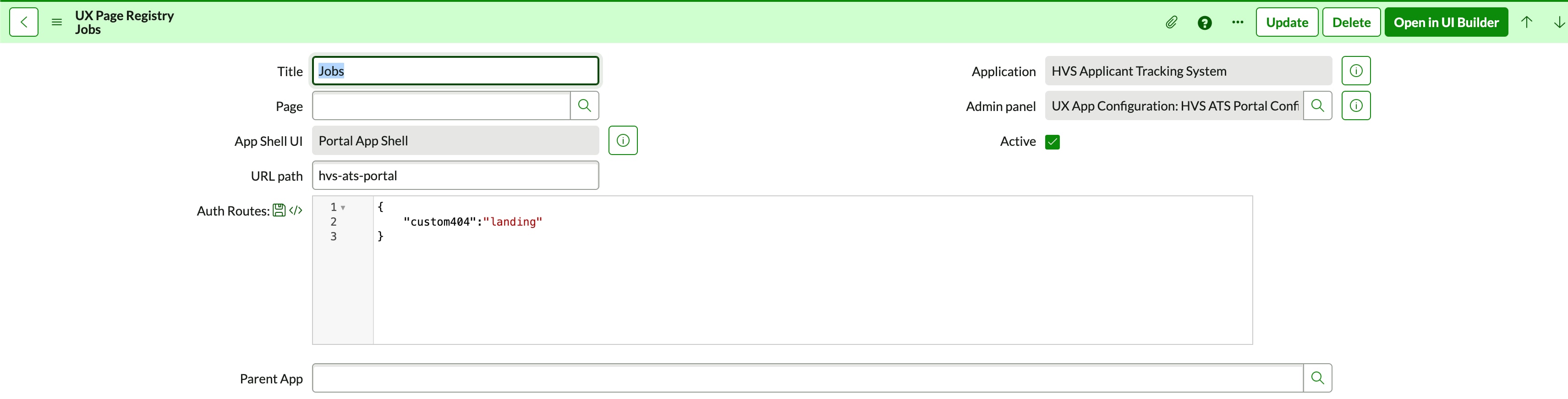
I have created a portal in the next experience with UI builder, I would like to remove the ServiceNow from the title of the page, because this my configuration:

But the title of the page is Job | ServiceNow.
If anyone has an idea for it ?
I have also a bonus question about how to add metada in the page as we do in html : <meta name="description" content="My content">


- Mark as New
- Bookmark
- Subscribe
- Mute
- Subscribe to RSS Feed
- Permalink
- Report Inappropriate Content
09-25-2025 02:50 AM
Hi @J_r_my1
Not 100% sure, but have a look at the UI16 property.

Regards
Dr Atul G. - Learn N Grow Together ServiceNow Techno - Functional Trainer
LinkedIn: https://www.linkedin.com/in/dratulgrover
YouTube: https://www.youtube.com/@LearnNGrowTogetherwithAtulG
******************************************************************************************
- Mark as New
- Bookmark
- Subscribe
- Mute
- Subscribe to RSS Feed
- Permalink
- Report Inappropriate Content
09-25-2025 03:16 AM
I already tried it. But it doesn't work, I still have it in the browser tab title
- Mark as New
- Bookmark
- Subscribe
- Mute
- Subscribe to RSS Feed
- Permalink
- Report Inappropriate Content
09-25-2025 03:21 AM
Hi @J_r_my1
I tried it on my end, and it's working fine. Please try clearing the cache (use cache.do), then log out and log back in.
Regards
Dr Atul G. - Learn N Grow Together ServiceNow Techno - Functional Trainer
LinkedIn: https://www.linkedin.com/in/dratulgrover
YouTube: https://www.youtube.com/@LearnNGrowTogetherwithAtulG
******************************************************************************************
- Mark as New
- Bookmark
- Subscribe
- Mute
- Subscribe to RSS Feed
- Permalink
- Report Inappropriate Content
09-25-2025 04:54 AM
I tried to empty my cache and servicenow cache. And tried it in different browser, but I still got the issue.