- Mark as New
- Bookmark
- Subscribe
- Mute
- Subscribe to RSS Feed
- Permalink
- Report Inappropriate Content
08-09-2017 03:56 AM
how to set numeric value for a variable in service catalog like mobile number...
Solved! Go to Solution.
- Mark as New
- Bookmark
- Subscribe
- Mute
- Subscribe to RSS Feed
- Permalink
- Report Inappropriate Content
08-09-2017 10:50 PM
You can use this an onchange client script to only accept numeric. If user is trying to write non numeric value then error occurs: Please enter numeric values only in the phone number field
function onChange(control, oldValue, newValue, isLoading) {
if (!isLoading) {
if(newValue != '') {
//check to see if there are any non numeric characters in the string
if(isNaN(newValue) == true) {
alert("Please enter numeric values only in the phone number field");
g_form.setValue('phone_number', '');
}
}
}
}
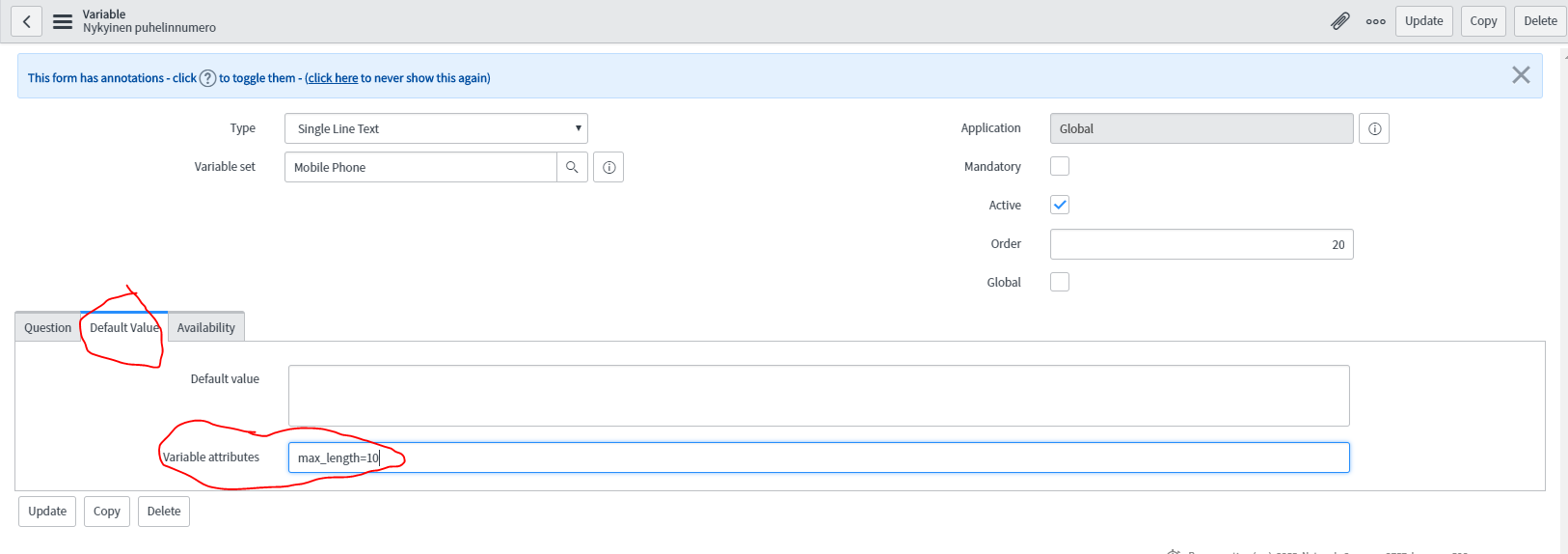
And you can set max lenght to 10 from variable's default value field -> Variable attributes : max_lenght=10

Thanks,
Joonas
please like or mark correct based on the impact of response
- Mark as New
- Bookmark
- Subscribe
- Mute
- Subscribe to RSS Feed
- Permalink
- Report Inappropriate Content
08-10-2017 12:15 AM
Hi Varun,
Did you get a chance to try it?
If my reply has helped your question, can you please mark it as correct to help the community?
Thanks,
Joonas


- Mark as New
- Bookmark
- Subscribe
- Mute
- Subscribe to RSS Feed
- Permalink
- Report Inappropriate Content
08-12-2020 05:07 PM
Hi - While the answer provided 3 years ago was useful at the time, ServiceNow has since introduced a script-free way to handle this. Under a Single Line Text variable, select Type Specification, then under Validation Regex select 'Number'.

You can also define your own validation queries to be available in this dropdown: https://docs.servicenow.com/bundle/orlando-it-service-management/page/product/service-catalog-manage...