- Mark as New
- Bookmark
- Subscribe
- Mute
- Subscribe to RSS Feed
- Permalink
- Report Inappropriate Content
05-14-2025 01:26 AM
My Instance struck in Waking up, do i need to Release Instance and What about Data????
Solved! Go to Solution.
- Mark as New
- Bookmark
- Subscribe
- Mute
- Subscribe to RSS Feed
- Permalink
- Report Inappropriate Content
05-14-2025 10:46 AM
Hi @snowlordser ,
Here's what you can Do-
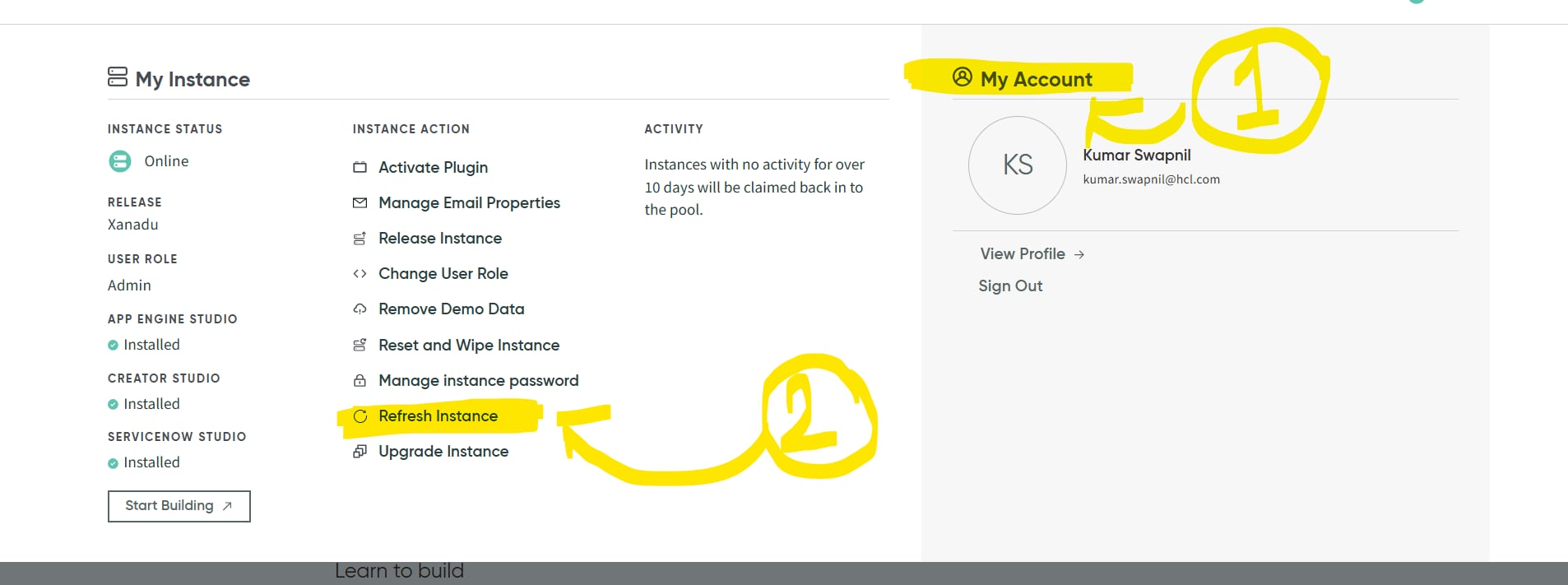
[[ A }} Try to Refresh Instance button in PDI.
1) Click on MY ACCOUNT
2) Find REFRESH INSTANCE button and wait for a minute or two.
>>> if this fixes your issue, then fine else you will have to wait.
Talking from my personal experience of PDI when that goes to a unscheduled maintenance
Waiting won't help as you will never know when maintenence will be over
As @AG - LearnNGrow mentioned, there is no support available for PDI and you're on your own for this issue.
{{ B }} Backup and restore you PDI data using GITHUB
FYI, earlier Backup and restore feature was available for PDI's which is disccontinued since 15 DEC 2022
Link to that Post- https://developer.servicenow.com/blog.do?p=/post/update-to-restore-on-pdis/
However, there is a way to Backup your PDI Data using GITHUB
Please go through this URL for detailed explanation - https://developer.servicenow.com/blog.do?p=/post/backup-your-pdi/
So the choice comes down to the question which is- if your current PDI's configuration is worth this much hassle?
>> If yes then go ahaead and backup PDI. If no then release this instance and get a new instance
Additional TIP - Use XANADU PDI instance, they are more stable as per my observation i might be wrong. But it's worth a try. If you find it to be true after a certain time, please revert back as well.
If my response proves useful, please indicate its helpfulness by selecting " Accept as Solution" and " Helpful." This action benefits both the community and me.
Regards
Kumar Swapnil
Complete Administation of monitoring tools like Zabbix\Solarwinds\DX-UIM & Devops Engineer
LinkedIn: www.linkedin.com/in/kumar-swapnil001
****************************************************************************************************************


- Mark as New
- Bookmark
- Subscribe
- Mute
- Subscribe to RSS Feed
- Permalink
- Report Inappropriate Content
05-14-2025 08:00 AM
Hi @snowlordser
I've been using PDI without any issues since this morning, but I've noticed several posts in the community about PDI being offline. Here are some points to consider:
- There is no support available for PDI.
- If you can wait, let's wait a bit longer.
- You can release this instance and start a new one, but you will lose your previous data. To avoid losing update sets in the future, make sure to take regular backups of your PDI.
There have been 3-4 posts in the community today about PDI failures or unavailability. Based on the responses, you might need to wait 1-2 days and hopefully, the PDI will be back online.
Regards
Dr Atul G. - Learn N Grow Together ServiceNow Techno - Functional Trainer
LinkedIn: https://www.linkedin.com/in/dratulgrover
YouTube: https://www.youtube.com/@LearnNGrowTogetherwithAtulG
******************************************************************************************
- Mark as New
- Bookmark
- Subscribe
- Mute
- Subscribe to RSS Feed
- Permalink
- Report Inappropriate Content
05-14-2025 10:46 AM
Hi @snowlordser ,
Here's what you can Do-
[[ A }} Try to Refresh Instance button in PDI.
1) Click on MY ACCOUNT
2) Find REFRESH INSTANCE button and wait for a minute or two.
>>> if this fixes your issue, then fine else you will have to wait.
Talking from my personal experience of PDI when that goes to a unscheduled maintenance
Waiting won't help as you will never know when maintenence will be over
As @AG - LearnNGrow mentioned, there is no support available for PDI and you're on your own for this issue.
{{ B }} Backup and restore you PDI data using GITHUB
FYI, earlier Backup and restore feature was available for PDI's which is disccontinued since 15 DEC 2022
Link to that Post- https://developer.servicenow.com/blog.do?p=/post/update-to-restore-on-pdis/
However, there is a way to Backup your PDI Data using GITHUB
Please go through this URL for detailed explanation - https://developer.servicenow.com/blog.do?p=/post/backup-your-pdi/
So the choice comes down to the question which is- if your current PDI's configuration is worth this much hassle?
>> If yes then go ahaead and backup PDI. If no then release this instance and get a new instance
Additional TIP - Use XANADU PDI instance, they are more stable as per my observation i might be wrong. But it's worth a try. If you find it to be true after a certain time, please revert back as well.
If my response proves useful, please indicate its helpfulness by selecting " Accept as Solution" and " Helpful." This action benefits both the community and me.
Regards
Kumar Swapnil
Complete Administation of monitoring tools like Zabbix\Solarwinds\DX-UIM & Devops Engineer
LinkedIn: www.linkedin.com/in/kumar-swapnil001
****************************************************************************************************************
- Mark as New
- Bookmark
- Subscribe
- Mute
- Subscribe to RSS Feed
- Permalink
- Report Inappropriate Content
05-14-2025 10:51 AM
Attached image for reference on how to refresh PDI. Please check it
*************************************************************************************************************
If my response proves useful, please indicate its helpfulness by selecting " Accept as Solution" and " Helpful." This action benefits both the community and me.
Regards
Kumar Swapnil
Complete Administation of monitoring tools like Zabbix\Solarwinds\DX-UIM & Devops Engineer
** Aspirant Servicenow Administrator
HCLTech, Noida
LinkedIn: www.linkedin.com/in/kumar-swapnil001
****************************************************************************************************************