- Mark as New
- Bookmark
- Subscribe
- Mute
- Subscribe to RSS Feed
- Permalink
- Report Inappropriate Content
07-02-2019 03:47 PM
We have a custom LDAP transform map. The phone number data pushed in to "Business Phone" field in the sys_user table from source import in the format xxx.xxx.xxxx. What I am trying to do is remove all special characters from source import and transform the data in the format as (xxx) xxx-xxxx.
How do I achieve this with Transform Map script, would it be an onBefore or onComplete or a Table transform script?
Mapping as follows,
Source Field - Target Field
u_telephonenumber (source) - phone(sys_user)
Solved! Go to Solution.
- Labels:
-
Scripting and Coding
- Mark as New
- Bookmark
- Subscribe
- Mute
- Subscribe to RSS Feed
- Permalink
- Report Inappropriate Content
07-12-2019 04:20 PM
Hi Raf,
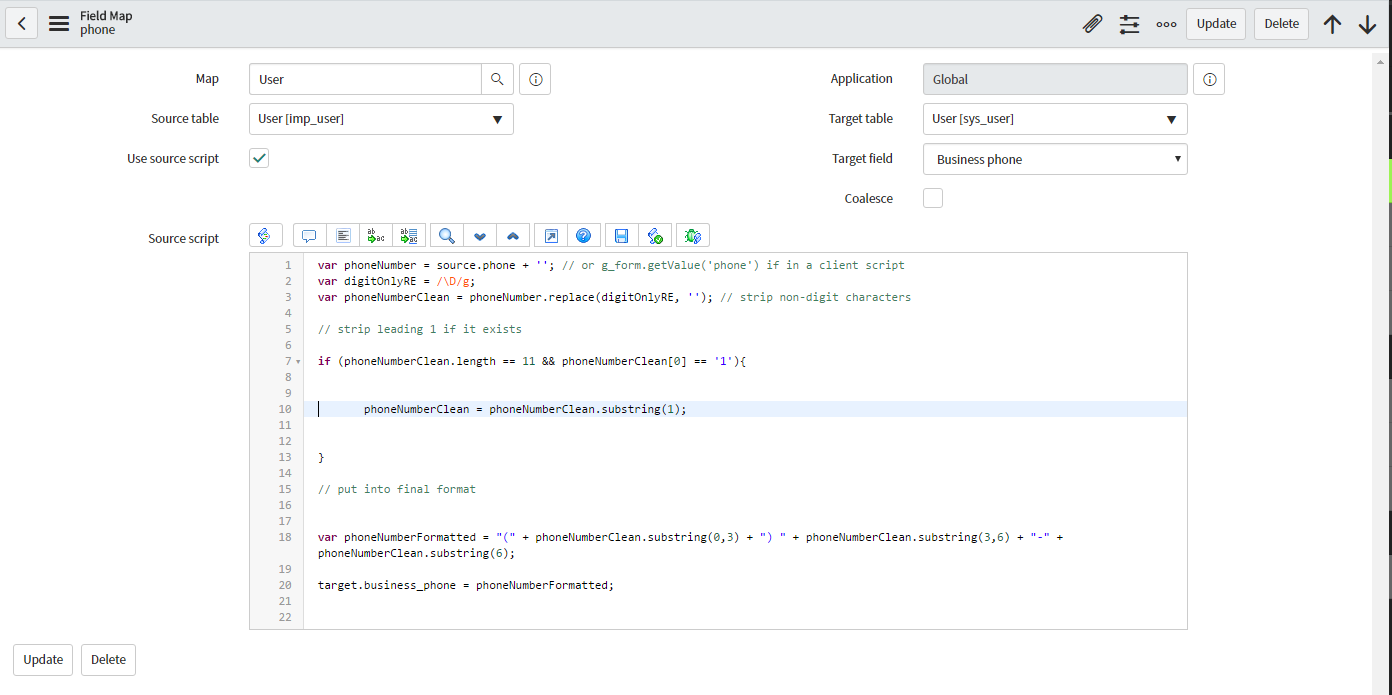
PFB script which worked for me,
answer = (function transformEntry(source) {
var phoneNumber = source.u_business_phone; //source field
var digitOnlyRE = /\D/g;
var phoneNumberClean = phoneNumber.replace(digitOnlyRE, ''); // strip non-digit characters
if (phoneNumberClean.length == 11 && phoneNumberClean[0] == '1'){ // strip leading 1 if it exists
phoneNumberClean = phoneNumberClean.substring(1);
}
var phoneNumberFormatted = "(" + phoneNumberClean.substring(0,3) + ") " +
phoneNumberClean.substring(3,6) + "-" + phoneNumberClean.substring(6);
return phoneNumberFormatted;
}
)(source);

- Mark as New
- Bookmark
- Subscribe
- Mute
- Subscribe to RSS Feed
- Permalink
- Report Inappropriate Content
07-02-2019 03:54 PM
Hi Nitish,
This previous post is a good reference:
- Mark as New
- Bookmark
- Subscribe
- Mute
- Subscribe to RSS Feed
- Permalink
- Report Inappropriate Content
07-02-2019 03:59 PM
Hi Raf, thanks for the response. I went through the same post before, how do I put in a transform script would it be an onBefore or onComplete or sys_transform_map script?
- Mark as New
- Bookmark
- Subscribe
- Mute
- Subscribe to RSS Feed
- Permalink
- Report Inappropriate Content
07-02-2019 04:12 PM

- Mark as New
- Bookmark
- Subscribe
- Mute
- Subscribe to RSS Feed
- Permalink
- Report Inappropriate Content
07-02-2019 04:57 PM
In the source script, we are not supposed to use the target object.