- Mark as New
- Bookmark
- Subscribe
- Mute
- Subscribe to RSS Feed
- Permalink
- Report Inappropriate Content
01-30-2024 01:40 PM
Hello ServiceNow Community,
I hope you're doing well.
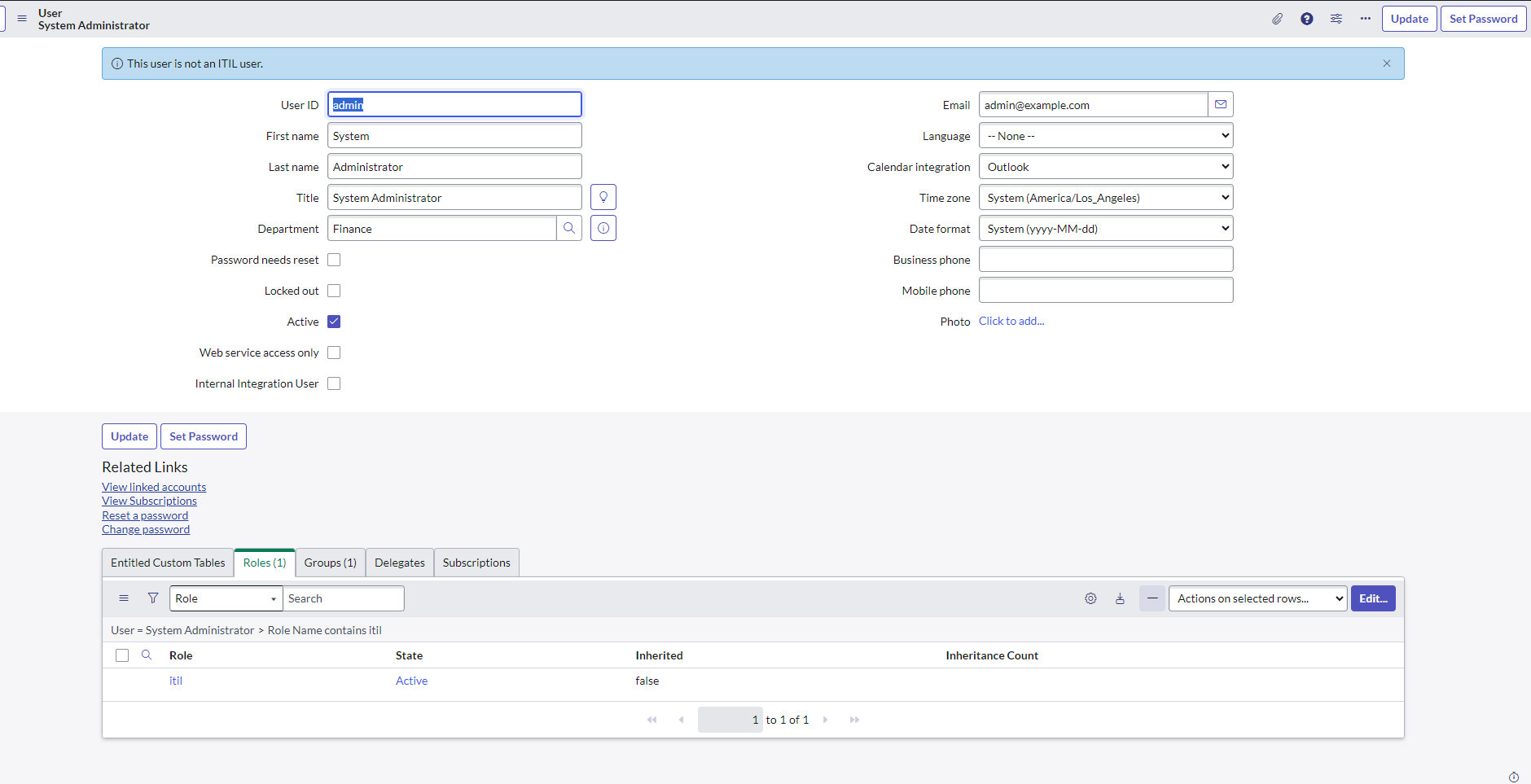
I am working on a feature that displays a specific message at the top of the user record when it is accessed. My goal is to implement this functionality within the sys_user table. When a user record is selected from the list and the user form opens, I want a notification to appear at the top, indicating whether the user has ITIL privileges.
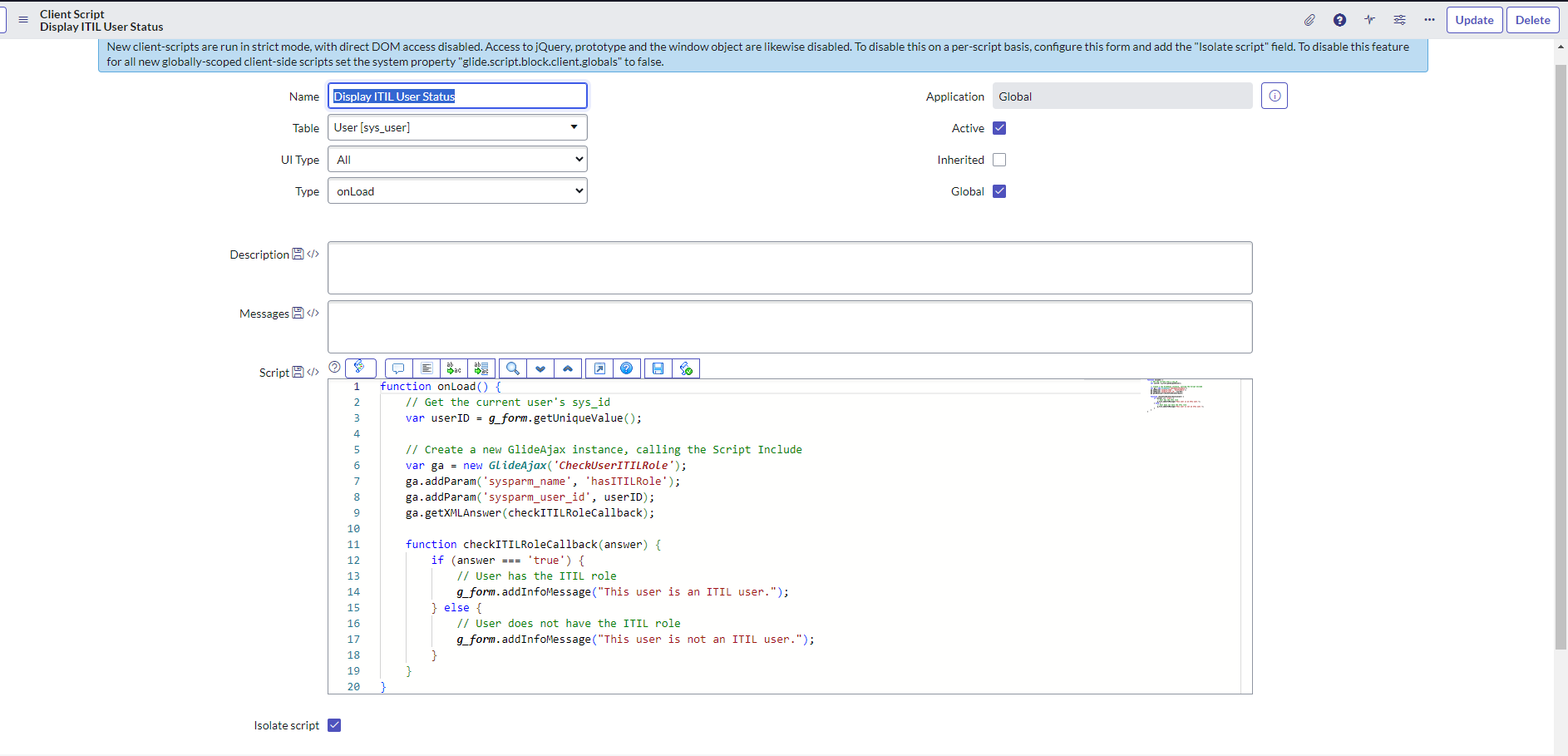
However, I'm encountering a challenge: despite my efforts, I am unable to get the system to show a confirmation message for users who are designated as ITIL users. For better illustration, I will provide screenshots of the issue, along with the code I've been using, attached below.
I used a script include and client script for this.
Your thoughts and feedback would be most appreciated.
Solved! Go to Solution.

- Mark as New
- Bookmark
- Subscribe
- Mute
- Subscribe to RSS Feed
- Permalink
- Report Inappropriate Content
01-30-2024 04:23 PM
Hi Philip
You need that script include to be client callable, and a few little changes to your code to pass through the values. Tick the "client callable" box on your ajax, and try this code instead:
ajax script:
var CheckUserITILRole = Class.create();
CheckUserITILRole.prototype = Object.extendsObject(AbstractAjaxProcessor, {

	hasITILRole:function(){

	var user = this.getParameter('userID'); //pass in user sys_id value from client script

	var userRoleGR = new GlideRecord('sys_user_has_role');
	userRoleGR.addQuery('user',user);
	userRoleGR.addQuery('role','282bf1fac6112285017366cb5f867469') //sys_id of itil role
	userRoleGR.query();

	if (userRoleGR.next()){
		return true;
	}
	}

  //type: 'CheckUserITILRole'

});
client script:
function onLoad() {

//get user sys_id value
 var user_ID = g_form.getUniqueValue();

//time for some AJAX
var ga = new GlideAjax('CheckUserITILRole');
    ga.addParam('sysparm_name', 'hasITILRole'); //ajax function
    ga.addParam('userID',user_ID); //pass sys_id into ajax

	ga.getXML(myCallBack); //process response

function myCallBack(response) {
   //Dig out the 'answer' attribute
	var ajaxcomplete = response.responseXML.documentElement.getAttribute('answer');
	//alert(ajaxcomplete); //alert the result to make sure all is well.

	if (ajaxcomplete == 'true'){
		g_form.addInfoMessage("This user has the ITIL role");
	}

   }

}
if that helps or answers your question, please click the appropriate button 🙂
- Mark as New
- Bookmark
- Subscribe
- Mute
- Subscribe to RSS Feed
- Permalink
- Report Inappropriate Content
01-30-2024 04:23 PM
Hi Philip
You need that script include to be client callable, and a few little changes to your code to pass through the values. Tick the "client callable" box on your ajax, and try this code instead:
ajax script:
var CheckUserITILRole = Class.create();
CheckUserITILRole.prototype = Object.extendsObject(AbstractAjaxProcessor, {

	hasITILRole:function(){

	var user = this.getParameter('userID'); //pass in user sys_id value from client script

	var userRoleGR = new GlideRecord('sys_user_has_role');
	userRoleGR.addQuery('user',user);
	userRoleGR.addQuery('role','282bf1fac6112285017366cb5f867469') //sys_id of itil role
	userRoleGR.query();

	if (userRoleGR.next()){
		return true;
	}
	}

  //type: 'CheckUserITILRole'

});
client script:
function onLoad() {

//get user sys_id value
 var user_ID = g_form.getUniqueValue();

//time for some AJAX
var ga = new GlideAjax('CheckUserITILRole');
    ga.addParam('sysparm_name', 'hasITILRole'); //ajax function
    ga.addParam('userID',user_ID); //pass sys_id into ajax

	ga.getXML(myCallBack); //process response

function myCallBack(response) {
   //Dig out the 'answer' attribute
	var ajaxcomplete = response.responseXML.documentElement.getAttribute('answer');
	//alert(ajaxcomplete); //alert the result to make sure all is well.

	if (ajaxcomplete == 'true'){
		g_form.addInfoMessage("This user has the ITIL role");
	}

   }

}
if that helps or answers your question, please click the appropriate button 🙂
- Mark as New
- Bookmark
- Subscribe
- Mute
- Subscribe to RSS Feed
- Permalink
- Report Inappropriate Content
01-31-2024 06:00 AM
Thanks this works great!