- Mark as New
- Bookmark
- Subscribe
- Mute
- Subscribe to RSS Feed
- Permalink
- Report Inappropriate Content
07-30-2020 08:04 AM
I created a onload catalog client script with the following script(note: not in the widget)
function onLoad() {
  spModal.open({
			title: 'Test.',
			message: "ACknowledge before proceeding",

			size: "md",
			buttons: [
				{label:'I Acknowledge', primary: true},
				//{label:'Cancel', primary: false}
			]
		}).then(function(ans){
			if (ans.label == "I Acknowledge"){
				//alert('party');

			}
		});


}
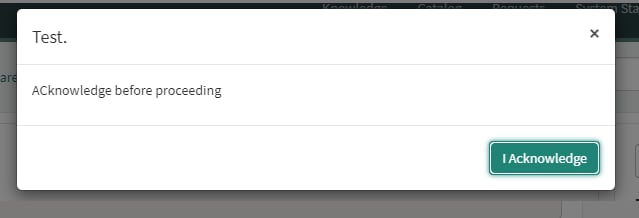
This is how the popup comes up during catalog item form load.

Need to remove close button(x) which is at right corner.
Note: this is not on widget , the script which i wrote is onload catalog client script
Solved! Go to Solution.
- Labels:
-
Scripting and Coding


- Mark as New
- Bookmark
- Subscribe
- Mute
- Subscribe to RSS Feed
- Permalink
- Report Inappropriate Content
07-31-2020 04:20 AM
Hi Prem,
I have written this and works:
function onLoad() {

	spModal.open({
		title: 'Test.',
		message: "Acknowledge before proceeding",
		backdrop: 'static',
		size: "md",
		buttons: [
			{label:'I Acknowledge', primary: true},
		]
	}).then(function(ans){
		if (ans.label == "I Acknowledge"){
			//alert('party');

		}
	});
	var checkExist = setInterval(function() {
		if (top.document.getElementsByClassName('close pull-right')[0]) {
			clearInterval(checkExist);
			var x = top.document.getElementsByClassName('close pull-right')[0];
			x.style.display = "none";
		}
	}, 100); // check every 100ms

}- Mark as New
- Bookmark
- Subscribe
- Mute
- Subscribe to RSS Feed
- Permalink
- Report Inappropriate Content
07-30-2020 11:44 AM
Update the catalog client script

function onLoad() {
    //alert(this.document);
    //alert(document);
    spModal.open({
        title: 'Test.',
        message: "ACknowledge before proceeding",

        size: "md",
        buttons: [{
                label: 'I Acknowledge',
                primary: true
            },
            //{label:'Cancel', primary: false}
        ]
    }).then(function(ans) {
        if (ans.label == "I Acknowledge") {
            //alert('party');

        }
    });

    setTimeout(function() {
        var closeButton = this.document.getElementsByClassName('close pull-right');
        //console.log(closeButton.length);
        for (var i = 0; i < closeButton.length; i++) {

            closeButton[i].style.display = 'none';
        }

    }, 0);

}Vinod Kumar Kachineni
Community Rising Star 2022
- Mark as New
- Bookmark
- Subscribe
- Mute
- Subscribe to RSS Feed
- Permalink
- Report Inappropriate Content
07-31-2020 04:20 AM
Hi Prem,
I have written this and works:
function onLoad() {

	spModal.open({
		title: 'Test.',
		message: "Acknowledge before proceeding",
		backdrop: 'static',
		size: "md",
		buttons: [
			{label:'I Acknowledge', primary: true},
		]
	}).then(function(ans){
		if (ans.label == "I Acknowledge"){
			//alert('party');

		}
	});
	var checkExist = setInterval(function() {
		if (top.document.getElementsByClassName('close pull-right')[0]) {
			clearInterval(checkExist);
			var x = top.document.getElementsByClassName('close pull-right')[0];
			x.style.display = "none";
		}
	}, 100); // check every 100ms

}- Mark as New
- Bookmark
- Subscribe
- Mute
- Subscribe to RSS Feed
- Permalink
- Report Inappropriate Content
07-31-2020 07:52 AM
- Mark as New
- Bookmark
- Subscribe
- Mute
- Subscribe to RSS Feed
- Permalink
- Report Inappropriate Content
08-26-2020 12:12 AM

- Mark as New
- Bookmark
- Subscribe
- Mute
- Subscribe to RSS Feed
- Permalink
- Report Inappropriate Content
04-02-2022 08:52 PM
Use the noDismiss option:
function onLoad() {
  spModal.open({
			title: 'Test.',
			message: "ACknowledge before proceeding",
			noDismiss: true, /* if true, then options.headerStyle will be: display: 'none' */
			size: "md",
			buttons: [
				{label:'I Acknowledge', primary: true}
			]
		}).then(function(ans){
			if (ans.label == "I Acknowledge"){
				//alert('party');

			}
		});
}