- Mark as New
- Bookmark
- Subscribe
- Mute
- Subscribe to RSS Feed
- Permalink
- Report Inappropriate Content
07-20-2017 07:25 PM
I am trying to send out an on-call email notification of our managers. How can I exclude the everything but today's current assign person of a group? My script show's tomorrow date for some reason. I need some guidance.
My desired output:
Manager On-Call Primary John Smith 7/20/2017
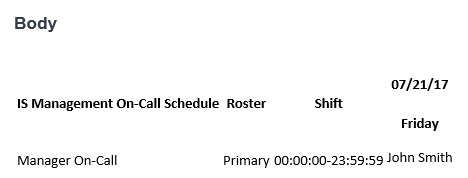
Current Output (looks messy):

My Script:
var emailBody = onCallSchedule();
       template.print(emailBody);

       function onCallSchedule(){
               var groups = [];
               var gr = new GlideRecord('sys_user_group');
               gr.addQuery('JOINsys_user_group.sys_id=cmn_rota.group!active', '=', 'true');
               gr.addOrderBy('name');
               gr.query();
               while (gr.next()) {
                       groups.push(gr.sys_id.toString());
               }

               var fsr = new FormattedScheduleReport();
               fsr.buildSchedule(groups.join(','), gs.today());
               var html = fsr.getReport();
               return html;
       }
Solved! Go to Solution.

- Mark as New
- Bookmark
- Subscribe
- Mute
- Subscribe to RSS Feed
- Permalink
- Report Inappropriate Content
07-26-2017 06:06 PM
Hi Bryant,
The above code is just to tell how can you get the user name alone.
If you want the complete solution please paste the complete code
I think there will be a script include "FormattedScheduleReport()" which you are using to build the HTML. Paste that code also so I can have a look.
Thanks,
Nag.
- Mark as New
- Bookmark
- Subscribe
- Mute
- Subscribe to RSS Feed
- Permalink
- Report Inappropriate Content
07-26-2017 08:45 PM
Sure! I only need the name - here is what I have in the Notification Email Script:
var emailBody = onCallSchedule();
template.print(emailBody);
function onCallSchedule(){
var groups = [];
var gr = new GlideRecord('sys_user_group');
gr.addQuery('JOINsys_user_group.sys_id=cmn_rota.group!active', '=', 'true');
gr.addOrderBy('name');
gr.query();
while (gr.next()) {
groups.push(gr.sys_id.toString());
}
var fsr = new FormattedScheduleReport();
fsr.buildSchedule(groups.join(','), gs.today());
var html = fsr.getReport();
return html;
}
And my output is when in Notifications:

- Mark as New
- Bookmark
- Subscribe
- Mute
- Subscribe to RSS Feed
- Permalink
- Report Inappropriate Content
07-26-2017 09:26 PM
Hi,
See the HTML generating code is from the method. I am sure that will be a script include. search "FormattedScheduleReport" in script include and send the code I can help you.
- var fsr = new FormattedScheduleReport();
- fsr.buildSchedule(groups.join(','), gs.today());
- var html = fsr.getReport();
- Mark as New
- Bookmark
- Subscribe
- Mute
- Subscribe to RSS Feed
- Permalink
- Report Inappropriate Content
07-27-2017 08:41 PM
okay, I was able to create a copy and modify the script includes file. Now I am able to get the results. Thanks!
- Mark as New
- Bookmark
- Subscribe
- Mute
- Subscribe to RSS Feed
- Permalink
- Report Inappropriate Content
08-02-2017 07:45 PM
Happy for you.
Thanks,
Nag.