
- Mark as New
- Bookmark
- Subscribe
- Mute
- Subscribe to RSS Feed
- Permalink
- Report Inappropriate Content
01-30-2024 04:41 AM
Hi Team,
How can I create a pop-up in Email Notification Content, that prompts users to enter a reason for escalating an incident when they click on the 'Click here to escalate' button? Additionally, how do I save the entered input as work notes in the current incident record upon submission?
What are various ways to achieve this functionality?
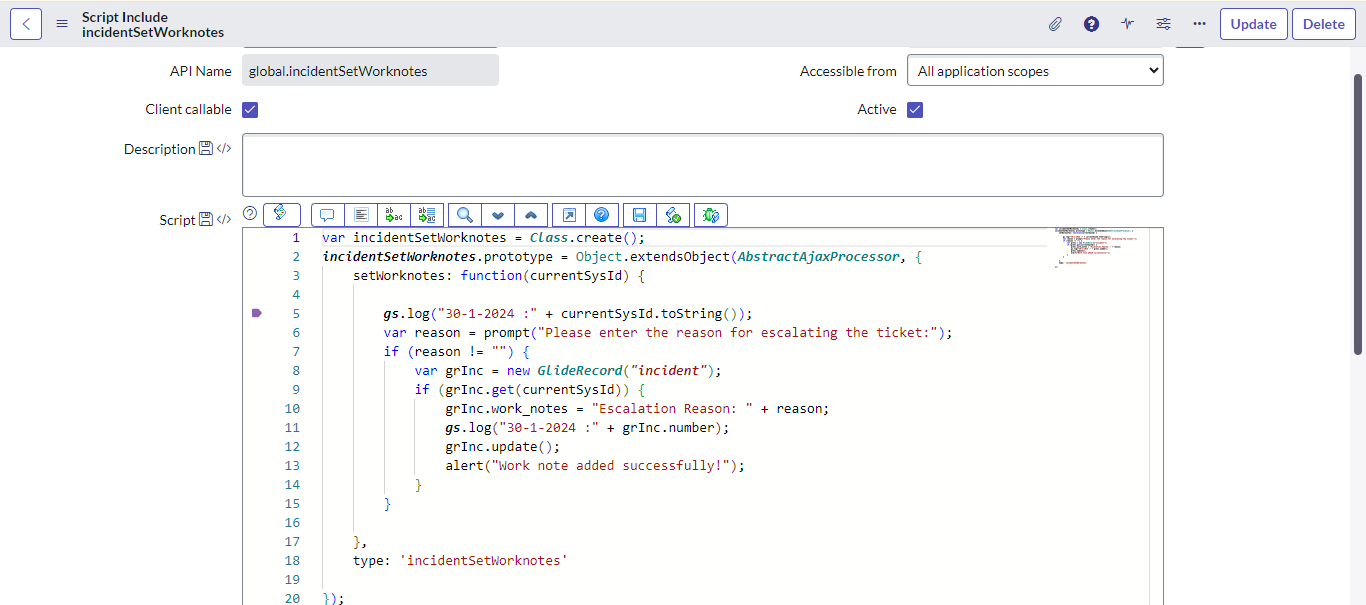
For this scenario, I tried to Create client calleable Script include and call it in Email script.But it doesn't show any error?
Solved! Go to Solution.

- Mark as New
- Bookmark
- Subscribe
- Mute
- Subscribe to RSS Feed
- Permalink
- Report Inappropriate Content
01-30-2024 05:02 AM
the only option is to reply to the email with notes and send the notes to the work notes via inbound action



- Mark as New
- Bookmark
- Subscribe
- Mute
- Subscribe to RSS Feed
- Permalink
- Report Inappropriate Content
01-30-2024 04:50 AM
Hi @Tejasr1
Best way is dont use Popups, on state change to onhold , make onhold reason mandatory and add that in work notes like we have in Incident onhold.
- Mark as New
- Bookmark
- Subscribe
- Mute
- Subscribe to RSS Feed
- Permalink
- Report Inappropriate Content
01-30-2024 04:56 AM
Hi @Dr Atul - LNG ,
Agree with your solution, but I need pop up functionality.
- Mark as New
- Bookmark
- Subscribe
- Mute
- Subscribe to RSS Feed
- Permalink
- Report Inappropriate Content
01-30-2024 05:02 AM
Then you need to bring UI page on UI action and then pass it towork notes.
- Mark as New
- Bookmark
- Subscribe
- Mute
- Subscribe to RSS Feed
- Permalink
- Report Inappropriate Content
01-30-2024 04:56 AM - edited 01-30-2024 04:58 AM
Hi @Tejasr1
The popup wont be possible in Emails as the Email platform like outlook wont support ServiceNow Client scripts. What you can do is call a UI Page having a comment box and add the link of UI Page in the email notification button, the button link would have the sys_id and table name of the record
