Passing variables from Client to Server side in Widget with Augular?

- Mark as New
- Bookmark
- Subscribe
- Mute
- Subscribe to RSS Feed
- Permalink
- Report Inappropriate Content
09-04-2017 09:00 PM
Hi folks,
I am stuck at a widget where a client side script is having difficulty to pass variable to the server, wondering if I could get any advice?
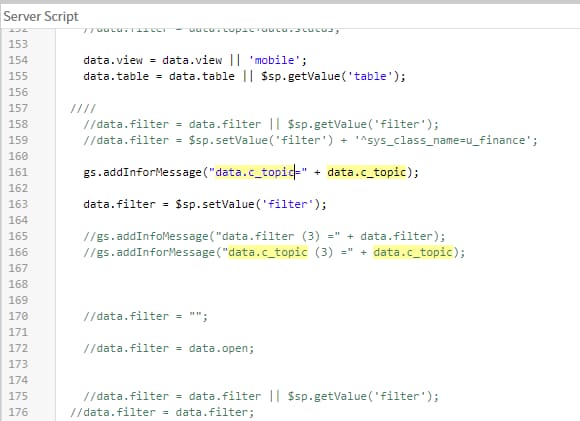
I have a widget "Data table 3" consisting of Server/Client scripts. In the client side, a variable c.data.c_topic need to pass to the server (see the highlighted below)

In the server side, try to display the variable by gs.addInfoMessage

As it can be seen, the data.c_topic shows as undefined.

I may need more details please let me know if so.
Thanks
- Labels:
-
Personal Developer Instance
- Mark as New
- Bookmark
- Subscribe
- Mute
- Subscribe to RSS Feed
- Permalink
- Report Inappropriate Content
09-04-2017 09:12 PM
Hi George,
How are you trying to pass the variable? You would have to use GlideAjax. Checkout the below training material provided by ServiceNow.
Thanks,
Kannan
- Mark as New
- Bookmark
- Subscribe
- Mute
- Subscribe to RSS Feed
- Permalink
- Report Inappropriate Content
09-04-2017 10:47 PM


- Mark as New
- Bookmark
- Subscribe
- Mute
- Subscribe to RSS Feed
- Permalink
- Report Inappropriate Content
09-04-2017 11:13 PM
Hi George,
You can use c.server.update to send the data to server as mentioned below.
function($scope) {
var c = this;
c.data.abc='Any Name';
c.update = function() {
c.server.update().then(function (response) {
c.data = {};
})
}
}
Server side you can use
if(input)
{
gs.log(input.abc);
}
else
{
//Code for intial load
}
Hope this helps.
Regards
Ujjawal
- Mark as New
- Bookmark
- Subscribe
- Mute
- Subscribe to RSS Feed
- Permalink
- Report Inappropriate Content
12-26-2017 12:48 PM
Thank you very much!