"let" keyword causes scheduled job not to run?

- Mark as New
- Bookmark
- Subscribe
- Mute
- Subscribe to RSS Feed
- Permalink
- Report Inappropriate Content
12-14-2025 10:58 AM
Hi all,
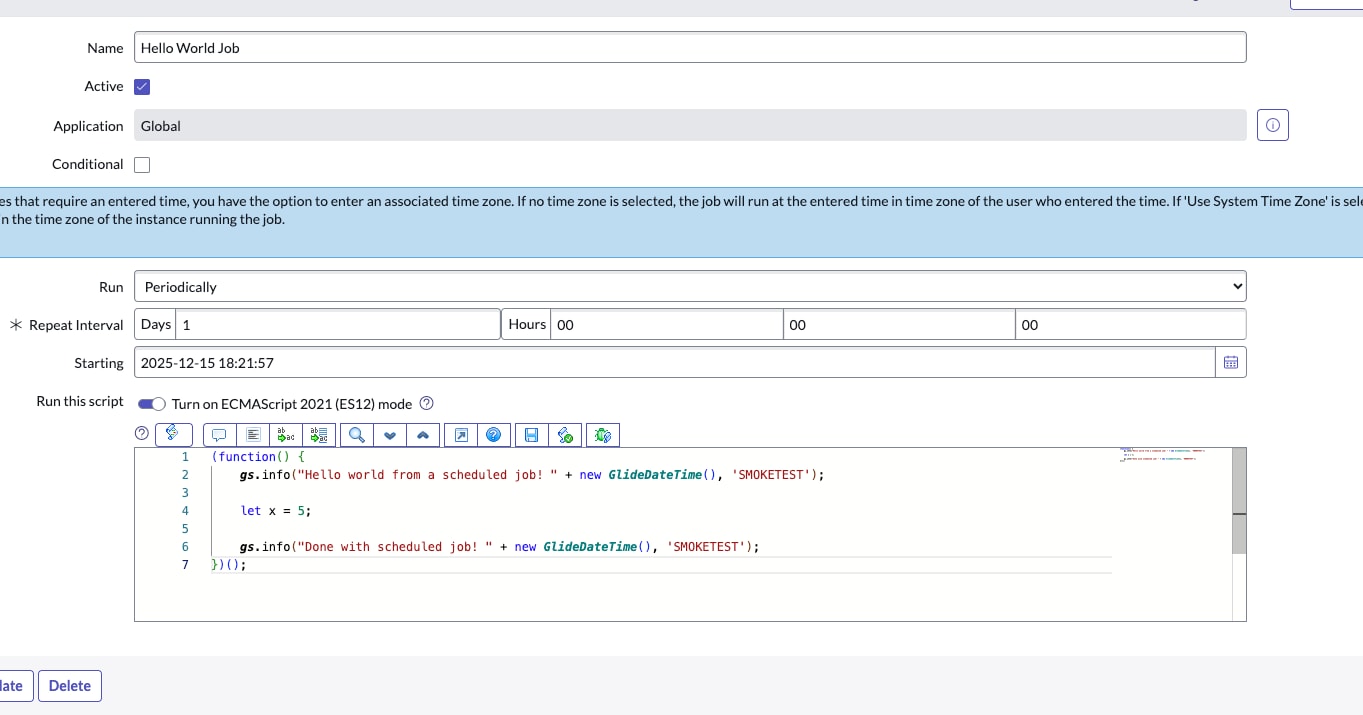
I've come across some unusual behavior on my ServiceNow Certified System Admin dev instance - apparently when I use the JavaScript "let" keyword in a scheduled job script, it causes the script not to execute at all. I haven't checked yet whether this applies to other "modern JavaScript" syntax. In the attached screenshot, you can see the script and my settings - I do have ES12 enabled, and the script is quite simple:
(function() {
	gs.info("Hello world from a scheduled job! " + new GlideDateTime());

	let x = 5;

	gs.info("Done with scheduled job! " + new GlideDateTime());
})();
When I click "execute now" for this, nothing at all is logged out to the System logs. When I comment out the "let" line, both messages are logged. When I change "let" to "var", both messages are logged. Why is this? The "let" keyword has worked for me on all other server-side scripts (i.e. Business Rules)
- Mark as New
- Bookmark
- Subscribe
- Mute
- Subscribe to RSS Feed
- Permalink
- Report Inappropriate Content
12-14-2025 02:35 PM - edited 12-14-2025 02:36 PM
The es12 mode in global is not extremely robust at least when it comes to things that are processed by the scheduler. I've noticed similar behaviour in email scripts as well. Probably best to stick to es5 in server-side scripting if you can't for some reason build in a scoped app.
The error can be found in the node log of the node that processed the sys_trigger for your scheduled script. From my pdi on zurich patch 2:
| 14:23:00.621 | Warning | worker.0 | worker.0 txid=6d85408e8371 ScriptEvaluator *** WARNING *** Javascript compiler exception: let is an ECMAScript 6 feature - not supported (<refname>; line 4) in:
|

- Mark as New
- Bookmark
- Subscribe
- Mute
- Subscribe to RSS Feed
- Permalink
- Report Inappropriate Content
12-15-2025 03:18 AM
Hi @shaunwassel, This happens because Scheduled Jobs running in the Global scope don’t reliably support ES6 features like `let` or `const`, even when ES12 is enabled.
As @l457 mentioned, the safest option here is to stick with `var` to keep scheduled jobs running smoothly.
If my response helped, please mark it as the accepted solution so others can benefit as well.
Muhammad Iftikhar
If my response helped, please mark it as the accepted solution so others can benefit as well.