Restrict Bulk Edit Fields for Agents in Workspace List View

- Mark as New
- Bookmark
- Subscribe
- Mute
- Subscribe to RSS Feed
- Permalink
- Report Inappropriate Content
3 weeks ago
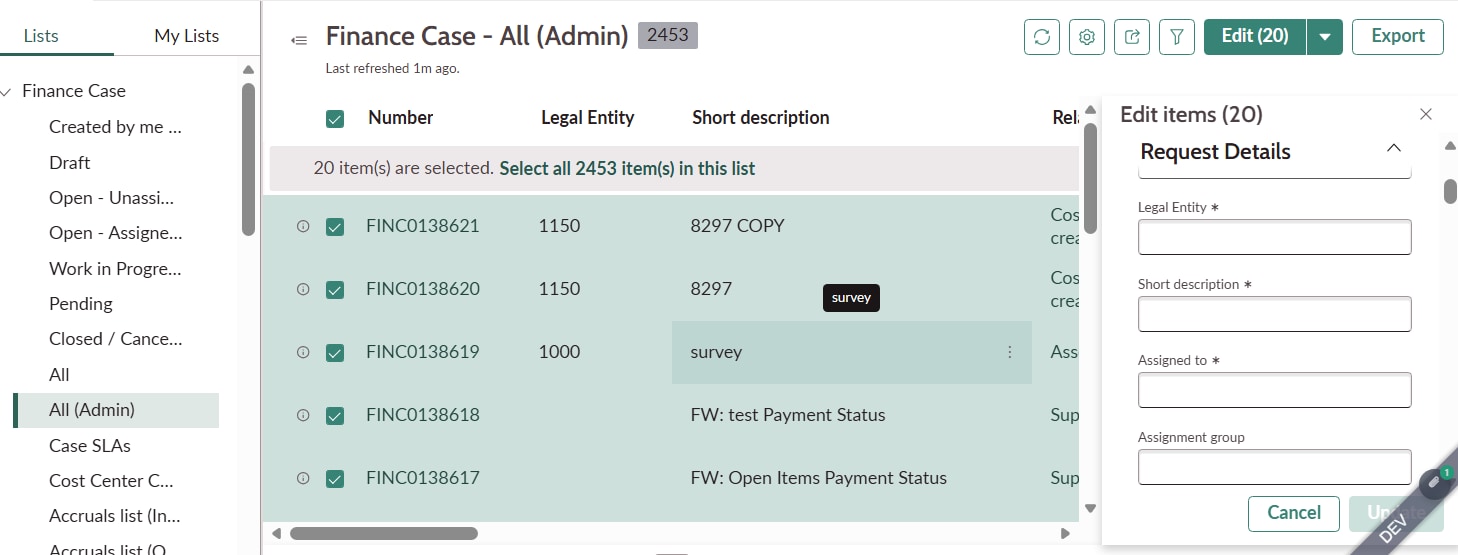
on workspace list view users can select multiple records using the multi-row selector and click the Edit option to perform a bulk update. Currently, the bulk edit dialog displays around 7-8 fields.
- Admins should continue to see and update all available fields in the bulk edit dialog.
- Agents should only be able to edit 3 specific fields during bulk update.
- Agents should still be able to edit the other fields when opening an individual record (record form). The restriction is required only for the bulk edit experience in Workspace.
I have explored UI Actions, Declarative Actions, and list configurations, but I have not found a way to control the fields displayed in the standard Workspace bulk edit dialog based on user roles.
Has anyone implemented a similar requirement? Is there an out-of-the-box way to restrict bulk edit fields by role.
Any suggestions would be appreciated.
- Mark as New
- Bookmark
- Subscribe
- Mute
- Subscribe to RSS Feed
- Permalink
- Report Inappropriate Content
3 weeks ago
Hi @n-ssurabhi,
As far as I know, there is no out-of-the-box setting to control the bulk edit fields by role. The Edit ({{count}}) dialog is a standard list action, and an older community thread found no configuration for its fields either.
Suggested approach (role-based):
- Open the action assignment for Edit ({{count}}) on your list (Declarative Actions > Action Assignments) and limit it to the admin role.
- Create a new declarative action, for example “Bulk update”, and assign it to the agent role.
- Have it open a UI Builder modal with only your 3 fields and update the selected records.
Admins keep the full dialog, and agents get a 3-field version. The record form stays unchanged.
Not role-based: the same thread suggests checking the Default or Workspace form view for the table.
Trimming that view changes the dialog for everyone, and it may also change the record form.
I’d skip field-level write ACLs, because agents still need to edit those fields on the record form.
If this helped to answer your query, please mark it helpful & accept the solution.