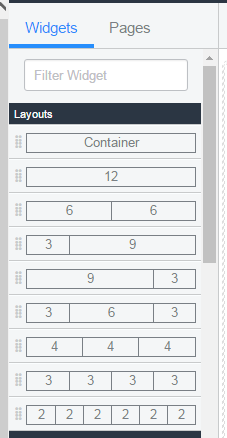
Service Portal - How to create new layout for the container

Options
- Mark as New
- Bookmark
- Subscribe
- Mute
- Subscribe to RSS Feed
- Permalink
- Report Inappropriate Content
02-01-2017 07:28 AM
Hi,
I started using Service Portal recently. I want to create new layout for my page to fit to my requirements.
I would like have new layout with columns: 2 7 3
Can you let me know where and how to change it?
Thanks
Labels:
- Labels:
-
Service Portal Development
2 REPLIES 2
Options
- Mark as New
- Bookmark
- Subscribe
- Mute
- Subscribe to RSS Feed
- Permalink
- Report Inappropriate Content
02-02-2017 04:16 AM


Options
- Mark as New
- Bookmark
- Subscribe
- Mute
- Subscribe to RSS Feed
- Permalink
- Report Inappropriate Content
02-02-2017 09:11 AM
Also whenever a column is selected you can click the [+] button in the top right corner which will than add an additional column to that row.