- Mark as New
- Bookmark
- Subscribe
- Mute
- Subscribe to RSS Feed
- Permalink
- Report Inappropriate Content
06-11-2018 02:08 AM
I have 2 client scrip like below for my register form
//Date of birth check function onSubmit()
function onSubmit() {
	//Type appropriate comment here, and begin script below
	var DoB = new Date(g_form.getValue('date_of_birth'));
	var CurrentDate = new Date();
	if(CurrentDate <= DoB) {
		g_form.addErrorMessage("Re-enter your DoB");
		g_form.clearValue('date_of_birth');
		return false;
	}
}
//Password check
function onSubmit(){

	//Type appropriate comment here, and begin script below
	var regex = /(?=.*[a-z])(?=.*[A-Z])(?=.*\d)(?=.*[@#$%^&+=])/g;
	var test_string = g_form.getValue('password');
	var min_len = 8;
	var valid = regex.test(test_string);
	if(!valid && test_string.length < 8){
		g_form.addErrorMessage("Password must be at least 8 characters long and contain: 1 Uppercase Letter, 1 Lowercase Letter, 1 Number, 1 Special Character.");
		g_form.clearValue('password');
		return false;
	}
	return true;
}
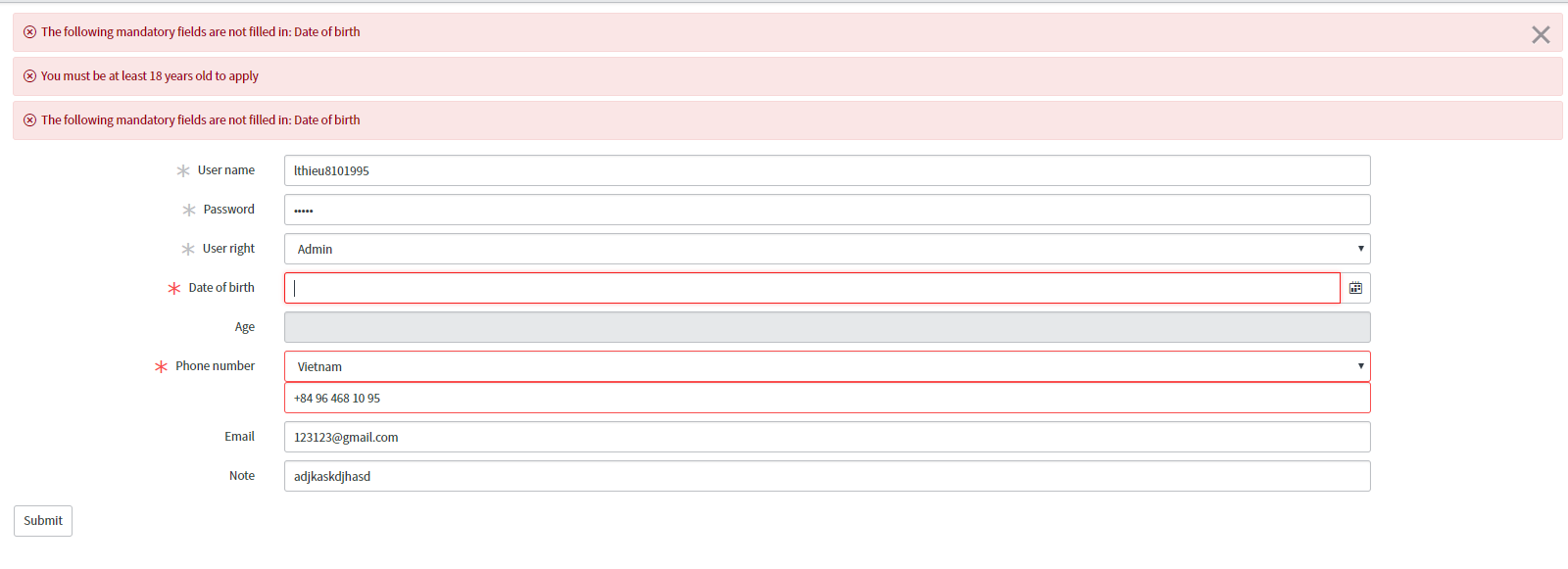
This is my register screen

The 1st error mess doesn't disappear when another one appear. I'm a new guy with servicenow. Can you guys help me ? Thank you
Solved! Go to Solution.

- Mark as New
- Bookmark
- Subscribe
- Mute
- Subscribe to RSS Feed
- Permalink
- Report Inappropriate Content
06-11-2018 02:56 AM
Try the below
function onChange(control, oldValue, newValue, isLoading) {
if (isLoading || newValue == '') {
return;
}
var inputtext = g_form.getValue('password'); //Lets assume the variable name is 'Password
var answer = true;
var param = /^(?=.*[0-9])(?=.*[a-z])(?=.*[A-Z])(?=.*[@#$%^&+=]).{8,15}/;
//The password will take character in between 8-15 and will must consist at least one small character. one capital character, one digit and any special character among @#$%^&+=.
if(!inputtext.match(param))
{
g_form.showFieldMsg('password','Enter valid password','error');
answer= false;
}
else
{
g_form.hideFieldMsg('password');
}
}

Harish
- Mark as New
- Bookmark
- Subscribe
- Mute
- Subscribe to RSS Feed
- Permalink
- Report Inappropriate Content
06-11-2018 02:12 AM
share the code of both client script plz
Harish
- Mark as New
- Bookmark
- Subscribe
- Mute
- Subscribe to RSS Feed
- Permalink
- Report Inappropriate Content
06-11-2018 02:16 AM
i just edited my post like above !
- Mark as New
- Bookmark
- Subscribe
- Mute
- Subscribe to RSS Feed
- Permalink
- Report Inappropriate Content
06-11-2018 02:19 AM
you need to use 2 onChange client scripts. Use the same code and run it onchange for those 2 variables
//Type appropriate comment here, and begin script below
var DoB = new Date(g_form.getValue('date_of_birth'));
var CurrentDate = new Date();
if(CurrentDate <= DoB) {
g_form.addErrorMessage("Re-enter your DoB");
g_form.clearValue('date_of_birth'); r
//return false; //not needed since it will show error message
}
//Type appropriate comment here, and begin script below
var regex = /(?=.*[a-z])(?=.*[A-Z])(?=.*\d)(?=.*[@#$%^&+=])/g;
var test_string = g_form.getValue('password');
var min_len = 8;
var valid = regex.test(test_string);
if(!valid && test_string.length < 8){
g_form.addErrorMessage("Password must be at least 8 characters long and contain: 1 Uppercase Letter, 1 Lowercase Letter, 1 Number, 1 Special Character.");
g_form.clearValue('password');
//return false;
}
//return true;
Harish
- Mark as New
- Bookmark
- Subscribe
- Mute
- Subscribe to RSS Feed
- Permalink
- Report Inappropriate Content
06-11-2018 02:38 AM
Can you help me to check Password check script ! I think it's wrong somewhere