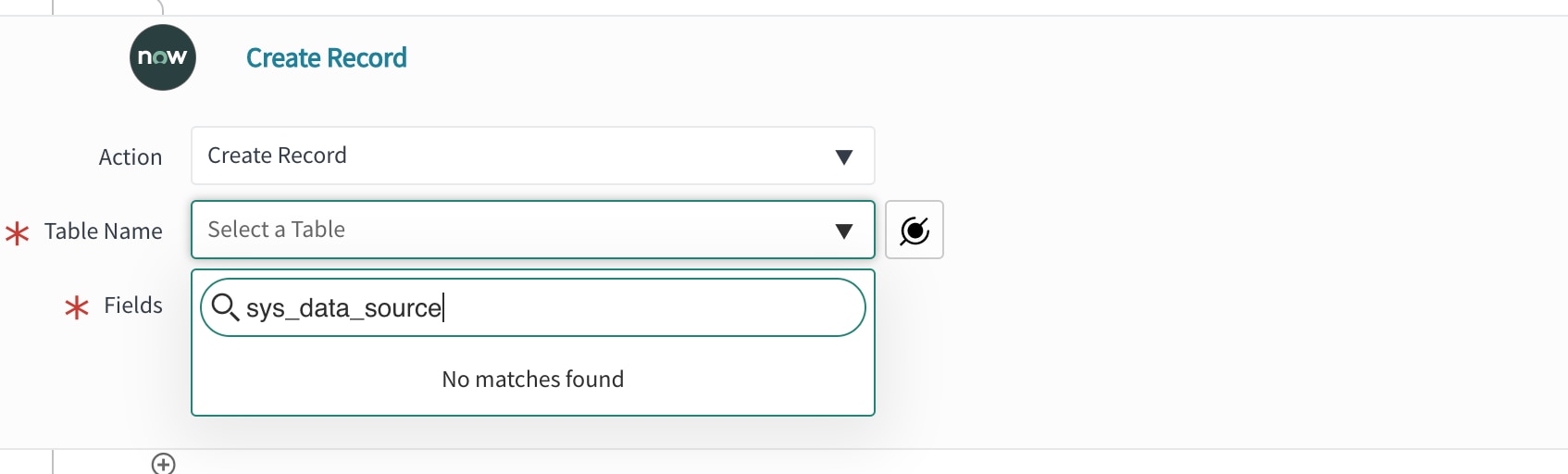
Table not visible/Table not found in create record action in Flow Designer

- Mark as New
- Bookmark
- Subscribe
- Mute
- Subscribe to RSS Feed
- Permalink
- Report Inappropriate Content
12-07-2020 09:36 AM
I want to create a new record in the Data Source (sys_data_source) Table using Flow Designer. But Flow Designer can't seem to find it. I have Admin rights and currently developing in scoped App.
---------

----------

What am I doing wrong?
- Labels:
-
Scoped App Development


- Mark as New
- Bookmark
- Subscribe
- Mute
- Subscribe to RSS Feed
- Permalink
- Report Inappropriate Content
12-07-2020 09:44 AM


- Mark as New
- Bookmark
- Subscribe
- Mute
- Subscribe to RSS Feed
- Permalink
- Report Inappropriate Content
12-07-2020 09:44 AM
Can you please check the properties "sn_flow_designer.allowed_system_tables" and see if you have mentioned sys_data_source table or not.
- Mark as New
- Bookmark
- Subscribe
- Mute
- Subscribe to RSS Feed
- Permalink
- Report Inappropriate Content
12-07-2020 10:02 AM

- Mark as New
- Bookmark
- Subscribe
- Mute
- Subscribe to RSS Feed
- Permalink
- Report Inappropriate Content
12-07-2020 10:49 AM
I have validated in scoped app as well, I can see it.
In global scope can you see that table?