Test Community Case – Email Tab & Reply Validation

- Mark as New
- Bookmark
- Subscribe
- Mute
- Subscribe to RSS Feed
- Permalink
- Report Inappropriate Content
07-30-2026 09:01 AM
- Mark as New
- Bookmark
- Subscribe
- Mute
- Subscribe to RSS Feed
- Permalink
- Report Inappropriate Content
07-31-2026 10:47 AM
Hi @Kajal Rai ,
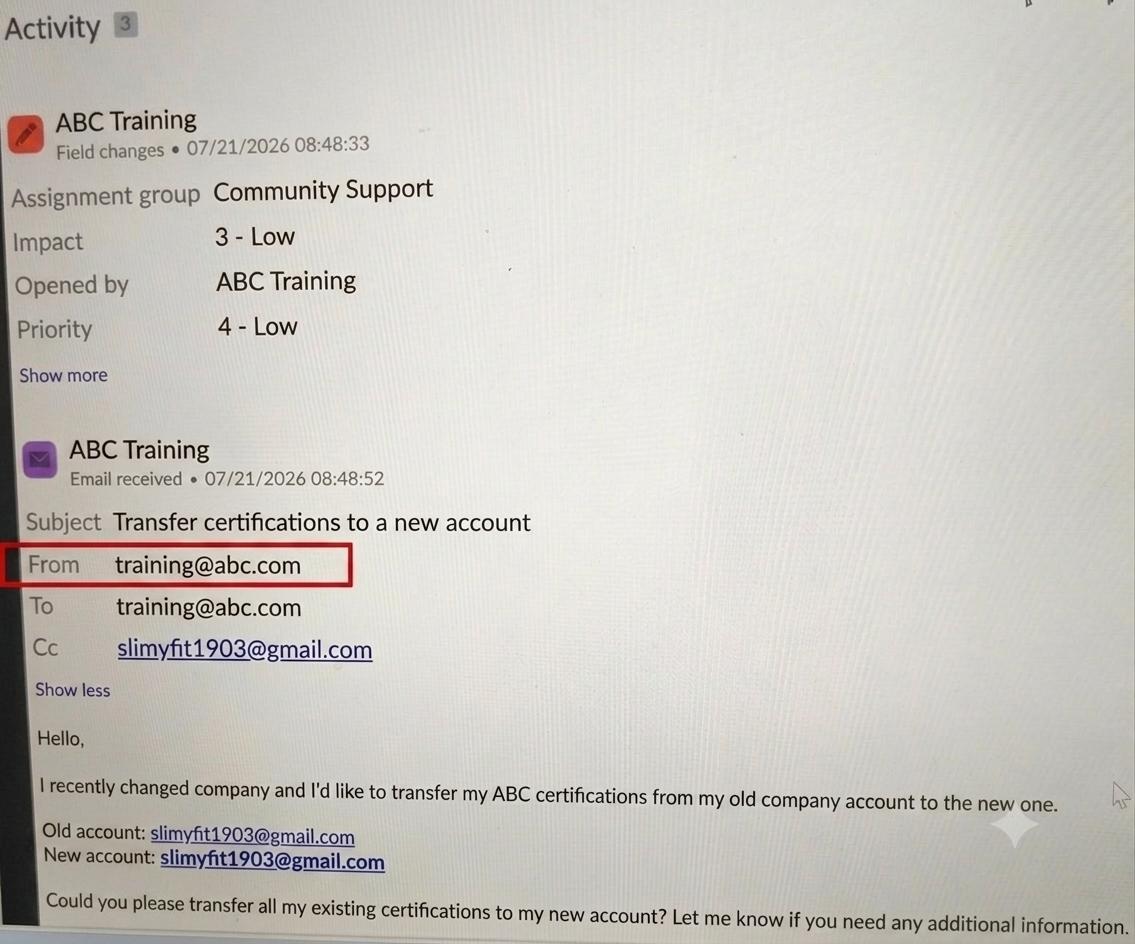
Based on the screenshots, I would validate this in two separate areas: Email availability and inbound email recipient handling.
1. Enable the Email tab on the Community Case
First confirm that the Community Case table has the Email Client enabled.
The table collection dictionary entry should contain:
email_client=true
Also verify that the agents have the email_composer role.
If Support Cases already show the Email tab, compare the Community Case table/configuration with the Support Case table before customizing the workspace.
2. Fix the incorrect From address
In your example, the received email activity shows:
From: training@abc.com
but the actual customer address should be:
slimyfit1903@gmail.com
Before changing the reply configuration, open the corresponding received Email [sys_email] record and check:
From
Recipients
CC
Headers
Target
If sys_email.from already contains training@abc.com, then the problem is occurring before the Workspace email client.
This commonly happens when the shared mailbox or forwarding configuration changes the original sender.
The correct architecture is to preserve the original sender when the message is delivered to ServiceNow.
Do not hard-code or derive the sender from the email body unless there is no other option.
3. Reply behavior
For an inbound email, use the OOB Reply / Reply All functionality from the Activity Stream.
Reply should populate the original sender.
Reply All should include the original sender and the other recipients from the inbound email.
So if Reply is showing training@abc.com, verify the original sys_email record first. The Workspace can only use the sender information available on that email record.
4. CC preservation
If the original inbound email contains CC recipients, use Reply All rather than custom scripting to rebuild the recipients.
Only consider an Email Client Configuration or template script if the OOB recipient data is correct in sys_email but is not being populated in the composer.
Recommended troubleshooting order:
Inbound mailbox
-> Received sys_email record
-> From / Recipients / CC / Headers
-> Case creation logic
-> Email Client Configuration
-> Workspace Email composer
From the screenshots, I would investigate the inbound/shared mailbox processing first because training@abc.com is already being recorded as the sender in the received email activity.
Once sys_email.from contains the real customer email, the OOB Reply functionality should use that sender correctly.
Hope this helps!
If this response helped, please mark it as Helpful.
If it resolves your issue, please Accept it as Solution.
Kind Regards,
Abhishek Pal
- Mark as New
- Bookmark
- Subscribe
- Mute
- Subscribe to RSS Feed
- Permalink
- Report Inappropriate Content
08-03-2026 12:49 PM