- Mark as New
- Bookmark
- Subscribe
- Mute
- Subscribe to RSS Feed
- Permalink
- Report Inappropriate Content
10-21-2022 01:26 AM
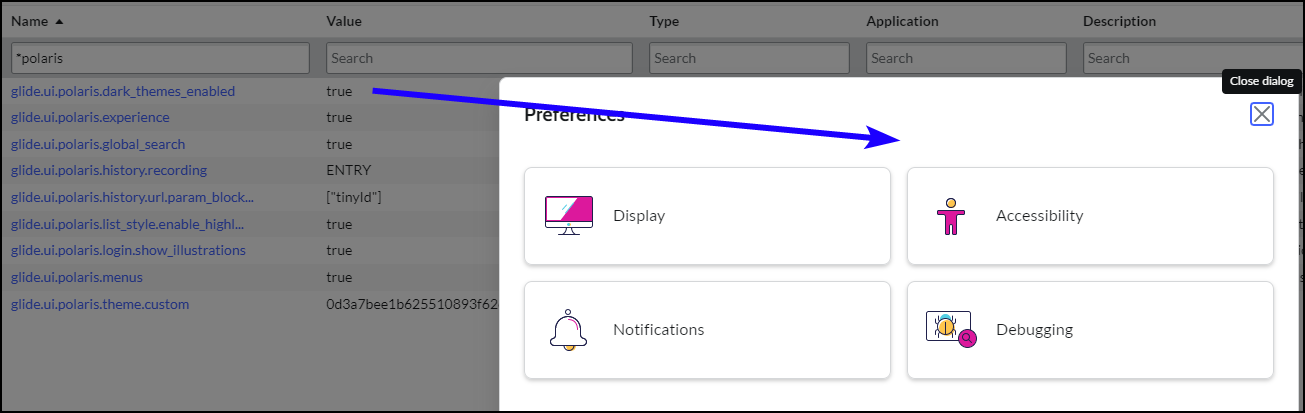
I have enable the Polaris dark theme as suggested but still don't have the Theme option available under Preferences.
Any idea as to what would cause it not to display?
Solved! Go to Solution.


- Mark as New
- Bookmark
- Subscribe
- Mute
- Subscribe to RSS Feed
- Permalink
- Report Inappropriate Content
10-21-2022 06:26 AM
Hello,
Yes seems to be a instance issue I am also in the same patch as you but the issues does not occur for me it would be better to raise a HI ticket with ServiceNow.
Please mark my answer as correct based on Impact.
- Mark as New
- Bookmark
- Subscribe
- Mute
- Subscribe to RSS Feed
- Permalink
- Report Inappropriate Content
10-25-2022 12:18 AM
Creating a new theme and setting it as the default is the cause, that is if it does not include a Dark variant. Once I've added the variant and refreshed my browser the Theme option showed up.
- Mark as New
- Bookmark
- Subscribe
- Mute
- Subscribe to RSS Feed
- Permalink
- Report Inappropriate Content
10-21-2022 06:26 AM
Hello,
Yes seems to be a instance issue I am also in the same patch as you but the issues does not occur for me it would be better to raise a HI ticket with ServiceNow.
Please mark my answer as correct based on Impact.
- Mark as New
- Bookmark
- Subscribe
- Mute
- Subscribe to RSS Feed
- Permalink
- Report Inappropriate Content
10-25-2022 12:18 AM
Creating a new theme and setting it as the default is the cause, that is if it does not include a Dark variant. Once I've added the variant and refreshed my browser the Theme option showed up.

- Mark as New
- Bookmark
- Subscribe
- Mute
- Subscribe to RSS Feed
- Permalink
- Report Inappropriate Content
06-06-2024 09:42 AM
I just ran into this recently as well, do you mean creating a new theme record in the sys_ui_theme table and setting that as a default? I do see all the expected themes there, I just can't for the life of me get the theme option to appear under preferences.
- Mark as New
- Bookmark
- Subscribe
- Mute
- Subscribe to RSS Feed
- Permalink
- Report Inappropriate Content
06-23-2025 07:18 AM
did you ever get this corrected?