- Mark as New
- Bookmark
- Subscribe
- Mute
- Subscribe to RSS Feed
- Permalink
- Report Inappropriate Content
06-13-2018 06:33 AM


I'm looking at an RITM.
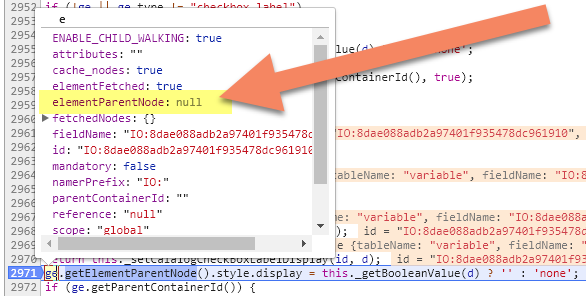
On this RITM, I have a Macro variable (pointing to a SP Widget) that seems to be causing this issue. If I make this macro variable active = false, this RITM loads fine.
Since the error is on ServiceNow's code side, I suppose there's no fix for this... however, it leaves one to beg the question, why do the individuals that code ServiceNow itself never do any try/catch or "if element exists" code???
Bad coding practice (ServiceNow default):
ge.getElementParentNode().style.display = "none"Good coding practice:
if (ge.getElementParentNode())
     ge.getElementParentNode().style.display = "none"
The problem is, because of this error, the entire page breaks and any UI Policy, Client Script, ... anything that uses JavaScript fails.
Solved! Go to Solution.

- Mark as New
- Bookmark
- Subscribe
- Mute
- Subscribe to RSS Feed
- Permalink
- Report Inappropriate Content
07-23-2018 08:58 AM
Found the same issue with Kingston and was given this workaround and it worked for us
The workaround can also be found using the following URL:
KB0691852 - Request Item and Service catalog task forms are broken after upgrading Kingston Patch 6
regards
- Mark as New
- Bookmark
- Subscribe
- Mute
- Subscribe to RSS Feed
- Permalink
- Report Inappropriate Content
08-07-2018 06:35 AM
Yep, same here. Thanks!
- Mark as New
- Bookmark
- Subscribe
- Mute
- Subscribe to RSS Feed
- Permalink
- Report Inappropriate Content
08-28-2024 02:32 AM
Hi @xiaix ,
Do you know the workaround for this,
i am unable to view the article .
please help me on this.
thanks in advance,