Variable length arrays in Flow Designer Outputs

- Mark as New
- Bookmark
- Subscribe
- Mute
- Subscribe to RSS Feed
- Permalink
- Report Inappropriate Content
07-15-2020 01:19 PM
I have a script that generates an array of requests. Each time the script runs, there may be a different number of requests (meaning the length of the array varies).
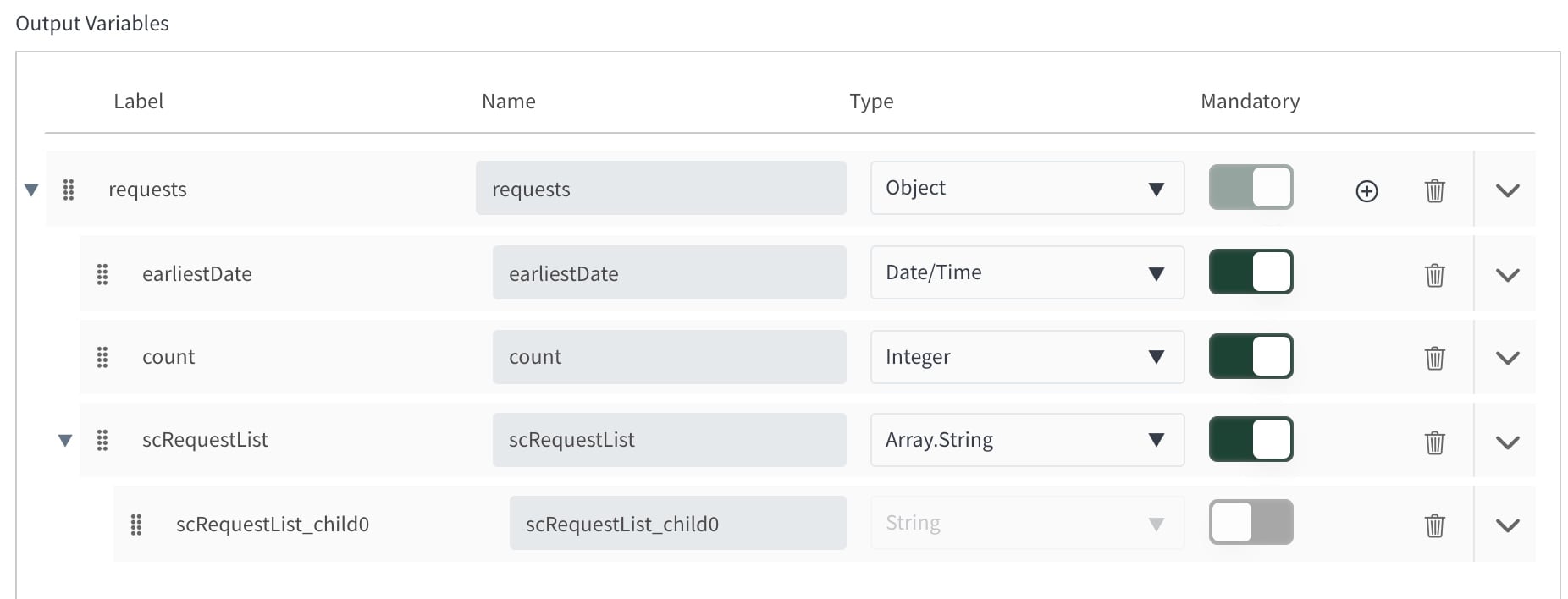
In Flow Designer, I cannot figure out how to account for variable length arrays since defining an output as Array:String asks for child elements.
My output object from the script is as follows,
output = {
count: <int>,
earliestDate: <date>,
scRequestList: [<array of strings>]
In Flow Designer, how do I define the output string array if the length of the array can vary? I've attached a JPEG of the current state of my script's output variables setup.
And here if you don't want to open attachment.

- Labels:
-
Scripting and Coding

- Mark as New
- Bookmark
- Subscribe
- Mute
- Subscribe to RSS Feed
- Permalink
- Report Inappropriate Content
07-22-2020 04:09 PM
Hey Bob,
What you have set up there looks right. When you define an "Array.<something>" as a variable in Flow Designer it should account for any number of strings, passed in as an array. I have used this myself as an input to an action and it's worked well.
Without actually seeing your code, I feel you may have a syntax issue. When you set up Output Variables in a Script Step, you need to pass them out as "outputs.variableName" which in your case, is "outputs.request".
Here's an example:
var reqOut = {};
reqOut.earliestDate = new GlideDateTime();
reqOut.count = 3;
reqOut.scRequestList = [];
reqOut.scRequestList.push("Hello 1");
reqOut.scRequestList.push("Hello 2");
reqOut.scRequestList.push("Hello 3");

outputs.request = reqOut;
Then, once you have that data-dot in your flow, you can drop it into a "For Each" flow logic step, and access each string in the array.
I hope this helps,
Andrew