DPR Workspace – Custom Field Not Displaying in Release Templates

- Mark as New
- Bookmark
- Subscribe
- Mute
- Subscribe to RSS Feed
- Permalink
- Report Inappropriate Content
08-07-2025 11:27 AM
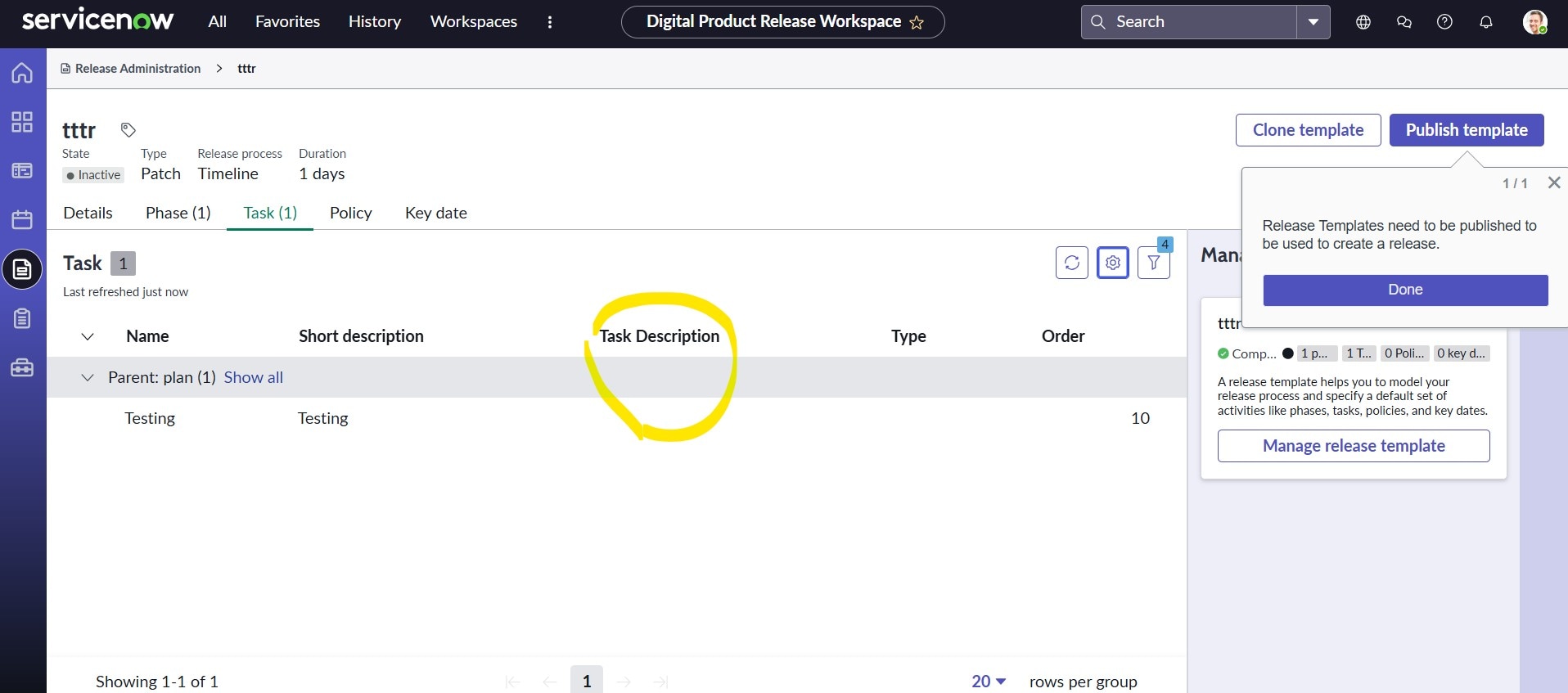
In the DPR workspace, under Release Administration>Add Phases>Add Task>KeyDates>policies. Here, under Add Task we have 'Task_name' field and is currently mapped to the short_description field via the client script include 'ReleaseTaskTemplateUtil'
- As we do not have Description field as part of OOB in release template form, our requirement is to add a new field called 'task description' next to 'task_name' which I have completed by customising DPR Tasks Playbook. But the inputs to this field is not showing in List view or in backend form (here too I have created same field in release template form as we do not have description field as part of OOB), I have updated the client script include to add this new field too but still seeing blanks in List view. Do we need to update anywhere else or how can we fix it.
- Additionally, for some release templates, the required fields are not being enforced or shown as expected when we edit playbook.
- Mark as New
- Bookmark
- Subscribe
- Mute
- Subscribe to RSS Feed
- Permalink
- Report Inappropriate Content
11-08-2025 12:43 PM
Hi @Bhanu29
Yes for your inputs, as you mentioned I have customized ReleaseTemplate and created new component in ui builder and linked them. Thanks
Also, another query is we have migrate our data from old release table to new dpr release table with required field mapping but in workspace when we open a release record -> Release Execution page is taking time to load and sometimes its not loading at all, do you have any idea about it we have raise a case as well.
Thanks
sowndharya