Designing a Future-Proof Multi-Location Working Custom Calendar Framework in ServiceNow

- Mark as New
- Bookmark
- Subscribe
- Mute
- Subscribe to RSS Feed
- Permalink
- Report Inappropriate Content
02-14-2026 09:14 AM
ServiceNow provides schedules and holiday configuration out-of-the-box.
However, in large enterprise environments with:
Multiple operational locations
Dynamic weekend rules
Seasonal demand changes
Location-specific holidays
SLA-critical workflows
OOTB schedules alone can become difficult to scale and govern.
To address this, I designed and implemented a custom, data-driven working calendar framework consisting of two widgets and a centralized server-side logic layer.
Why This Was Created
This solution was built for scenarios where:
Weekends may become working days during peak demand
Low-demand periods may introduce additional off days
Different locations follow different public holidays
Emergency closures override normal schedules
SLA calculations must remain deterministic
Admins require non-technical override capability
Long-term calendar stability (10–25 years) is required
Instead of calculating working days dynamically at runtime, this design converts calendar logic into structured, governed business data.
High-Level Architecture
The implementation consists of:
Calendar Data Layer (Server)
Calendar Service Layer (Script Include)
Scheduled Year Generation Job
New Location Auto-Generation Logic
Calendar Viewer Widget (Read-Only)
Holiday Editor Widget (Admin Override)
Data Layer Design (Conceptual)
The core idea:
One record per Date per Location
Each day for each location is explicitly stored with a day type:
Working
Weekend
Holiday
This removes ambiguity and eliminates runtime calendar guessing.
A 25-year window was pre-generated to ensure long-term SLA determinism.
Leap Year & Date Handling (Technical Approach)
Leap year is calculated using the standard rule:
Divisible by 4
Not divisible by 100 unless divisible by 400
This ensures correct February handling (29 days when applicable).
Day-of-week is calculated using platform date APIs, and weekend classification is derived from day-of-week mapping.
During generation:
Each month calculates number of days
Leap year condition adjusts February
Day-of-week is computed
Weekend rule applied
Public holiday patterns copied
Final day-type stored
All date logic is resolved during generation — not during SLA execution.
Scheduled Job (Year Roll-Forward Mechanism)
A scheduled job runs annually.
Its purpose:
Detect last generated year
Create calendar entries for the next year
Copy recurring public holidays
Apply weekend logic
Maintain rolling 25-year future window
This ensures no manual maintenance is required at year-end.
New Location Handling
When a new location is added:
The system detects the insertion
It generates full calendar data for that location
It aligns with existing future year window
It copies global holiday templates where applicable
This makes the system scalable as the organization grows.
Central Calendar Service Layer
A centralized server-side logic layer acts as the single source of truth.
Consumers such as:
SLAs
Flows
Business Rules
Client validation
Reports
Do not calculate dates manually.
They call a single method conceptually like:
“Is this date working for this location?”
The service:
Checks for admin override
Falls back to stored day type
Returns deterministic result
This avoids duplicated logic across the platform.
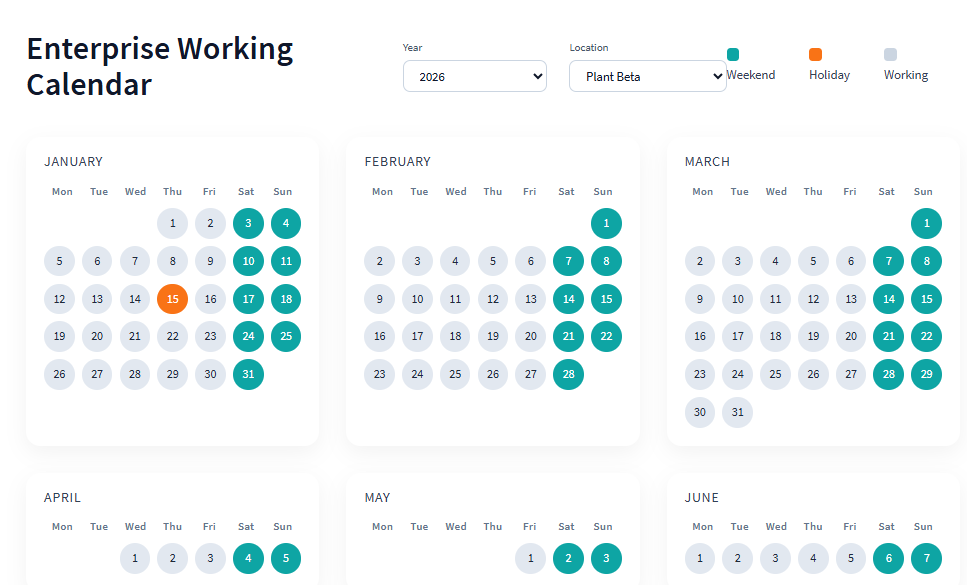
Widget 1: Calendar Viewer (Read-Only)
Purpose
Visualize full year
Select location
Select year
Show day legends (Working / Weekend / Holiday)
Client-Side Responsibilities
Render months in grid
Display day headers (Mon–Sun)
Apply styling based on day-type
Handle year/location dropdown change
Request new data from server
Server-Side Responsibilities
Fetch calendar data for selected year and location
Return structured month/week/day format
Include day-type and holiday metadata
Use Cases
Business users checking operational calendar
SLA planning validation
Operations planning
Reporting alignment
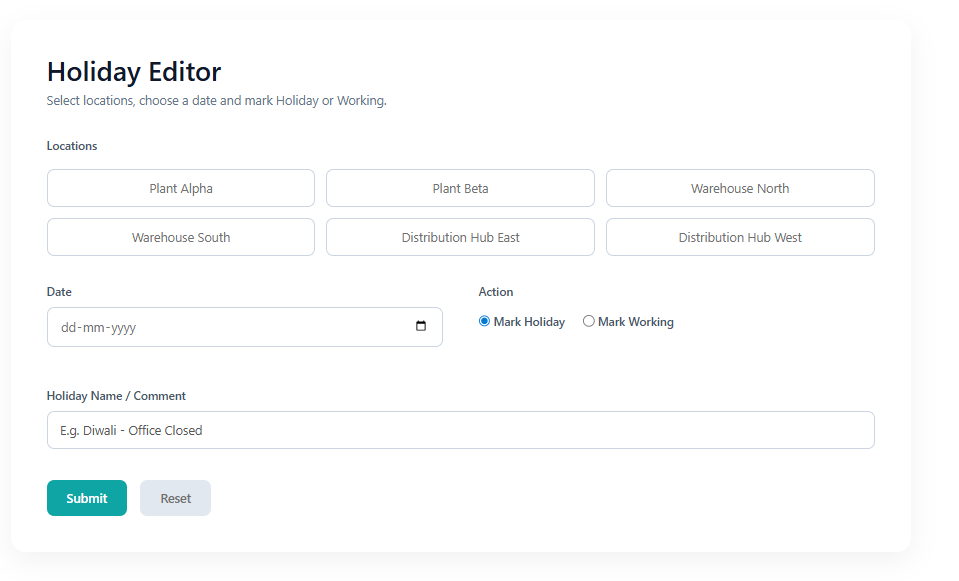
Widget 2: Holiday Editor (Admin Override)
Purpose
Allow authorized admins to:
Select one or more locations
Select a date
Mark as Holiday or Working
Add optional reason/comment
Client-Side Responsibilities
Multi-location selection
Date input handling
Action selection (Holiday/Working)
Submit override request
UI feedback
Server-Side Responsibilities
Validate inputs
Create or update calendar record
Ensure override precedence
Maintain auditability
Why Separate Widget?
Separation of concerns:
Viewer = Read-only business interface
Editor = Controlled administrative override layer
This improves governance and security.
Complete Logical Flow Diagram
Below is the full logical flow of the system:
┌────────────────────────┐
│ Scheduled Job (Yearly) │
└────────────┬───────────┘
│
▼
┌─────────────────────────────┐
│ Generate Next Year Calendar │
└────────────┬────────────────┘
│
▼
┌─────────────────────────────┐
│ Calendar Data (Date+Location) │
└────────────┬────────────────┘
│
┌────────────────────┼────────────────────┐
▼ ▼ ▼
Viewer Widget Holiday Editor SLA / FlowClient UI) (Admin UI) SLA / Flow
(Consumers)
│ │ │
▼ ▼ ▼
Server Fetch Override Update Calendar Service
│ │ │
└──────────────► Central Calendar Service ◄─────────────┘
Why Not Only OOTB Schedules?
OOTB schedules are configuration-driven.
This solution is:
Data-driven
Location-aware
Override-controlled
SLA-deterministic
Future-proof
Admin-friendly
Auditable
OOTB does not provide:
A per-date-per-location data model
A visual full-year calendar widget
Rolling multi-year auto-generation
Built-in multi-location override governance
Performance Considerations
Composite indexing on date + location
Bulk year generation
Avoid runtime date math during SLA execution
Precompute day-types
Minimize GlideRecord calls inside SLAs
This significantly improves SLA evaluation performance at scale.
Where This Architecture Is Most Useful
Industries where operations are dynamic:
Manufacturing (peak production cycles)
Banking (quarter-end demand)
Healthcare (emergency scheduling)
Logistics (seasonal shipping spikes)
Retail (festival and holiday peaks)
In these industries:
Working days are business-dependent — not calendar-fixed.
Key Design Principles Followed
Separation of concerns (UI vs Service layer)
Deterministic SLA behavior
Precomputation over runtime calculation
Governance and auditability
Scalability for long-term enterprise growth
Admin empowerment without code changes
Conclusion
This framework transforms calendar management from simple configuration into a structured, scalable architectural component.
Instead of asking:
“Is today working?”
The system knows — because it has already defined it for every location, for the next 25 years.