Options
- Mark as New
- Bookmark
- Subscribe
- Mute
- Subscribe to RSS Feed
- Permalink
- Report Inappropriate Content
04-25-2019 02:13 AM
Hi Gregory,
You can get this working by making the below modifications to the widget:
in the html of the cloned version of the KB Article Page:
  <!--add the below html line-->
   <div class="pull-right">
     <button ng-click = "showFunct()">Show All</button>
     <button ng-click = "hideFunct()">Hide All</button>
   </div>
    <!--ends here-->
    <div ng-show="showFlag" >
    <div ng-if="!data.direct" class="kb_article" ng-bind-html="::data.text" style="overflow-x:auto;"></div>
    </div>
then in client controller, add the below two functions and the variable showFalg initialised as true when the page loads:
	$scope.showFlag = true;
	$scope.showFunct = function(){
		$scope.showFlag = true;
	};
	$scope.hideFunct = function(){
		$scope.showFlag = false;
	};
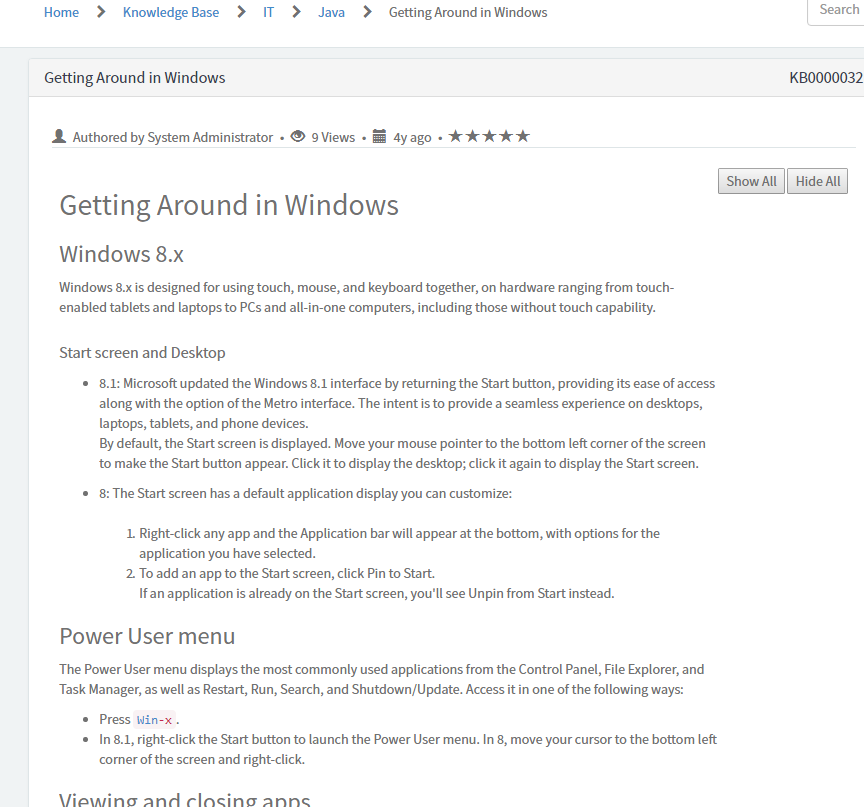
you will end up getting something something similar to this:

If you are confused about where to make changes in the html, then just replace the entire html with the below line:
<div ng-if="data.isvalid" class="panel panel-{{options.color}} b">
<div class="panel-heading">
<h2 class="panel-title h4">
<span class="pull-left">{{::data.short_description}}</span>
<span class="pull-right">{{::data.number}}</span>
</h2>
</div>
<div class="panel-body m-b-lg wrapper-lg">
<div class="row m-b-lg b-b">
<span class="author pad-right" ng-if="data.author">
<glyph sn-char="user" class="pad-right" />
${Authored by {{::data.author}}}
</span>
<span ng-if="data.sys_view_count == 1" class="views pad-right">
<span class="pad-right">•</span> <glyph sn-char="eye-open" class="pad-right" />
${{{::data.sys_view_count}} View}
</span>
<span ng-if="data.sys_view_count > 1" class="views pad-right">
<span class="pad-right">•</span> <glyph sn-char="eye-open" class="pad-right" />
${{{::data.sys_view_count}} Views}
</span>
<span class="published pad-right">
<span class="pad-right">•</span> <glyph sn-char="calendar" class="pad-right" />
<sn-day-ago date="data.publishedUtc"/>
</span>
<span ng-if="data.rating > 0 && !data.direct" title="{{::data.rating}} rating">
<span class="pad-right">•</span> <uib-rating ng-model="::data.rating" max="5" readonly="true" aria-label="${Article rating} - ${Read Only}"/>
</span>
</div>
<!--add the below html line-->
<div class="pull-right">
<button ng-click = "showFunct()">Show All</button>
<button ng-click = "hideFunct()">Hide All</button>
</div>
<!--ends here-->
<div ng-show="showFlag" >
<div ng-if="!data.direct" class="kb_article" ng-bind-html="::data.text" style="overflow-x:auto;"></div>
</div>
<h4 ng-if="data.direct">
${View or download the attachments below}
</h4>
<div ng-if="::data.showAttachments || data.direct" class="b-t m-t">
<sp-attachment-manager table="'kb_knowledge'" sys-id="::data.sys_id" omit-edit="true"></sp-attachment-manager>
</div>
</div>
</div>
<div ng-if="!data.isvalid">
${Article not found}
</div>
Note: Mark this answer as correct/helpful if this works so that it can be used by others as well