- Mark as New
- Bookmark
- Subscribe
- Mute
- Subscribe to RSS Feed
- Permalink
- Report Inappropriate Content
11-28-2015 03:54 AM
This is what I did to make it work. I did it with the OOB way to create incident since we have changed our way.
Preferable is to just copy the oob-rules etc. and edit that and inactive the OOB ones to still get the future upgrades on the originals once in case you want to see what is new etc.. Here I'm just editing the real ones.
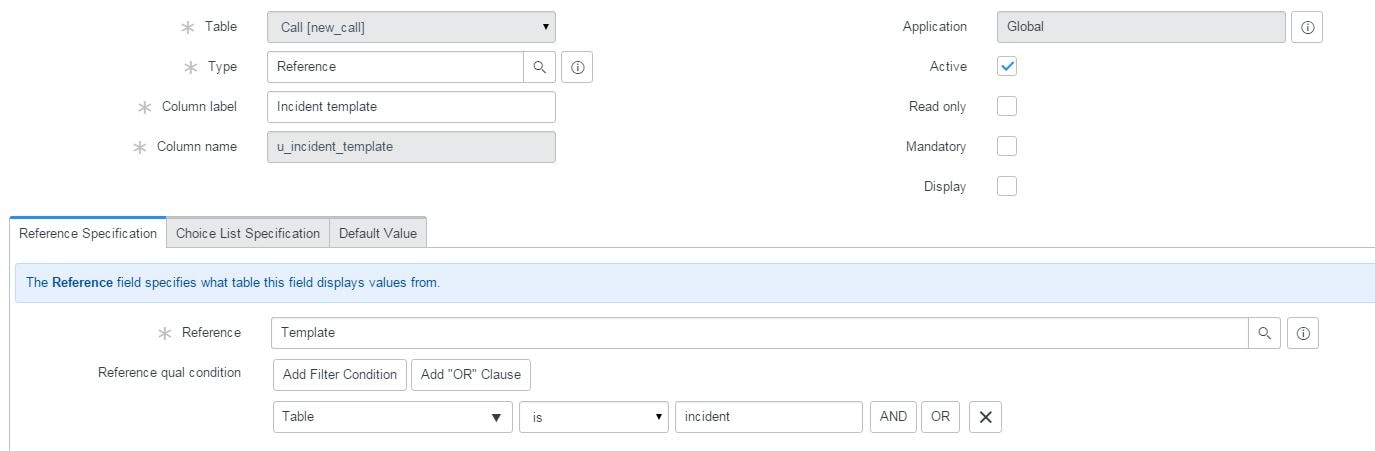
1. Create a reference field on call named "incident template". When you create it you can choose any field you want since the template-table isn't in the choice list.
* Choose Configure dictionary on incident template.
* Change the reference field to the table template(sys_template).
* Add the ref qual condition "Table IS incident" to just see incident templates.

2. Edited the Business rule "CallTtypeChanged"
* Add the following line: gr.u_incident_template = current.u_incident_template;

3. Create an UI policy so that the field "incident template" only shows if the call type is incident.
* Set the condition to "Call type IS incident".
* Make sure the "reverse if false" is checked.
* Make a UI Policy Action on field "u_incident_template". and set visible to true.

Now everything with the call is done. And lets head to incident.
1. Do the same first step as we did with call. We'll make it exact the same if we want to build some more functionality later on it.
* Create a reference field on call named "incident template". When you create it you can choose any field you want since the template-table isn't in the choicelist.
* Choose Configure dictionary on incident template.
* Change the reference field to the table "sys_template".
* Add the ref qual condition "Table IS incident" to just see incident templates.
2. Create an UI policy that hides the field "incident template".
* No condition since we never want the field to be visible. But we still need it in the form to be able to change it etc.
* Make a UI Policy Action on field "u_incident_template". and set visible to false.

3. Create a onLoad script that will apply the template when the incident is loading. Efter its applyed it will empty the incident template field otherwise it will apply every time the incident is loaded.
* Add the following code:
function onLoad()
{
//Get the value from the field.
var template = g_form.getValue('u_incident_template');
//Check so the field isnt empty
if(template != '')
{
//Apply the template
applyTemplate(template);
//Wait 2 seconds before clearing the value with the function clearTemplate
setTimeout(clearTemplate,2000);
}
}
function clearTemplate()
{
//Empty the field
g_form.setValue('u_incident_template', '');
}
And now it should be working 😃 Let me know if you have any other questions.