- Mark as New
- Bookmark
- Subscribe
- Mute
- Subscribe to RSS Feed
- Permalink
- Report Inappropriate Content
03-24-2022 06:12 PM
Hi,
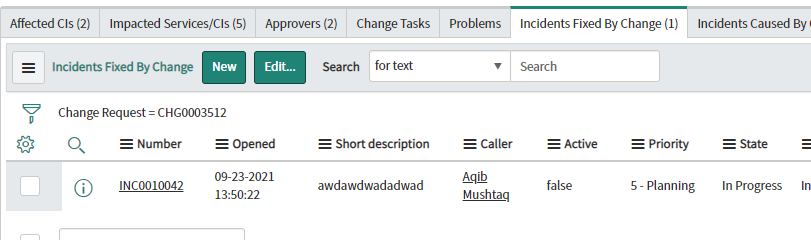
Are you confirming that when you add an incident to the related list on the change...that it's parent field on the incident is being set to that change request?
In your second screenshot, it's filtering for the parent field on that incident to show as the change record.
If adding that record to that related list in your first screenshot doesn't actually make that association and update the parent field, then no, it won't show.
Please mark reply as Helpful/Correct, if applicable. Thanks!

- Mark as New
- Bookmark
- Subscribe
- Mute
- Subscribe to RSS Feed
- Permalink
- Report Inappropriate Content
03-24-2022 06:47 PM
Thanks you are right the parent field was not beeing populated, we have a requirement to show in incident form in the change related list all the changes that were executed to fix that incident.
- Mark as New
- Bookmark
- Subscribe
- Mute
- Subscribe to RSS Feed
- Permalink
- Report Inappropriate Content
03-25-2022 06:41 AM
Hi,
When you associate that incident to the change in the related list: "Incidents fixed by Change":

a relationship is made by placing the change request reference in the Incident Related Records tab and the Change Request field:

So that's where the relationship would show. If you want it to show in the Change Requests related list on the Incident, then you'd have to set the "Parent" field on the incident to that record as well (you could accomplish this by creating a "before" business rule on the incident table with a condition that the change request field changes) and then check the "Advanced" checkbox, go to the Advanced tab, and use a simple script such as:
current.parent = current.rfc;However, your sort of changing the meaning of that related list, but if that is what is relevant to your organization, then so be it. It's only going to show the one record though? So you could just train users to look at the related records tab and the change request field if they need to see a related change request and then remove the "change request" related list from the incident form if it causes any confusion.
The last thing you could do is create a new relationship (new related list): https://docs.servicenow.com/bundle/rome-platform-user-interface/page/administer/form-administration/... and then use settings such as (EXAMPLE😞

and script like:
(function refineQuery(current, parent) {

current.addQuery('sys_id', parent.rfc);

})(current, parent);
Then add that related list to your incident form and it'd look like this:

And then you could remove the Change Request > Parent related list currently shown.
So I've given you like 3 options basically to go with to accomplish this.
Hopefully that resolves your issue?
Please mark reply as Helpful/Correct, if applicable. Thanks!
- Mark as New
- Bookmark
- Subscribe
- Mute
- Subscribe to RSS Feed
- Permalink
- Report Inappropriate Content
03-25-2022 09:54 AM
Hi,
Thank you very much for marking my reply as Helpful.
If it also helped guide you Correctly, please also mark it as Correct.
Thank you and take care! 🙂
- Mark as New
- Bookmark
- Subscribe
- Mute
- Subscribe to RSS Feed
- Permalink
- Report Inappropriate Content
03-24-2022 06:19 PM
The 1st related list shows Incidents where field Change Request is filled in with a reference to the current Change Request - so it shows up in the related list.
The 2nd related list shows Change Requests where field Parent is filled in with a reference to the current incident. By updating reference Change Request on an Incident, does not automatically update the same Change Request by setting field Parent to refer to the incident Involved - so nothing show up in the related list.
In other words the two related lists show their data based on different data and updating an Incident to point to a Change Request (through field Change Request) does not automatically update the Change Request to point to the same Incident (through field Change Request).
In other words things are working fine, as expected.
If you want to show the list of Change Requests as Incident related list, displaying those Change Request that are referenced by an Incident through the Change Request field, is kinda' pointless, the same info can be had on the form (perhaps is already there) by showing the Change Request field.