Options
- Mark as New
- Bookmark
- Subscribe
- Mute
- Subscribe to RSS Feed
- Permalink
- Report Inappropriate Content
03-16-2020 02:28 PM
You can actually report on MRVS by creating a database view, then use that view to report on
- Create a new Database view (System Definition -> Database Views)
-
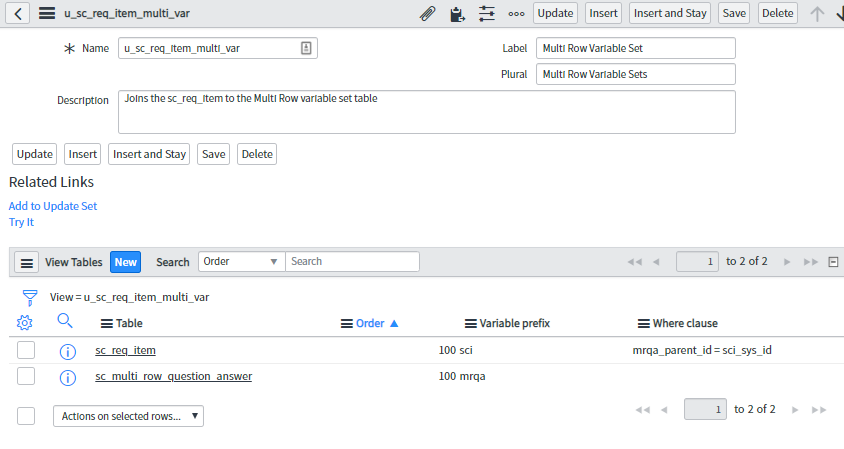
- Give it a name like 'u_sc_req_item_multi_var'
- Label like "Multi Row Variable Set"
- Plural like "Multi Row Variable Sets"
- Description like "Joins the sc_req_item to the Multi Row variable set table to be able to report"
- Save
- Under View Tables click "New"
-
- Table: Requested Item [sc_req_item]
- Variable Prefix: sci
- order: 100
- Where clause: mrqa_parent_id = sci_sys_id
- Click "Submit"
- Under View Tables click "New"
-
- Table: Multi Row Question Answer [sc_multi_row_question_answer]
- Variable Prefix: mrqa
- order: 100
- Where clause: keep this field blank
- Click "Submit"
You should now have a DBV that looks something like this:

Create a new report
Select Table as source and select your new Database view (Multi Row Variable Set) as the table

You should now be able to create a query and select the catalog item that you want to report on that has the MRVS, as well as adjust your columns to display the Question and Value as well as any other columns you want on your report.

Please mark this answer as correct or mark has Helpful if helpful.